

Send your user's details to the agent
Map your app's fields — a name, an age, a plan — to the placeholders in the agent's prompt, and send them from iOS, Android, Flutter, React Native, Kotlin Multiplatform or a website: at sign-in, for one call, or fixed at launch. Which value wins, the limits, what never to send, and how to check what the agent received. The same prompt variables a server sends on an API call.
An agent's prompt can name details about the person it is talking to —
{name_user}, {age}, {plan} — and your app fills them in. Each value travels
under the placeholder's own name: the agent reads {age} from the value your app
sent as age. These are prompt variables, the same thing a server sends as
variables when it places a call through the API
(side by side below).
Placeholders and the names your app sends
Whoever writes the agent's prompt chooses the names: {callee_name},
{name_user} and {first_name} all work. The placeholders can sit in the
prompt, the welcome message and a flow agent's steps. On the agent's page,
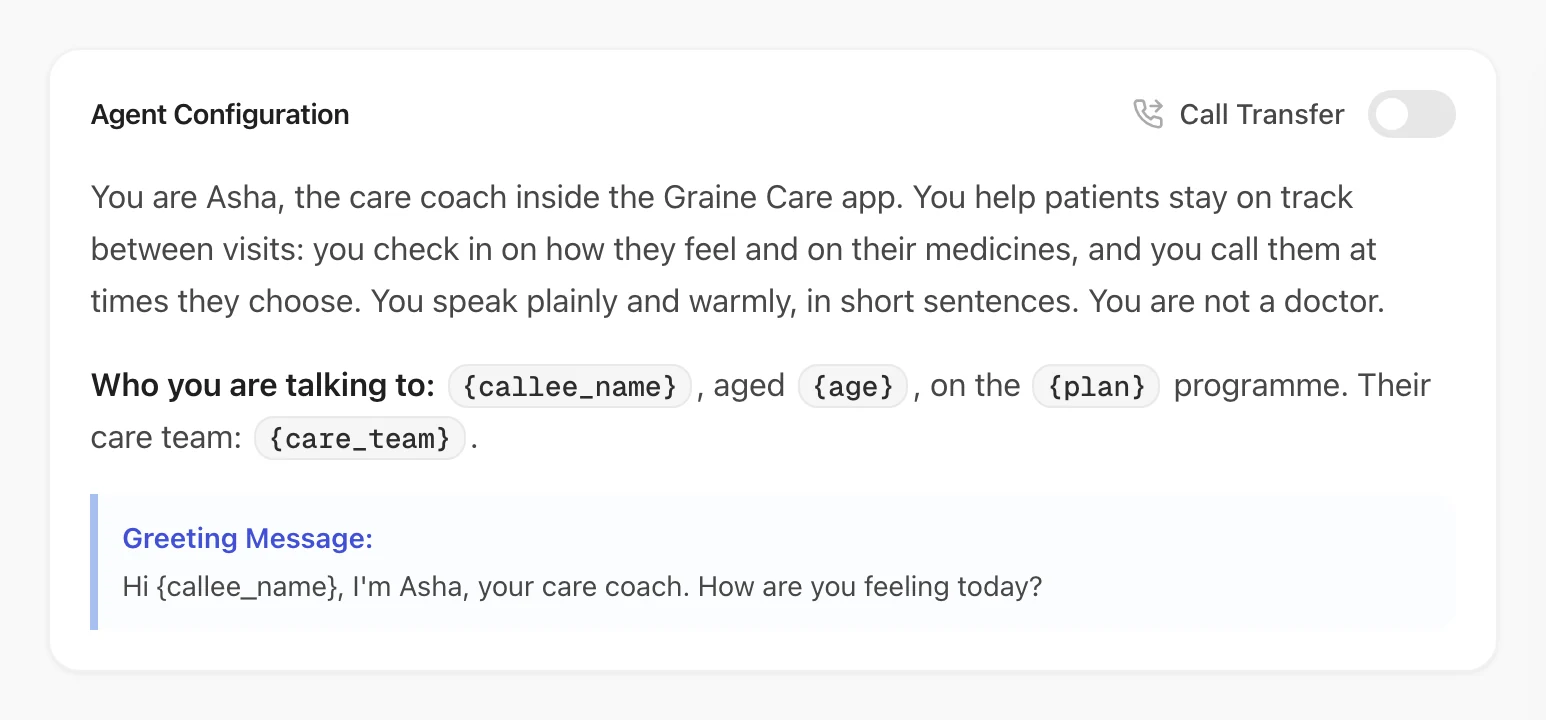
Agent Configuration shows each one, in braces, where it is used. Here the
author chose {callee_name}, {age}, {plan} and {care_team} for the prompt,
and {callee_name} again in the Greeting Message:
- Letters, digits and underscores, starting with a letter:
name_user,age,plan_name. A placeholder with a hyphen, a space or a dot in it is not filled from your app's values. - Matched exactly, upper and lower case included: a value sent as
name_userfills{name_user}, never{Name_User}or{nameUser}. - A few names are Graine's. On a call Graine fills
who_calledandcall_reason(which value wins), and names starting withgraine_are reserved. Pick any other name for your own details. - Nothing is renamed for you. The SDK sends each key exactly as your code wrote it, so your code is where your app's fields meet the agent's names:
| In your app | The agent's placeholder | What your app sends |
|---|---|---|
| The user's first name | {name_user} | name_user: "Asha" |
| Their date of birth | {age} | age: 34 — worked out in your app; the prompt asks for an age, not a date |
| Their subscription tier | {plan} | plan: "Gold" |
| The order the user is calling about | {order_id} | order_id: "A-1042", with that call only |
In the examples below, user.ageInYears stands for your own code that works the
age out from the date of birth.
A placeholder nothing fills is left empty, so write sentences that read well without the value:
A welcome message of Hi {name_user}, welcome back! greets someone who is not
signed in with "Hi , welcome back!".
In the demo app
The demo app, set up as a care coach, shows the signed-in patient on its
Profile. At sign-in its code sends the name as callee_name and the age as age
with setVariables, and calls identify with the Patient ID — the
identifier — and the name, age, plan and care team as traits:
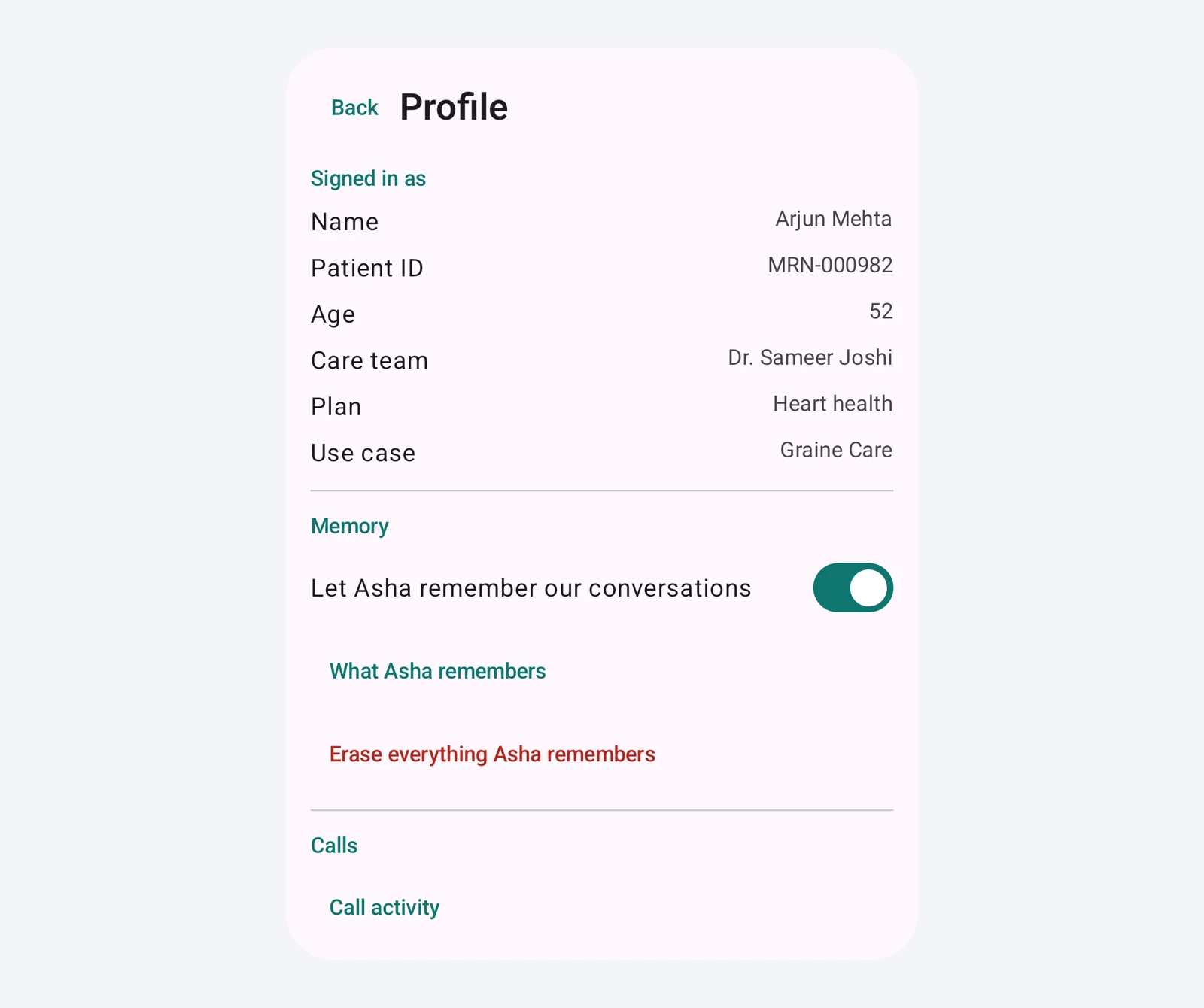
When Arjun starts a conversation, the agent greets him by name.
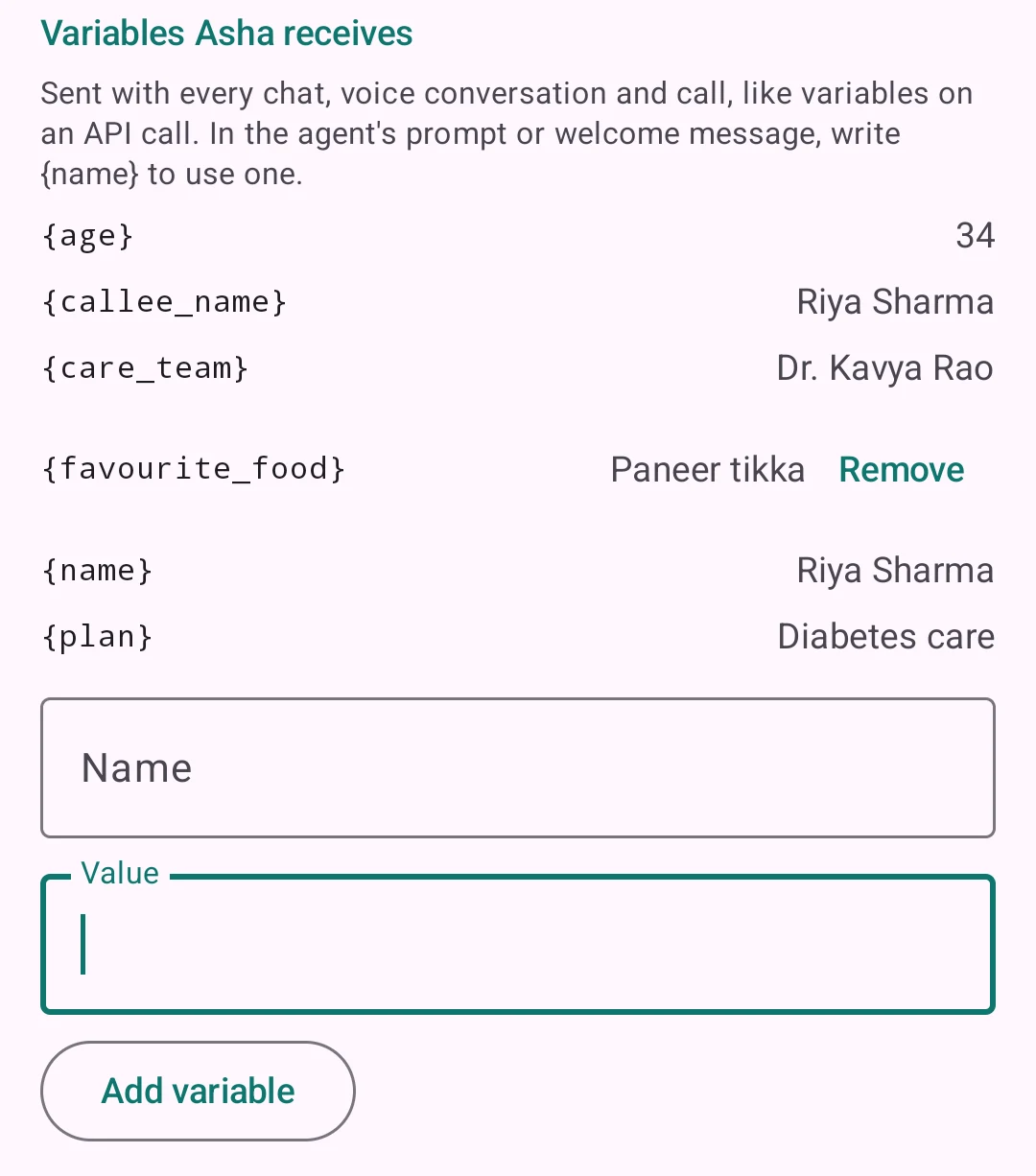
The demo's Profile also lists Variables Asha receives: exactly what the SDK will send with the
next chat, voice conversation or call, read back with currentVariables(). Its form adds any variable
by name and value with setVariables, the way an API call carries variables. Here, signed in as
Riya, {favourite_food} was added from the form, and the next call carried it:
What it needs in the dashboard
| Where | Setting | Value |
|---|---|---|
| Agent → Custom Variables | The placeholders the agent reads | name_user, age, plan — the names your app will send |
| Agent → the prompt and the Greeting Message (a flow agent: its Welcome message and steps) | Where each value goes | {name_user}, {age} in the sentences that use them |
| Agent → Memory → Settings | Who is the user? | The trait that identifies the user, user_id by default. It is never a prompt variable: a placeholder of that name stays empty |
What to do, in order
- At launch, set what is the same for every user in the config's
variables: your app's name, a region. These are your own constants and are sent without masking. - After sign-in, send the user's details with
setVariables, under the agent's names — besideidentify, which tells Graine who the user is. Do both again at every launch once your sign-in is restored: the SDK keeps these values in memory, not on the device. - When a detail changes — a new plan — call
setVariableswith that key alone. Values are merged: the other keys stay, andnullunder a key removes it. - For one call, pass its own
variablestostartCall. They apply to that call only and win over everything your app set. If you get the call ready withprepareCallwhen the screen appears, pass it the samereasonandvariables: a prepared call is used only when both match. - On sign-out, clear them:
setVariables(null)removes every value your app set while it ran, andidentify(null)signs the user out and drops their traits. The next conversation knows nothing about them.
Variables are read when a chat, a voice session or a call starts. A value set during one reaches the next.
The code, platform by platform
Each example maps the user's first name to {name_user}, their age to {age} and
their plan to {plan}, adds one variable for a single call, and clears everything
on sign-out.
setVariables(_:) takes [String: Any?]?; startCall(reason:variables:agent:)
and prepareCall(reason:variables:agent:) take [String: Any]. In an app with
several agents, setVariables is the agent's own: call it on
GraineInApp.named("support") too if that agent's prompt reads the same names.
Which value wins
When two sources send the same name, the later one in this list wins:
- Default values the dashboard holds for the agent.
- The config's
variables— the provider's on React Native,load()'s on a website. setVariables.- The traits from
identify, all but the identifier. - On a call: the call's own
variables. - On a call:
call_reason, which is yourreasonwhen you pass one. - On a call:
who_called, set by Graine. Nothing replaces it.
Send each detail through one of them: a trait beats a setVariables value of the
same name.
What identify adds
identify tells Graine who the user is, and its traits reach the agent too:
- Every trait but the identifier becomes a prompt variable, masked on the
device:
identifywithuser_idandname_userfills{name_user}. - The identifier — the trait the agent's Who is the user? setting names,
user_idby default — is never a prompt variable. It tells Graine who the user is (for memory, their devices and the calls Graine rings), and Call History shows it. A{user_id}placeholder stays empty whenuser_idis the identifier. - A new
identifyreplaces the traits;setVariablesmerges into what is set. - One user for the whole app.
identifyon any agent reaches every agent;setVariablesand the config'svariablesare each agent's own. A website shows one agent at a time: itssetVariablesvalues are the page's and carry over to the next agent, whileload()'svariablesare each agent's.
So: identify for who the user is, and for details every agent may use;
setVariables for the names one agent's prompt reads.
Limits
Design for these — they hold for a chat, the voice bar on Standard audio and every call:
- 12 variables at most, from every source together. On a call,
who_calledandcall_reasonare two of the 12. - Names up to 40 characters, values up to 200. Longer ones are cut.
- About 1 KB in all, counted in bytes: a letter in Devanagari takes three. Over
that, the SDKs leave out the biggest values first until the rest fit — on a call,
who_calledandcall_reasonlast. From a website, none of them reach the agent in that conversation. - Values are text. A number or true/false arrives as text (
34,true). An object or a list is dropped; React Native and the website send a trait's as JSON text.
The voice bar over WebRTC takes more. Every channel's limits, and what happens to a set that is too big: Variables.
What never to send
- Secrets: passwords, access tokens, API keys, session ids. A variable is text in the agent's prompt — the agent can repeat it — and your team sees it in Call History.
- The identifier, anywhere but
identify. Sent withsetVariablesor in the config, it reaches the prompt like any other value. - Personal numbers the agent does not need. What your app sends while it runs —
setVariables, traits and a call's variables — is masked on the device: an email address, a card number, a PAN or Aadhaar number or an Indian mobile number reaches the agent as[EMAIL],[CARD],[PAN],[AADHAAR]or[PHONE]. Your own formats can be added: Masking your own formats. The config'svariablesare your own constants and are not masked. - Long text — a history, a document. It is cut at 200 characters, and it is the first value left out when the set is too big.
- Names starting with
graine_. They are Graine's own; your app's are dropped before the conversation starts.
Check what the agent received
- Before a conversation:
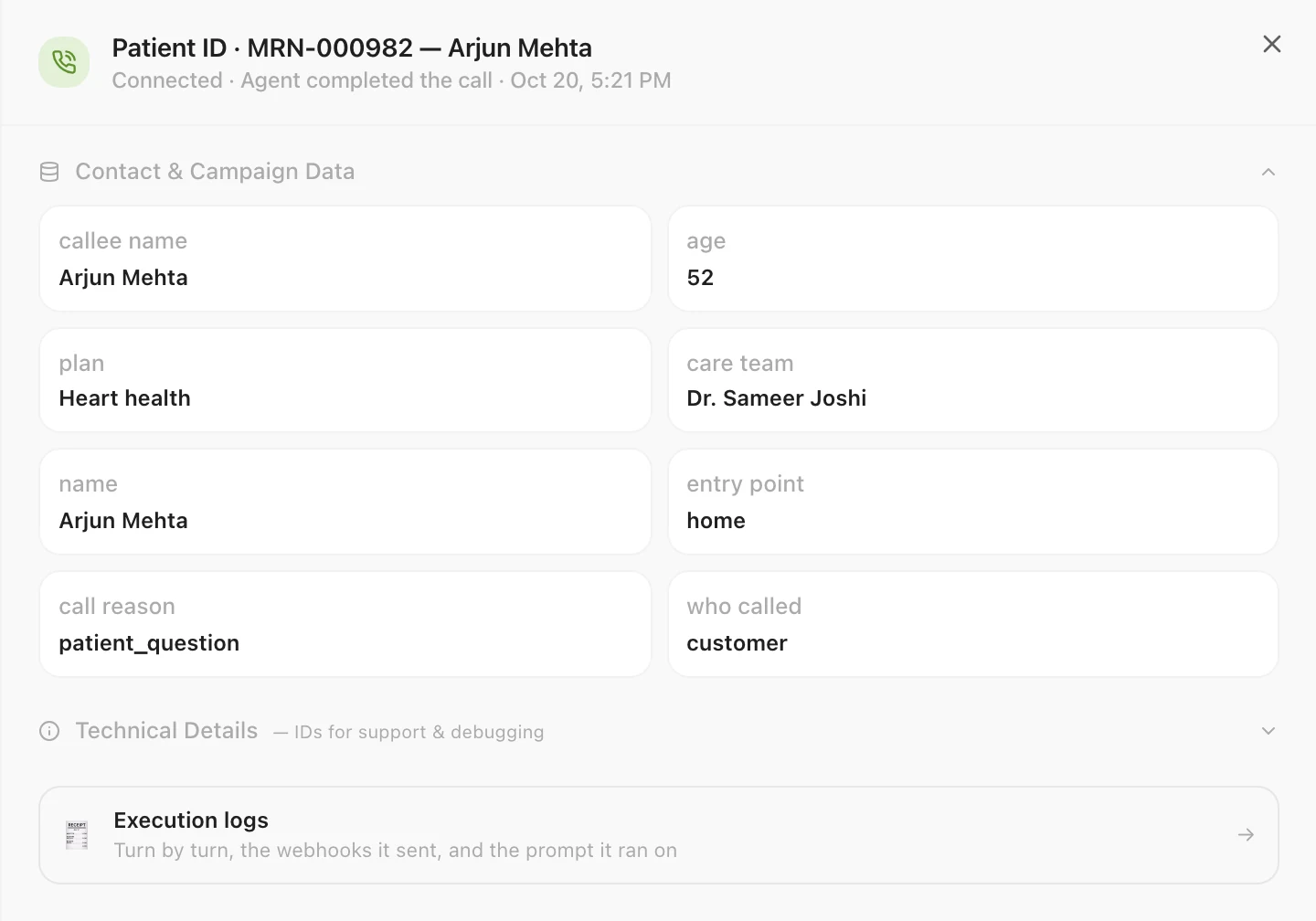
currentVariables()— on React Native,client.getVariables()— returns the merged set the next conversation will carry, masked as it leaves the device. A call adds its own variables,call_reasonandwho_calledon top. - After it: open the conversation in Call History. Contact & Campaign
Data lists the variables it carried, by name, with underscores shown as spaces
(
name user,age). - The prompt it ran on: Execution Logs → Instructions shows the agent's prompt with its placeholders. Check each one's spelling against the names your app sends.
Arjun's call from the demo app, in Call History. His Patient ID names the
conversation at the top; it is the identifier, so it is not among the variables.
Contact & Campaign Data holds what the app sent — callee_name, age,
plan, care_team and name — then the call's own entry_point,
call_reason (the reason the app passed) and who_called, which Graine sets:
The same as the API
A server that places a phone call puts the user's details in variables; an app
sends the same names through its SDK. The agent and its prompt do not change:
{name_user} is filled from name_user whichever sent it, and a value nobody sent
is left empty either way.
| A server, through the API | An app, through the SDK | |
|---|---|---|
| The user's details | variables, on every request | setVariables and the traits from identify, once — every conversation after carries them |
| One call's own | variables, on that request | startCall's variables |
| Values | Strings | Text, numbers or true/false, all sent as text |
The API's side: Place a call · Quickstart → Place the call.
Troubleshooting
| What you see | Why | Fix |
|---|---|---|
| The agent says "Hi ," or skips a detail | No value reached it under that exact name | Compare the placeholder with your key, case included; check currentVariables() before the conversation starts |
| A value set during a conversation is not used | Variables are read when a conversation starts | It reaches the next chat, voice session or call |
| The previous user's details after a sign-out | They were not cleared | setVariables(null) and identify(null) on sign-out |
| The details are gone after the app restarts | The SDK keeps them in memory | Set them again at launch, where you restore the sign-in |
{user_id} stays empty | user_id is the identifier, which never reaches the prompt | Use another trait, such as name_user |
The agent reads [PHONE] or [EMAIL] | The value looked like a phone number or an email address, and was masked on the device | Send only what the agent needs |
| Only some variables arrive | More than 12, or over about 1 KB in all | Fewer, shorter values; on a website, over 1 KB none arrive |
| A call does not have your app's variables (React Native, Flutter) | Calls are not attached | GraineCalls.attach(client) on React Native, GraineCalls.instance.attach() on Flutter, once |
| Another agent does not have them | setVariables is each agent's own | Set them on every agent whose prompt reads them |
Every channel, its limits and the reserved names: Variables · who the user is: Identify the user · calls: the user calls the agent, Graine rings.