

Memory
Let the agent remember a customer across conversations — turning it on, its scope and retention, what to remember, each customer's own choice, and forgetting — and exactly when nothing is remembered.
With memory on, the agent remembers what it learned about a customer — a preference, an open complaint, what it promised to do — and starts their next conversation knowing it, on the phone or in your app. It learns quietly in the background and never slows a reply.
Who is remembered
| Conversation | The customer is | Memory |
|---|---|---|
| A phone call — inbound, outbound, a campaign, a scheduled call | Their phone number | On, when the agent has memory on |
| In your app or on your website — the chat, voice in the bar, a native call | The identifier your app passes — Identity and users | On, when the agent has memory on, the customer has an identifier, they have not turned memory off, and this device is one of theirs |
| Anything else — no identifier, a test from the dashboard, a device past the customer's limit | Nobody | Off |
Memory never mixes people. A conversation with no identity remembers nothing and recalls nothing. There is no shared memory for unknown customers, so one person's details can never surface in another's conversation. An app on an SDK that does not pass an identifier gets no memory in its conversations.
How it works
Recalled once, used throughout, learned in the background, kept for as long as you say.
- Recall happens once, when the conversation starts, for every kind of agent — flow agents included, where it reaches every step. It is allowed 1.5 seconds; if it takes longer, the conversation goes ahead without memory rather than keep the customer waiting.
- Learning runs in the background, every four customer turns and once more at the end. Text is redacted before it is stored — card numbers, Aadhaar and PAN, phone numbers and email addresses — with the same redaction transcripts get. A summary at the end is stored only when it holds something worth keeping.
- Nothing in it can break a conversation. A memory that cannot be recalled or stored is logged and counted; the conversation carries on.
Conversations continue
Memory keeps facts; this keeps the conversation itself. A customer who comes back — later that day, next week, on another of their devices — finds their chat where they left it, the way a messaging app keeps a thread, and the agent picks up from it.
| What is kept | The last 50 messages between the customer and each agent: what they typed, the agent's replies, and what was said on calls in your app or on your website, each with when it was said |
| For how long | 7 days after the latest message — each new message starts the 7 days again |
| Each agent its own | One agent never shows another's conversation, even when the two share memory |
| For whom | Exactly the customers memory applies to: identified, memory on for the agent and for them, on one of their devices. An anonymous conversation, a dashboard test and a phone call keep nothing — a phone call keeps memories only |
When they come back:
- In the chat, the window opens on the conversation: the earlier messages, a voice call as one row, a date line where the day changes. There is no second welcome message — the agent continues, and the customer types next.
- On a call, the agent greets them as on any new call, and knows the latest 20 messages, so it carries on rather than starting over. Its memories are recalled as usual.
- If the earlier messages cannot be read in time, the conversation starts fresh rather than keep the customer waiting.
Forgetting the customer — forgetMemory() in your app, Forget this person
in the dashboard — deletes these messages with the memories. From your app, a
forgetMemory() that succeeds also clears the chat on screen; one that fails
deletes nothing and leaves the chat as it is. Turning memory off for them
(setMemory(false)) stops keeping and showing them, and deletes nothing, as with
memories.
On an SDK before 0.7.0 the chat window does not show the earlier messages; the agent still continues from them. The chat window's side: Chat → Coming back to a conversation.
Turn it on
Agent → Memory → Settings — the same section as Embed & Widgets → Users & memory.
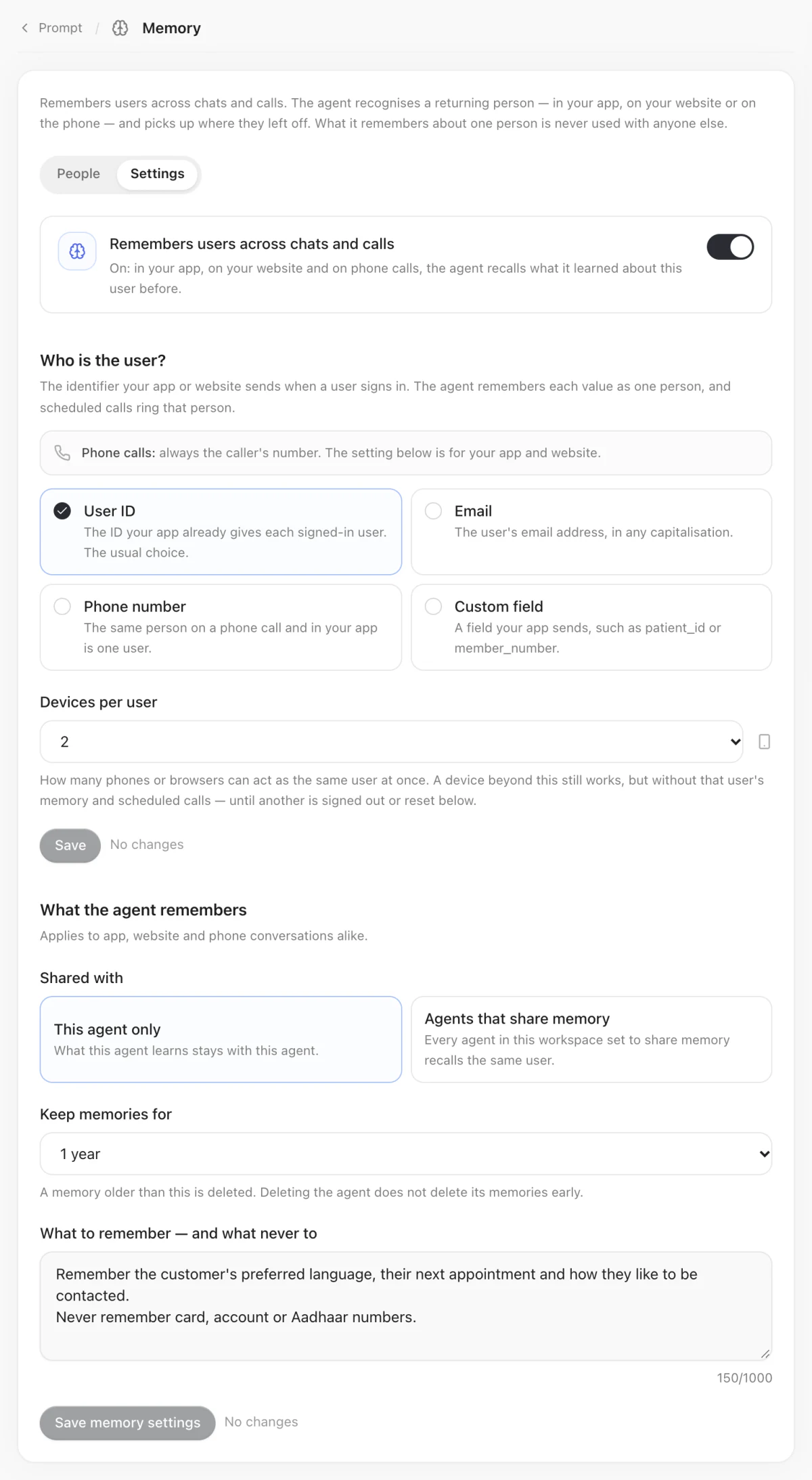
| Setting | Values | |
|---|---|---|
| Remembers users across chats and calls | On or off — off by default | The master switch, for phone calls and in-app conversations alike |
| Who is the user? | User ID, Email, Phone, or a custom field such as customer_id or patient_id | In-app conversations only; a phone call is always the caller's number — Identity and users |
| Devices per user | 1 to 5; 2 by default | How many installs can act as one customer — Installs and devices |
| Shared with | This agent only (the default), or Agents that share memory | Shared memory is read and written by every agent in the workspace set to share memory |
| Keep memories for | 1 to 3,650 days; 365 by default | Each memory expires that long after it was stored |
| What to remember — and what never to | Up to 1,000 characters | "Remember preferred language and open complaints. Never remember health details." |
The agent's website and in-app conversations, and its A/B test variants, share its memory: a customer is one customer to the agent, whichever answered.
Saving these settings is a change to the agent like any other: on a live agent, in a workspace that reviews changes, it goes for approval.
Each customer's choice
A customer can turn memory off for themselves. Pass it with identify(), or on
its own with setMemory(); the SDK remembers the choice for that customer on
that install, so you need not repeat it at every launch. It applies from the
next conversation.
With memory off, that customer's conversations are neither recalled nor stored. It defaults to on.
Show a customer what is remembered
memories() returns what the agent remembers about the signed-in customer, for
this agent's memory scope: newest first, at most 100, each already redacted. Show
it on a privacy screen beside the switch that turns memory off and the button
that forgets.
| Field | |
|---|---|
id | The memory's id |
text | What the agent remembers, already redacted |
createdAt, updatedAt | When it was stored and last changed, or empty when unknown |
Like forgetting, it answers only on one of the customer's own devices — another is
refused with device_limit — and needs an identifier (identity_required).
Every return type and error: Identity and memory, and the fields of GraineMemory.
Forgetting
From your app, forgetMemory() deletes everything remembered about the
signed-in customer, for this agent's memory scope — and the conversation kept so
it can continue — and resolves with how many memories it deleted (0 when there
were none). It works only from one of the customer's own devices; another device
is refused with device_limit, and one with no identifier with
identity_required.
The chat on screen clears only when it succeeds. The conversation is part of
what was forgotten, so a successful forgetMemory() empties the chat window too.
A failure — Graine unavailable (unavailable, 503), device_limit, no network —
deletes nothing, and the chat stays as it is.
From the dashboard, under Agent → Memory → People: everyone the agent has talked to while they were identified, each shown by their identifier — User ID · u_8812, Email · asha@acme.example — as in Call History.
| Action | What it does | Who can |
|---|---|---|
| Find a person | Type an in-app customer's identifier, or a caller's phone number, and open what the agent remembers about them | Anyone who can view calls |
| Delete this memory | Deletes one memory, from the person's panel | Anyone who can edit agents |
| Forget this person | Deletes everything the agent remembers about them, and the conversation kept for them | Anyone who can edit agents |
| Reset devices | Releases every device bound to that customer | Anyone who can edit agents |
A person's panel also lists their recent conversations in Call History.
The activity log records that an agent's memory was forgotten, and by whom — never whose memory it was.
Deleting an agent does not delete its memories. They expire when their retention ends. Forget a customer before you delete the agent if they asked to be forgotten.
What is stored
Short facts, each with the agent, the channel and the conversation it came from, under the customer's one-way key. Graine stores the identifier your app sends so your team can see who each conversation was with; the memory service only ever receives a one-way key derived from it (What Graine keeps). Memories expire after the retention you set.
For a customer whose conversation continues, their last 50 messages with each agent are kept as they were said, for 7 days after the latest (Conversations continue).
Memory is personal data. Tell your customers the agent remembers them, use What to remember — and what never to to keep anything sensitive out, and give them the way to turn it off and to be forgotten.
Limits
| Recall | Once per conversation, within 1.5 seconds |
| What to remember | 1,000 characters |
| Retention | 1 to 3,650 days |
| Devices per customer | 1 to 5 |
| A conversation kept to continue | The last 50 messages per agent and customer, for 7 days after the latest |
Troubleshooting
| What you see | Check |
|---|---|
| The agent remembers nothing in your app | Memory is off for the agent; the app passes no identifier, or the one the setting does not name; the customer turned it off; or this device is past their limit |
| It remembers on the phone but not in the app | The in-app identity is not Phone — a caller and an app user are the same person only when both are the number |
| A test from the dashboard remembers nothing | By design: a dashboard test has no customer, so it never reads or writes anyone's memory |
forgetMemory() answers device_limit | It was called from a device that is not one of the customer's — sign out elsewhere, or reset their devices |
| Something sensitive was remembered | Forget the customer, and add it to What to remember — and what never to as something never to keep |
| The chat opens empty for a returning customer | They are not identified, memory is off for the agent or for them, their last message was more than 7 days ago, they were forgotten, or the app's SDK is older than 0.7.0 |