

Components
Draw the answer on screen instead of reading it out — lists with pictures, plans, time slots and quick actions, designed in the dashboard and drawn natively by the SDK.
Reading three cars and their prices out loud loses the customer at the second one. A component puts them on the screen they are already holding, and hands your agent a structured answer back from the tap.
You build it once in the dashboard. The SDK draws it. Nothing about it lives in your app — not the items, not the look, not where a tap goes.
Watch it first
A live call in a real app: the agent draws the component, the customer taps, and the tap reaches the conversation.
How it works, in one picture
The dashed box is optional: a component with no endpoint shows what you typed. The dashed arrow is the tap arriving as the customer’s own turn.
In one line: design it in Web components, switch it on for this agent under Embed & Widgets → On screen, name it in the prompt. In the app you write nothing — the agent bar already draws it.
Everything you can change, and where
Nothing in this table is code. Each row is a field in the dashboard, and each one reaches the phone the next time you press Push to the agent.
| Where | Choices | |
|---|---|---|
| Content | Web components → Content | Typed here, or live from your API when it is shown |
| Look | Look & feel | Gallery · Cards · List · Spotlight · Compact |
| Size, density, button, facts, columns | Look & feel | Per-look knobs |
| Surface | Look & feel | Full screen · sheet · card above the bar · auto |
| Whose shapes | Look & feel → Change | Follow the phone · iPhone · Android · Samsung |
| One or several | Look & feel → Choose | One tap answers, or tick two and press once |
| Corners and accent | Look & feel → Change | From Appearance, or this component's own |
| What a tap does | When they tap | Tell the agent · open a screen · run an action |
| How waiting looks | Appearance → Loading | Dots · Pulse · Ring · Bars · your logo |
| What the agent calls it | Agent → Tool name | car_showcase, plus the prompt paragraph to paste |
Turning one on
Four things have to be true before a component can appear, and one of them fails silently if your agent is older.
Saving is what pushes a component into an agent’s config — a live agent reads a snapshot of its tools, not the library. Components are deliberately never written to a phone agent, so an embed with no web-call variant is skipped and the dashboard tells you which.
Is it actually on the agent?
There are two copies and only one is callable: the library in the dashboard, and the snapshot inside the agent's config that the agent reads. Embed & Widgets → On screen reads the snapshot back and says one of three things:
- The agent can call
…— it is live; mention it in the prompt. - Nothing — press Save selection to push it.
- No web-call variant — components are never written to a phone agent. Open that agent, save it once to create one, and come back.
A component is a tool the model calls. Refer to it in the prompt the way you would any other tool — by what it does, no special syntax. An agent never told it exists answers in words and reaches for whatever else it has. On a flow agent, say it in the instructions of the step that should show it.
Live content from your API
Leave the endpoint blank and the component shows what you typed. Fill it in and it is called the moment the agent reaches for the component; the JSON it returns is merged over what you authored, so the layout stays yours and the items, prices, images or times are live.
| Called from | Our servers, not the device — a key in a header never ships to the app |
| Must be | https, reachable from the internet. Private addresses and cloud metadata are refused |
| Timeout | 8 seconds, and only on a channel that can draw — a phone call never pays it |
| If it fails | The component still shows what you authored |
Press Test endpoint in the editor to call it with sample values. It reports the status, the time, how many items came back, and puts the live data into the phone preview.
Ask it for what the customer said
A placeholder in the URL, a query value or the body becomes a parameter the model fills from the conversation:
| Where they work | The URL, any query value, the body at any depth |
| Where they do not | Headers, deliberately — a placeholder there would let the model choose an authorization value |
| Required? | Never. Someone who has not named a budget still sees the default list |
| Left blank | The query parameter is dropped, not sent empty — ?max_price= asks something different from not asking |
| Safety | Values are encoded on substitution and the finished URL is re-checked before the call |
Name parameters for their direction, and say what each means. A component
whose endpoint takes only {max_price} gets filled with max_price whatever
the customer said — including "cars above 25 lakh", which then comes back
as everything below it. A filter that looks like it worked is the worst kind of
wrong. Write one line per parameter in what it means, for the agent; it
becomes the first thing the model reads in that parameter's description.
The editor also generates the paragraph to paste into the prompt — the tool name, when to reach for it, and each parameter in your words. An agent told only "call car_showcase" sends whichever parameter it can guess at.
Name it for the moment it should be used
The tool name is the biggest lever on whether a component is ever shown, because it is all the model has when deciding.
| Harder to trigger | Easier to trigger |
|---|---|
plan_comparison | show_health_plans |
product_list | show_cars_in_budget |
calendar_slots | offer_appointment_times |
Letters, numbers and underscores; it cannot start with a digit, and end_call,
transfer_call and switch_language are built into every agent. Renaming changes
what the prompt must say — update both in the same sitting, or the agent keeps
calling a name that no longer exists, which looks exactly like a broken
component.
Look and feel
Chosen on the component, in Web components → Look & feel. The SDK draws whatever is saved; nothing in your app decides it and nothing in your app changes when it changes.
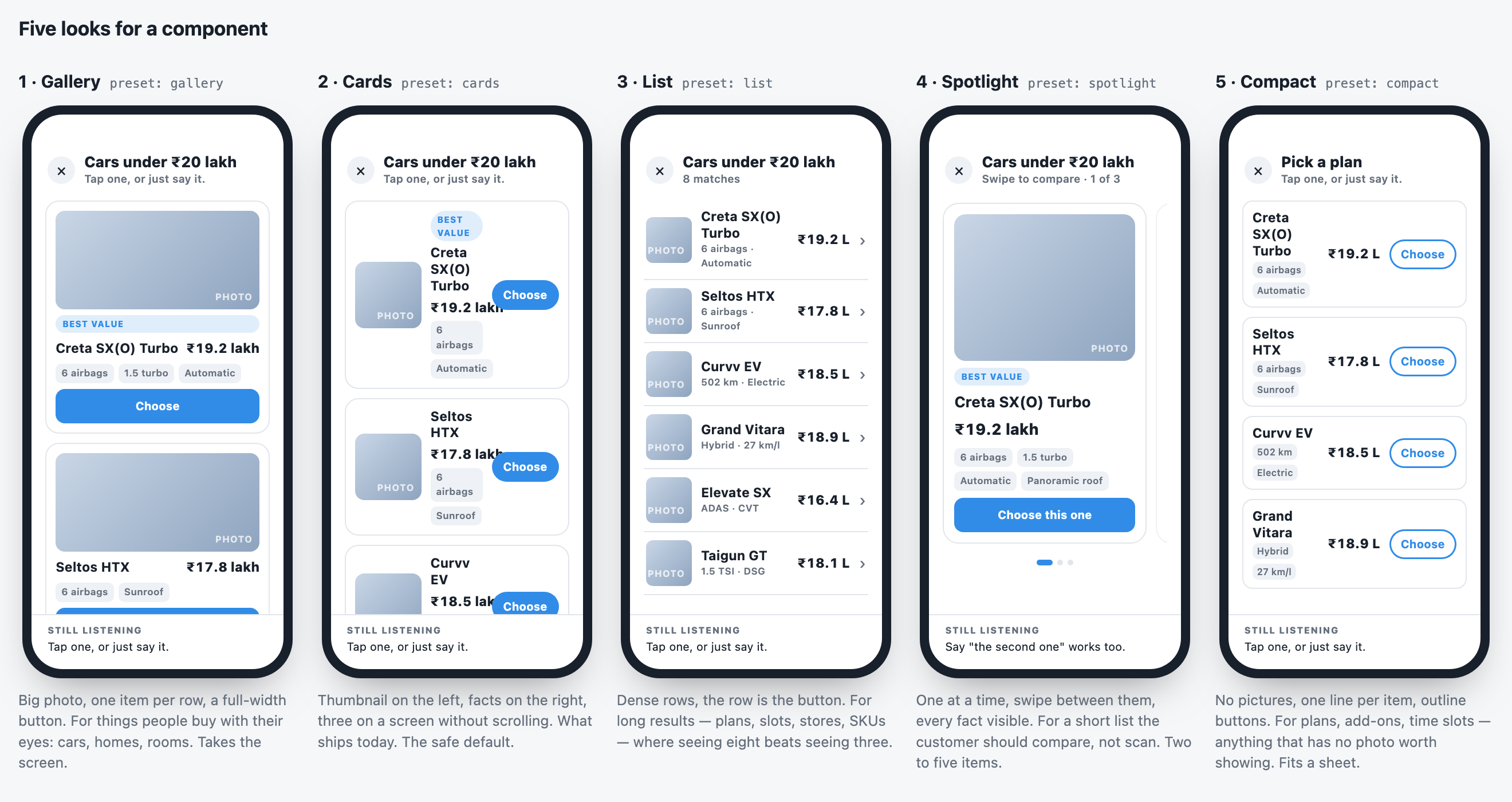
| Preset | What it draws | Best for |
|---|---|---|
| Gallery | A big photo on every item, full-width button | Things people buy with their eyes |
| Cards | Thumbnail left, facts right, three to a screen. The default. | Most lists |
| List | Dense rows; the row is the button | Long results — plans, slots, SKUs |
| Spotlight | One at a time, swipe to compare | Two to five items to compare |
| Compact | No pictures, one line each | Plans, add-ons, time slots |
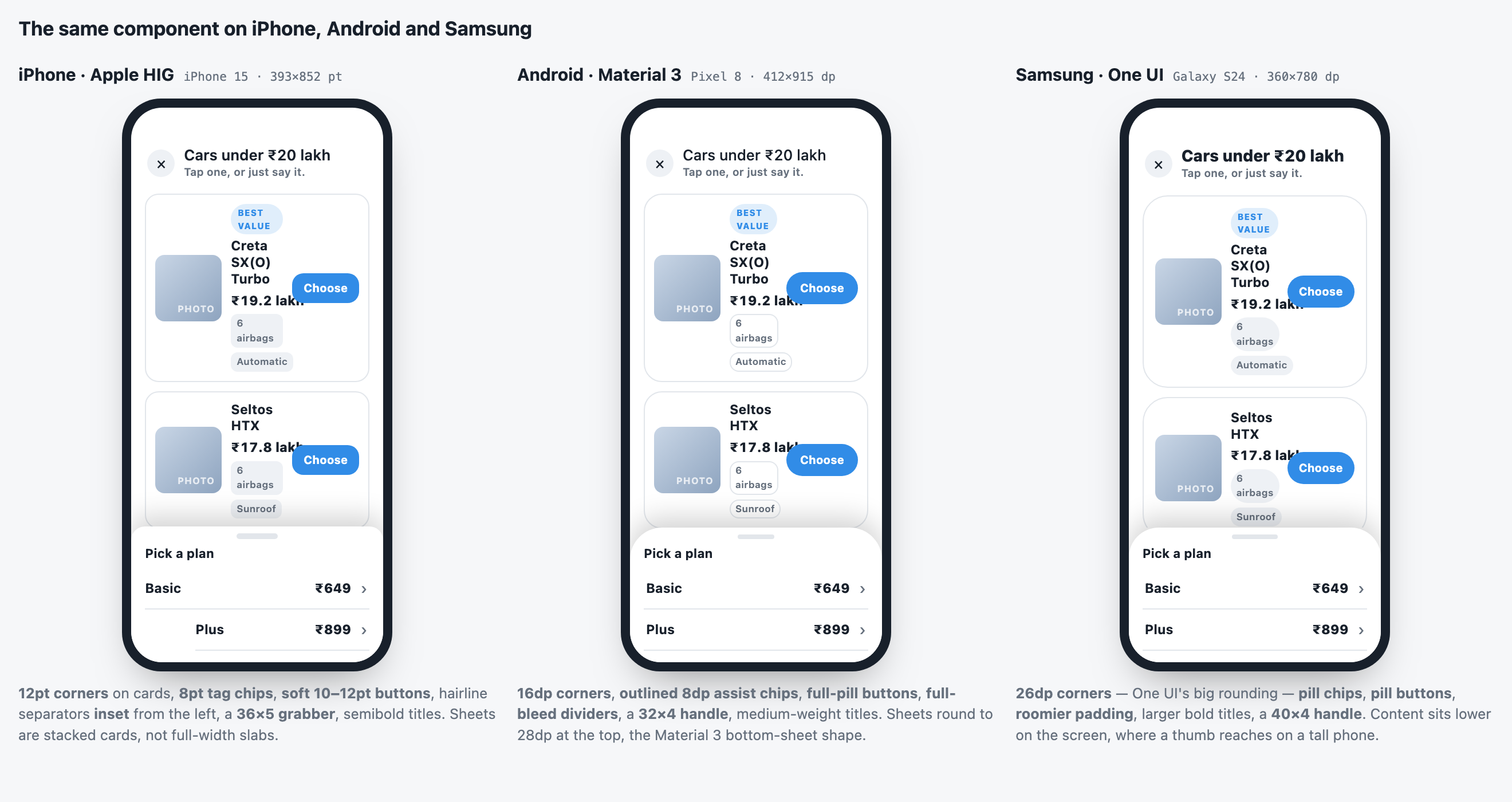
Platform is whose design grammar to use. Follow the phone — the default — draws Apple's shapes on an iPhone, Material's on Android and One UI's on a Samsung: corner radii, chip and button shapes, separator insets, the sheet's grabber. Colours stay the brand's. Pinning one draws that grammar everywhere.
The preview beside the editor is the same renderer the phone uses, in a phone-sized frame, with Preview as and a light/dark switch.
An app on an older SDK draws Cards for a look it has never heard of. Nothing breaks on a phone that has not updated.
When they tap
A tap is always a turn: the choice goes to the agent as the customer's own sentence, and the structured answer goes to your webhook. Beyond that, you choose.
Open a screen. Register one handler, once:
From then on, When they tap → Open a screen is a field on every component:
{id}, {title}, {price} and {summary} are the item they tapped; {ids}
and {titles} are all of them when several may be chosen. Change the path, push
to the agent, and the next tap goes somewhere else — no app release.
Run an action names a specific action instead, for a tap that is not
navigation; a path you also set arrives as a path argument. Either way, your
app reports whatever screen it lands on, which is how the agent knows where the
customer now is — and an action this build does not implement is refused,
reported, and the conversation carries on.
Choosing several
A comparison needs two. Look & feel → Choose → Several turns the rows into
ticks with one button underneath. Two or three picks, one press, one turn: the
customer's message names every item they picked. The answer carries every item
plus ids, titles and count, which is what compare?ids={ids} reads.
Below two it says how many more are needed rather than offering a press that does nothing; past the cap (default 3) the oldest tick gives way, because a tap that does nothing reads as a broken row.
Closing is not answering
Close a component without choosing and the agent is told — quietly. It does not
speak about it, but it stops referring to options nobody can see and it knows
which tool to call if they ask again. useGraineWidget().closed holds it and
reopen() puts it back with no second call to your API.
How waiting looks
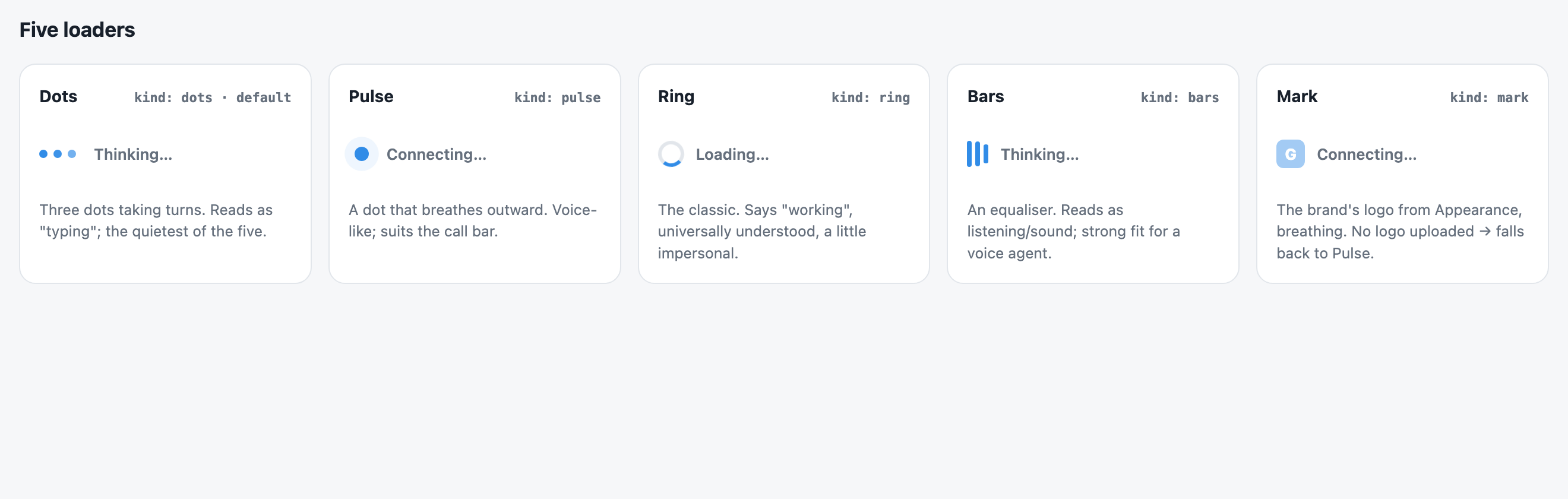
Chosen once, in Appearance → Loading: the kind, its size and speed, its
colour, and the words for each moment — Connecting…, Reconnecting…,
Thinking…, Loading…. The web chat draws the same, and so does the SDK's
voice bar (GraineVoiceBar, and the bar on Android, iOS and Flutter) — in its
status line while the call connects, reconnects and while the agent thinks.
Drawing your own bar, the same loader is one component:
api.phase is idle · connecting · reconnecting · thinking · speaking · listening. Pass label to override the words, or kind / size / color for
one place.
A component on its way shows the loader, and only the loader. The agent
says one is coming before it calls your API, and GraineWidget draws your
loader — centred, at reading size, with the words set for Loading… — on the
same surface the component will take, so nothing jumps when the content lands.
It stays up for at least 450 ms, because a loader that vanishes within two
frames reads as a glitch rather than as loading.
Tick also show the shape in Appearance to draw a dimmed outline of the coming component beneath it. Off by default: fake rows above a loader read as content that is not real, and on a short phone they push the only honest thing on screen below the fold.
Drawing components yourself? useGraineWidget().loading is { id, kind } while
one is in flight.
Drawing them yourself
The agent bar already draws every kind. Do this only if you want your own UI.
submit takes two things and both matter: data, the structured answer your
backend wants, and summary, a sentence for the conversation. Send only the
first and the customer taps a card, sees a tick, and the agent carries on as
though nothing happened.
For any kind you do not draw, render widget.fallbackText — what the agent would
have said instead. dismiss() closes it locally.
imageUrl takes an absolute URL, a root-relative path (resolved against the
agent's origin before it reaches the device — React Native would otherwise draw
an empty box and say nothing), or a data URI.
The kinds the dashboard ships
lead_form, plan_comparison, info_card, calendar_slots, quick_actions,
product_list, blank. The SDK relays kind verbatim, so an agent may send one
of your own — handle what you draw and fall back for the rest.
One library, chosen per agent
Components belong to the workspace, not to an agent — a lead form is the same lead form whichever agent shows it. Which of them an agent may show is per agent, under Embed & Widgets → On screen.
Pick nothing and the agent gets every enabled component, including ones added later. Tick even one and it sees only what is ticked. Untick everything and it draws nothing and answers in words — a real choice, and not the same as having picked nothing.
Every component you give an agent becomes a tool it can call, so a car catalogue on a loan agent is not clutter but a tool a model will eventually reach for.
Pointing at something
A second way to use the screen: instead of drawing something new, point at what is already there.
"Tap Continue" is useless if the customer cannot find Continue.
That is the whole integration. Registering the name tells the agent the element exists and can be pointed at; the boolean tells you when it is being pointed at.
The SDK does not draw the highlight. It does not own your design language, and a ring that looks right in one app looks broken in the next. You get a boolean and style it the way the rest of your app would — a border, a pulse, a scroll-into-view.
Highlights expire after six seconds. One still lit after the conversation moved on is worse than none: the customer keeps looking at the wrong thing.
Scoped to the component. Unmounting deregisters it, so the agent is never offered a target on a screen the customer has left.
The one dashboard step
Declare highlight_element on the agent, under Integrations & Tools,
alongside your other actions:
You do not implement it. The SDK answers it: it checks the name against what is actually registered on the current screen and refuses with the real list when the agent invents one — so a wrong guess produces a useful sentence rather than a dead action.