

Identity and users
Who the customer is, and how the platform decides it — the agent's identity setting, identify() with the identifier, installs and the devices-per-user limit, signing out, what Graine keeps of an identifier, and how Call History shows who each conversation was with.
Memory, scheduled calls and calls that ring a customer all need to know who the customer is — the same person across conversations, devices and channels. The platform decides that the same way everywhere:
| Conversation | Who the customer is |
|---|---|
| A phone call — inbound, outbound, a campaign, a scheduled call | The phone number. Always |
| In your app or on your website — the chat, voice in the bar, a native call | The trait your agent's identity setting names: a user ID by default, or an email, a phone number or a field of your own |
Your app says who the customer is with identify(), as it does today. What is
new is that one of those traits — the one the setting names — is the
identifier, and the platform treats it differently from every other trait.
Versions: iOS, Android and Flutter 0.7.0, Kotlin Multiplatform 0.8.0 and React Native 0.41.0; a website always runs the current loader.
How it works
The identifier never becomes a prompt variable. Graine stores the identifier your app sends so your team can see who each conversation was with; the memory service only ever receives a one-way key derived from it.
How the setting reaches your app
- Each agent has its own identity setting — Who is the user? and Devices per user, saved with that agent. There is no workspace-wide one: an app that uses two agents gives both the same setting.
- The SDK reads it with the agent's session when it starts. A change in the dashboard reaches installed apps without an update, from each customer's next conversation.
- Your app calls
identify()with its signed-in user. One call reaches every agent in the app; each takes the trait its own setting names. - The identifier travels with the requests that start something — a conversation, a call, a booking, a device registration — and Graine turns it into the customer's user key at the first stop.
- Memory, devices, booked calls and rings are kept under that key, so the same person is recognised on every channel and device you allow.
Changing the setting later re-keys every customer from their next conversation: their memory and devices start over. Choose it once, before launch.
1. Choose the identifier
Agent → Memory → Settings → Who is the user? (also under Embed & Widgets → Users & memory). It is set per agent.
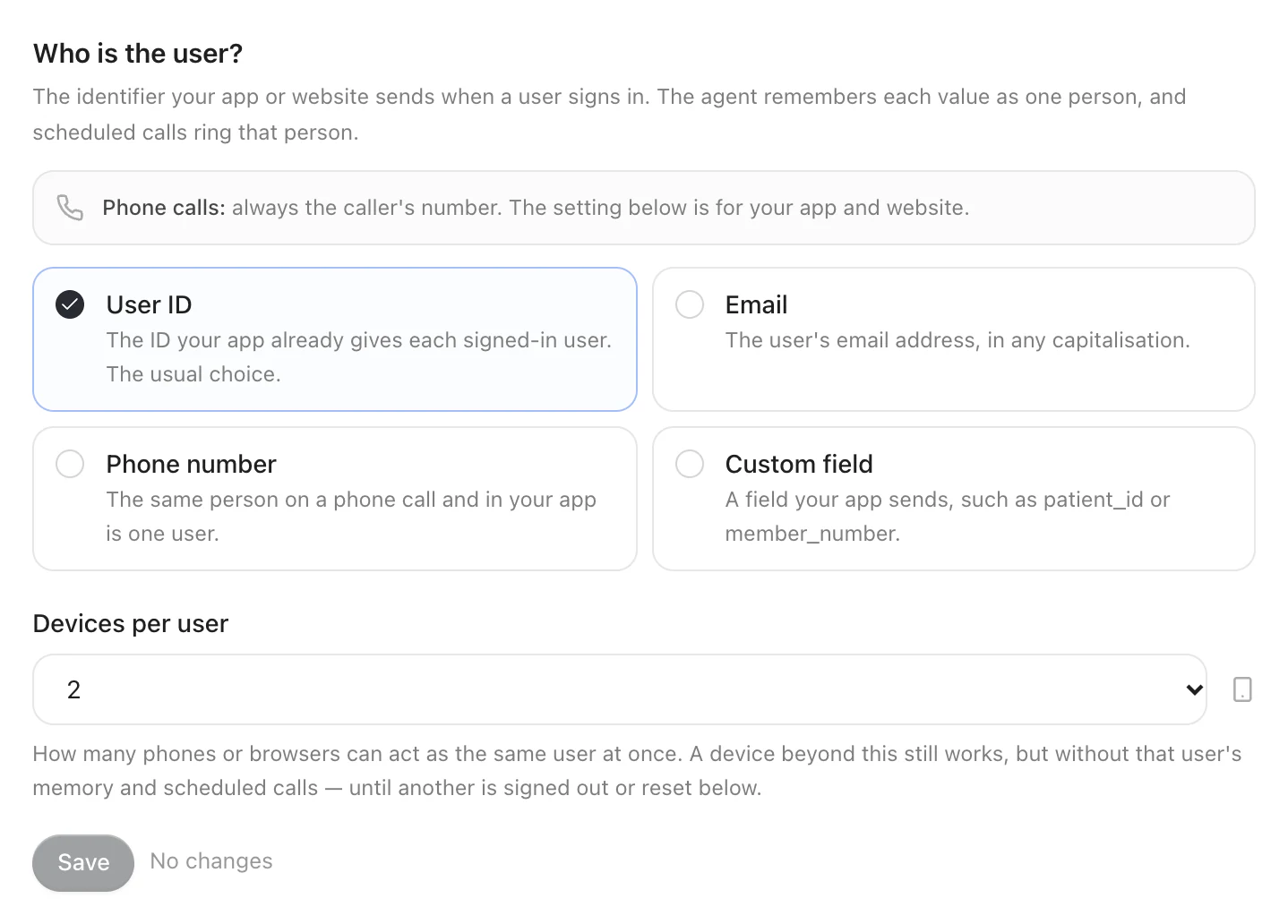
| Choice | Your app passes | Matched as |
|---|---|---|
| User ID (the default) | user_id | Exactly, case-sensitive, up to 256 characters |
email | Lower-cased; it must look like an email address, up to 254 characters | |
| Phone | phone | Its digits, 8 to 15 of them; the last ten count, so +91 98765 43210 and 098765 43210 are the same person |
| Custom field | the name you give it, such as customer_id, member_id or patient_id | Exactly, like a user ID. The name is lower-case letters, digits and underscores, starting with a letter, up to 40 characters |
Choose Phone when the same people also talk to your agent on the phone: a caller and an app user with the same number are then the same person, so memory carries between the two.
Phone calls ignore this setting — their identifier is always the number.
2. Pass it with identify()
Pass the identifier with the traits you already send. Send it as a string; an integer is accepted and read as its digits.
What happens to each trait:
| Trait | Masked on the device | A prompt variable | Identifies the customer |
|---|---|---|---|
name, plan, every other trait | Yes | Yes — {name}, {plan} | No |
user_id — the one the setting names | No | Never | Yes |
The identifier travels only with the requests that need to know the customer — starting a conversation or a call, registering the device, booking a call, signing out, forgetting — and only to identify them. The agent never sees it, so it cannot read it out or repeat it.
What does not count as an identifier
A value that cannot tell one person from another is treated as no identity, and that conversation has no memory and cannot be the target of a call:
- empty,
null,true/false, an object, a number with a fraction; - a placeholder, in any case:
none,nil,null,undefined,nan,unknown,anonymous,anon,guest,test,0,-,n/a,na; - a value already masked, such as
[PHONE]or[EMAIL]; - an email that is not shaped like one, or a phone number with fewer than 8 or more than 15 digits.
When it takes effect
Identity is fixed for a conversation when the conversation starts. A sign-in
during a conversation applies to the next one. You can call identify() before
the SDK has loaded the agent's settings: it keeps the traits and works out the
identifier once they arrive, and no conversation starts before then.
At every launch
The SDK does not keep who is signed in from one launch to the next — only the
install ID and each customer's memory choice. Your app owns its sign-in, so call
identify() as soon as it has restored its own session at launch, as well as on
every sign-in. Until then, conversations are anonymous.
Installs and devices
Each install of your app gets an install ID the first time it runs: a random identifier, never shown to the agent, kept across launches.
| Platform | Where it is kept |
|---|---|
| iOS | The keychain, for this device only — it survives a reinstall |
| Android | App storage that is left out of backups |
| React Native | The native side when present, otherwise the SDK's own storage |
| Flutter | The platform side |
| Website | The browser's local storage, or memory when storage is blocked |
Read it as installId on the SDK when you need to match an install in your own
logs.
Devices per user (1 to 5, 2 by default, under Memory → Settings) caps how many installs can act as one customer. The first installs to identify as a customer are bound to them; once the limit is reached, another install that claims the same identifier still works, but for that customer it:
- gets no memory — nothing recalled, nothing stored;
- cannot be rung for their calls;
- cannot forget their memory, and is answered
device_limitwhen it tries.
A device is released when:
- the customer signs out on it —
identify(null); - it has not been seen for 30 days;
- someone on your team presses Reset devices in that customer's panel, under Memory → People.
Signing out
identify(null) forgets the identity on the device, releases the device from the
customer, and unlinks it from their calls. Conversations after that are
anonymous: they have no memory until someone signs in again.
Call it on sign-out and on account switch, before the next customer's
identify().
Reading it back
Who is signed in is your app's to know: the SDK never hands the identifier back.
What it does give you, for the customer identify() named:
| You want | Call |
|---|---|
| Their booked calls, upcoming first | scheduledCalls() — Scheduled calls |
| What the agent remembers about them | memories() — Memory |
| To erase it | forgetMemory() |
| This install's ID, to match your own logs | installId |
Each SDK's exact names and types are on Identity and memory.
Without an identifier, memories() and forgetMemory() answer identity_required.
What Graine keeps
Graine stores the identifier your app sends so your team can see who each conversation was with; the memory service only ever receives a one-way key derived from it.
- The identifier is kept on the conversation's record, with the field it came from, in the form it is compared in: trimmed, an email in lower case, a phone number as its last 10 digits, at most 256 characters. Call History shows it (below). It never becomes a prompt variable and is never part of what the agent reads about the customer.
- The user key — a one-way fingerprint of your workspace, the identity setting and the value — is what memory and the customer's devices are kept under. The memory service receives only the key.
- The same value in two workspaces gives two unrelated keys.
- Keys never change, so memory and devices survive anything you do on your side short of changing the identity setting.
- A key cannot be turned back into the identifier. Your admins find a customer by typing the identifier, which is turned into the key the same way.
The install ID is kept as a one-way key.
How far to trust it
The identifier is what your app says. With a publishable key and no server of yours in the path, nothing proves the person holding the phone is that customer. What bounds it:
- Device binding — a customer's identifier works with memory and calls on at most the number of devices you allow, and their own sign-out frees a device.
- No personal data in a ring — a push names the call, the agent's call name and which agent is calling, nothing else.
- Rate limits per key, per install and per address.
Treat identity as a way to recognise a returning customer, not as proof: before the agent discusses an account, confirm the customer through one of your actions. If your risk assessment needs the identifier verified by your own servers, raise it with us.
In Call History
Every conversation shows who it was with:
| Conversation | Call History shows |
|---|---|
| In your app or on your website, with an identifier | The identity setting's label and the value: User ID · u_8812, Email · asha@acme.example, Customer ID · C-20931 |
| In your app or on your website, without one | The customer's name, from their traits — else the connection's id |
| A phone call | Phone · the caller's number |
| A call Graine rang | The customer it was booked for. A call your team booked in the dashboard shows the identifier they typed from the moment it rings, before the customer answers |
The label comes from the agent's identity setting: User ID, Email,
Phone, or your own field's name written out (customer_id becomes Customer
ID). The same line heads the conversation's detail, and appears in Agent →
Memory → People and on a person's panel. To find someone, search Call
History by their identifier. Conversations from the same customer are grouped
together.
Errors
Each SDK raises these as a typed error with a code and a message —
Errors, and each method's own on Identity and memory.
code | When | What to do |
|---|---|---|
identity_required | A call to the user, a booking or a forget needs an identifier and the app has not passed one | Call identify() with the identifier first |
device_limit | This install is not one of the customer's allowed devices | Sign out on another device, wait for one to expire, or reset the customer's devices |
invalid_request | A field is missing or malformed | Fix the request |
rate_limited | Too many requests from this install or key | Back off and try again, honouring Retry-After |
unavailable | Graine could not complete it just now | Try again with backoff |
invalid_key | The publishable key is wrong | Copy it again from Embed & Widgets |
origin_refused | The app or site is not in Allowed domains | Add app://, or your site |
Troubleshooting
| What you see | Check |
|---|---|
| The agent does not remember someone who signed in | The identity setting names a different trait from the one you pass; the value is a placeholder; memory is off for them; or this is their third device on a limit of two |
| The same person shows up twice | The identifier differs between devices — a user ID on one, an email on the other — or its case changed (a user ID is case-sensitive) |
| A caller and an app user are not the same person | The in-app identity is not Phone, or the numbers differ in their last ten digits |
device_limit for a real customer | They have more devices than you allow. Raise Devices per user, or reset their devices |