

Integration guide: apps and website
The one page your team starts from — release 0.10.1, no meeting needed: the versions, a first success in 30 minutes, the dashboard set up from scratch, install and initialise on React Native, iOS, Android, Flutter, Kotlin Multiplatform and the web, every use case with its code, variables, calls both ways and their messages, booking with the SDK's sheet, data and privacy, error codes, the QA script and the go-live checklist.
This guide takes your team from nothing to a launched agent in your app and on your website — talking, chatting, seeing the screen, acting on it, remembering each user, booking calls and calling them like WhatsApp — with no meeting. It is written for release 0.10.1, and every part links to the page that covers it in depth.
Start here — no meeting needed
Everything your engineers need is in this guide, the SDK references and the demo apps. Read in the order below; if anything blocks you, write to us (at the end of this section) and we answer by email.
What you receive
| What it is | |
|---|---|
| This guide | Online at www.graine.ai/docs/in-app/integration-guide, and as a PDF in your integration pack: the setup, every use case with its code on every platform, variables, calls, the QA script and the go-live checklist |
| One SDK reference per platform | Every public function, property, event, error and type, with its signature, parameters, what it returns, the errors it raises and what to expect — grouped by use case, then A to Z: React Native, iOS, Android, Flutter, Kotlin Multiplatform, Website |
| The demo apps | Working apps for React Native, Flutter, iOS, Android, Kotlin Multiplatform and the web, each with two agents. RUN-THE-DEMO.md in the demo runs them with your own agents; agent-setup/SETUP.md recreates the demo's agents in your workspace |
The versions
| Platform | Package | Version | Install | Runs on |
|---|---|---|---|---|
| iOS (Swift; Objective-C too) | GraineInApp | 0.10.1 | Swift Package Manager: https://github.com/GraineAI/inapp-ios, from 0.10.1 | iOS 15+, Xcode 15+ |
| Android (Kotlin, Java) | ai.graine:inapp-android | 0.10.1 | implementation("ai.graine:inapp-android:0.10.1") | Android 7 (API 24)+ |
| Flutter | graine_inapp | 0.10.1 | graine_inapp: ^0.10.1 | Flutter 3.19+ |
| React Native | @graineai/inapp-react-native, and @graineai/inapp-react-native-calls for calls | 0.44.1 and 0.5.1 | npm install @graineai/inapp-react-native@0.44.1 @graineai/inapp-react-native-calls@0.5.1 | React Native 0.71+ (calls: a native build, not Expo Go) |
| Kotlin Multiplatform | ai.graine:inapp-kmp, ai.graine:inapp-kmp-compose | 0.10.1 | implementation("ai.graine:inapp-kmp:0.10.1") | Kotlin 2.1.20+, Android 7+, iOS 15+ |
| Website | The loader | Always current | <script src="https://www.graine.ai/embed/v1.js"></script> | Any modern browser |
| Calls over WebRTC (optional) | iOS GraineInAppRTC, Android ai.graine:inapp-android-rtc; React Native and Flutter: a build switch | The SDK's own | Calls over WebRTC | As the SDK |
The iOS pod (pod 'GraineInApp', '~> 0.10') builds the same sources. The source of
every native SDK is public: github.com/GraineAI.
The order to read
- This section, then What you build and How it works.
- Set up everything from scratch — the dashboard, in order, with screenshots.
- Install and initialise on your platform.
- The use cases you need — each with the exact code on every platform, the dashboard settings it needs and a troubleshooting table.
- Your platform's SDK reference, as you code.
- The QA script and the go-live checklist.
A first success in 30 minutes
- An agent. Create one in the dashboard (or clone yours), and try it there.
- Its key and your app. Agent → Embed & Widgets → Set up embedding →
Install: copy the
pk_live_…key, and addapp://(and your website hosts) to Allowed domains. - The SDK — install and initialise: configure it once at launch with the key, and put the bar on screen.
- Open the bar. The launcher appears in your design; tap it and the agent
greets you. Nothing appears?
app://is missing or the key is wrong — Troubleshooting.
WhatsApp-style calls end to end: a checklist
- iOS: Push Notifications, Background Modes Audio and Voice over IP,
the microphone string;
enableVoIPPushes()at every launch. - Android: Firebase in the app — the SDK registers for pushes itself (an app with its own messaging service forwards the token and every message to the SDK); notifications asked for on Android 13+.
- Workspace settings → In-app calling: the APNs key and the Firebase service account, Checked and working. — create your credentials.
- Agent → Calls & scheduling: Name on the incoming call, who may book, the limits, quiet hours; the agent's Calling Window.
-
identify()after sign-in, with the identifier Who is the user? names. - The user calls the agent:
startCall(reason:)— how. - The agent calls the user: book one (the agent, the booking sheet, or your team), or test with Ring now — how.
- The prompt handles
who_called(customer,scheduled,agent) andcall_reason. - Optional: calls over WebRTC — the module in the build (iOS, Android) or the build switch (React Native, Flutter); the agent's In-app call audio on WebRTC (recommended) — how.
What's new
0.10.1 (React Native 0.44.1, calls 0.5.1):
- On Android the SDK registers for pushes itself. Add Firebase to the app
(
google-services.json, its Gradle plugin and the messaging library) and the SDK's own messaging service rings every call push and receives every new token — no messaging service to write. An app that has its ownFirebaseMessagingServicekeeps handing Graine's pushes and tokens over (handlePush,onNewToken). Changelog.
0.10.0 (React Native 0.44.0, calls 0.5.0):
- The SDK asks for call permissions.
requestCallPermissions()asks for the microphone, notifications (Android 13+) and the full-screen ring (Android 14+);callPermissionsreads each one andopenCallSettings()opens the page to change it. Permissions. - A setup check.
callSetupProblemslists what is still missing for calls to ring — a capability, the microphone sentence, a push token, a permission, push credentials not uploaded — each with the exact fix. - React Native: an Expo plugin adds the microphone sentence, the background
modes and the push entitlement;
webrtc: trueturns on WebRTC calls.
0.9.0 (React Native 0.43.0, calls 0.4.0):
- Calls over WebRTC, in both directions. Add the SDK's WebRTC module — iOS
GraineInAppRTC, Androidai.graine:inapp-android-rtc, a build switch in React Native and Flutter, each platform's module in Kotlin Multiplatform — and the calls the user places and the calls Graine rings carry their audio over WebRTC: steadier on a weak network, prepared while the ring shows. A call WebRTC cannot set up continues on the WebSocket inside the same call.callTransportchooses,transportsays which one ran, and the agent's In-app call audio setting can keep every call on the WebSocket. Calls over WebRTC. - The same features on every SDK: emptying the chat on screen (
clear,clearChat), a chat that says it is reconnecting or gave up, the voice captions switch, the rows a chat window draws for a chat of your own, answering a component from your own UI, the brand's design tokens and the merged prompt variables in Kotlin Multiplatform. Changelog. - Variables over 1 KB are trimmed to fit, the biggest left off first, instead of none travelling. Variables.
0.8.0:
- The SDK's own booking sheet on every platform:
presentBooking(iOS, Android, Kotlin Multiplatform),GraineBooking.show(Flutter),openBookingand<GraineBookingSheet>(React Native),GraineAgent.openBooking(website), withbookingAvailableto show your own Call me button only when booking works — and Book a call in each SDK's chat window. Booking with the SDK's sheet. - Calls that cannot connect say so, quickly. iOS: one 20-second deadline before the conversation opens, and a clear end when the phone never gives the call its audio; Android: a dead connection ends after 50 seconds of silence, and a slow network never freezes a call. A call starts at once on the agent's settings already on the device. The messages.
- Variables travel only on the signed ticket for chats and calls. Variables.
- In-app call audio — the dashboard setting for how calls' audio travels, ready for the WebRTC calls that 0.9.0 brings.
Questions
Email support@graine.ai with your workspace name, the platform and SDK
version, what you did, what you expected and what happened — a screenshot or the
error code helps. We answer by email. Never email keys or credential files: push
credentials are uploaded in Workspace settings → In-app calling.
What you build
| What your users get | What you write | |
|---|---|---|
| The agent in your app | A bar in your brand's design: voice or chat, components drawn on screen, the agent filling fields and moving them forward | The SDK, a few lines at launch, one hook or call per screen, one handler per action |
| The agent on your website | The same agent in a widget: voice or chat, components, actions on the page | Two script tags, plus the same identity, screen and action calls if you want them |
| Calls like WhatsApp | The user calls the agent from your app; the agent calls them back when they asked — ringing on the lock screen, going on with the screen off | One button, two lines that hand the SDK its push tokens, and your push credentials uploaded once |
| Booking a call | "Call me at…" — the day, the time, what it is about — drawn by the SDK in your design | One call: presentBooking / openBooking / GraineBooking.show |
| A user who is remembered | The agent knows them across conversations, devices and channels — app, website and phone; a chat picks up where it left off | One identifier passed with identify() |
No server of yours is needed for any of it: your app and your site use a publishable key and the SDKs, and Graine rings, schedules and remembers.
How it works
Your app and your website talk to the same agent; Graine keeps one key per customer, remembers under it, and rings their phone for it.
The whole platform, in an engineer's terms — transports, admission, data, limits, failure modes: Architecture and guarantees.
Before you start
| What you need | |
|---|---|
| Graine | A workspace, and an Admin for the steps that change workspace settings (push credentials) |
| Apps | React Native 0.71+ (calls: a native build, not Expo Go); iOS 15+ and Xcode 15+; Android 7 (API 24)+; Flutter 3.19+; Kotlin Multiplatform with Kotlin 2.1.20+ (Android 7+, iOS 15+) |
| Calls on iOS | An Apple Developer account, an APNs auth key (a .p8 file, its Key ID, your Team ID), and a real iPhone — calls do not ring in the simulator |
| Calls on Android | A Firebase project with Cloud Messaging, its google-services.json in the app, and a service account that may send messages |
| Website | The domains the widget will run on, staging included |
| Phones to test on | At least one iPhone and two Android phones from different manufacturers |
Set up everything from scratch
The dashboard, in the order that works: the agent; Embed & Widgets → the
publishable key and Allowed domains (with app://); Agent → Memory → Who is
the user?; Calls & scheduling — Users, from your app, the calling window,
In-app call audio; Workspace settings → In-app calling — the APNs key and
the Firebase service account; the design in the Garage; the demo's agent packs;
a test with the demo apps. Step by step, with screenshots:
Set up everything from scratch.
Install and initialise
Declare the microphone (RECORD_AUDIO, MODIFY_AUDIO_SETTINGS;
NSMicrophoneUsageDescription) and, for calls, the iOS capabilities —
Permissions.
CallsBridge attaches the calls package to the in-app client —
calls the user places.
Calls over WebRTC (optional). ENV["GRAINE_WEBRTC"] = "1" at the top of
ios/Podfile and graineWebRtc=true in android/gradle.properties (or
GRAINE_WEBRTC=1 in the build's environment), then rebuild: calls in both
directions carry their audio over WebRTC, steadier on a weak network — about 12 MB
on an iPhone, 7.4 MB on a 64-bit Android phone. No code changes; the agent's
In-app call audio setting can keep calls on the WebSocket —
Calls over WebRTC.
When it works: the launcher appears in your design; open it and the agent
greets you. Nothing appears? app:// or your domain is missing from Allowed
domains, or the key is wrong — Troubleshooting.
Use cases by SDK
Every use case, with the exact code on every platform — the functions to call in order, what they read or set and what to expect at each step, from setting up to cleaning up — plus the dashboard settings it needs and a troubleshooting table:
| Use case | The how-to |
|---|---|
| Install the SDK and get the first answer | Install |
| Identify the user: memory and conversations that continue | Identity and memory |
| Chat: the window, its sizes and the Garage's controls | Chat |
| The voice bar | The voice bar |
| Several agents in one app | Several agents |
| Screen context, actions and components | Screen, actions, components |
| WhatsApp-style calls: the user calls the agent | Calls from the app |
| Calls Graine rings: booked calls and Ring now | Rings |
| Calls over WebRTC: both directions, steadier on a weak network | Calls over WebRTC |
| Booking from your app with the SDK's sheet | The booking sheet |
| The scheduled-calls list | Scheduled calls |
| Design in the Garage | Design |
| Going live | Going live |
The same rows against every platform, each cell opening that platform's code: Use cases by SDK.
Identity and memory
Pass the signed-in user with the identifier your Who is the user? setting
names — user_id by default, or email, phone, or a field of your own such as
customer_id — and whether they allow memory. Sign-out is identify(null).
- The identifier is never a prompt variable. Graine stores the identifier your
app sends so your team can see who each conversation was with — Call History
shows User ID · u_8812 — and the memory service only ever receives a one-way
key derived from it. Every other trait (
name) is masked on the device and becomes a prompt variable. - With the same field and value on your app and your website, they are one user: memory and scheduled calls follow them. A phone caller is the same user only when the field is Phone number.
- No identifier, a placeholder such as
guest, or a device past the user's limit means no memory for that conversation — never a shared one. - Conversations continue. For an identified user with memory on, Graine keeps
their last 50 messages with each agent, for 7 days after the latest. When they
come back, the chat opens on the conversation — the earlier messages, a voice
call as one row, a date line where the day changes — and the agent picks up
where it left off; a new call still opens with a greeting, and the agent knows
what was said.
newConversation()— or New conversation in the chat's header — starts a fresh thread and keeps the memories; a successfulforgetMemory()deletes both.
The code on every platform: Identify the user · the rules: Identity and users · Memory.
Variables
What your app can tell the agent — traits from identify, variables at start-up
and while the app runs, a call's reason — reaches the prompt's placeholders
({name}, {plan}, {call_reason}). Chats and calls carry them in the signed
ticket that opens the conversation: 12 variables, 200 characters each, about
1 KB in all (on a call, who_called and call_reason first; past 1 KB the SDKs
leave off the biggest values first); a call over WebRTC carries the same set; the
voice bar's WebRTC audio allows 40 of 300 characters, then drops the biggest values
first.
Keys starting with graine_ are Graine's own and never reach the agent from an
app. In full, with what happens when a set is too big:
Variables.
Chat, voice and components
What a user gets is the dashboard's What visitors get: the call, the chat, or both with a switch. One conversation runs at a time.
- Voice — the microphone is declared by your app and asked for when a call starts (the voice bar).
- Chat — typed, with the same screen context, actions and components, at the Garage's Window size — Compact, Large or Full screen — or the size your code asks for (chat).
- Components — lists, plans, slots and choices drawn in your design; a tap is the user's next turn (components).
- Several agents — a support agent in Help, a sales agent on Plans: each its own key, design, chat and actions; who the user is, shared (several agents).
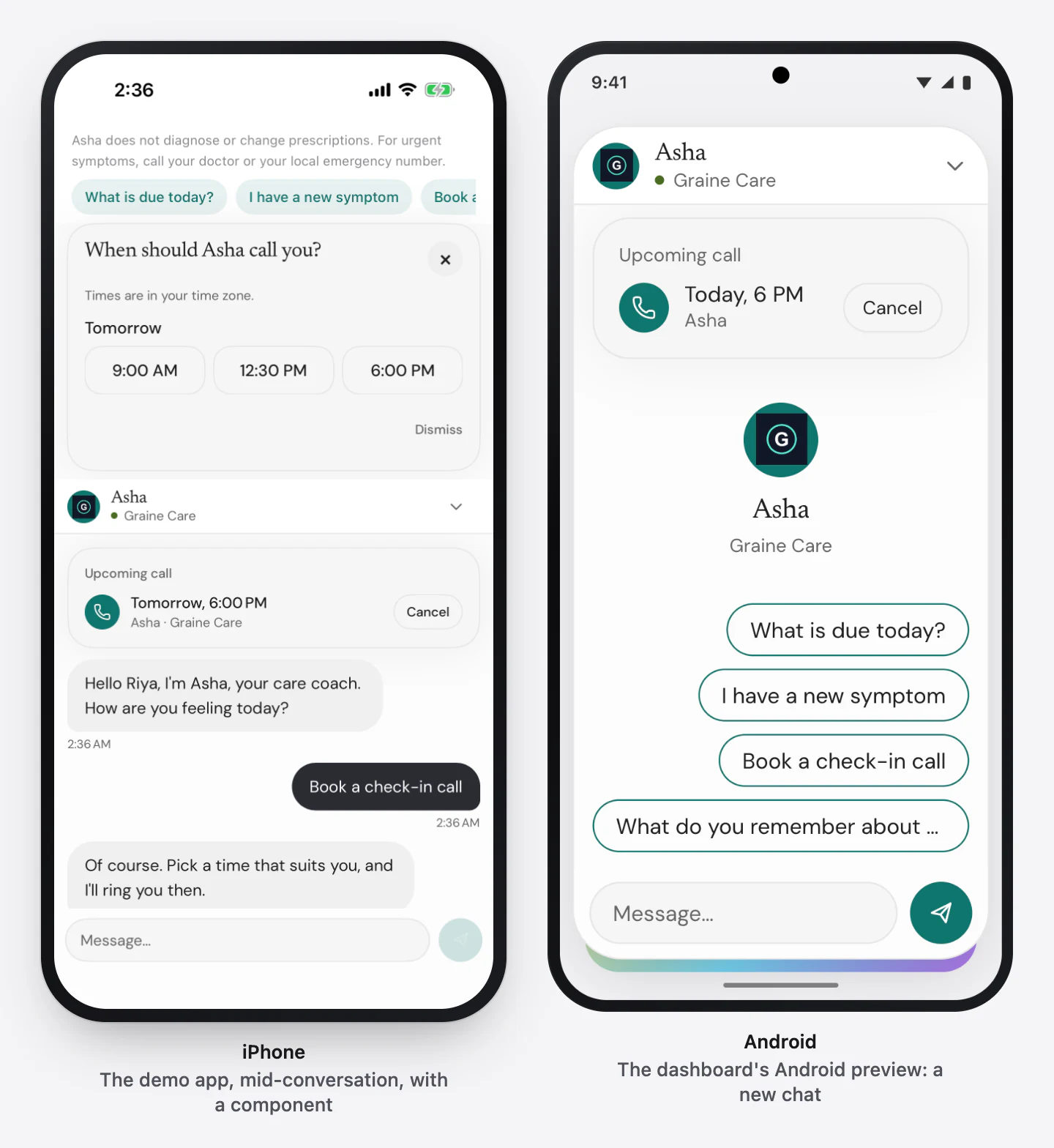
Calls like WhatsApp
Two directions, one call engine in your app. The user calls the agent from a
button — startCall(reason:), and the agent hears who_called = customer
(how). The agent calls the user:
Graine rings their phone when a booked call is due, through your push
credentials, and the agent hears who_called = scheduled with the booking's
reason (how). Both directions carry their audio over
WebRTC when your app includes the SDK's WebRTC module — steadier on a weak network
— and over the WebSocket otherwise (how).
What your users see
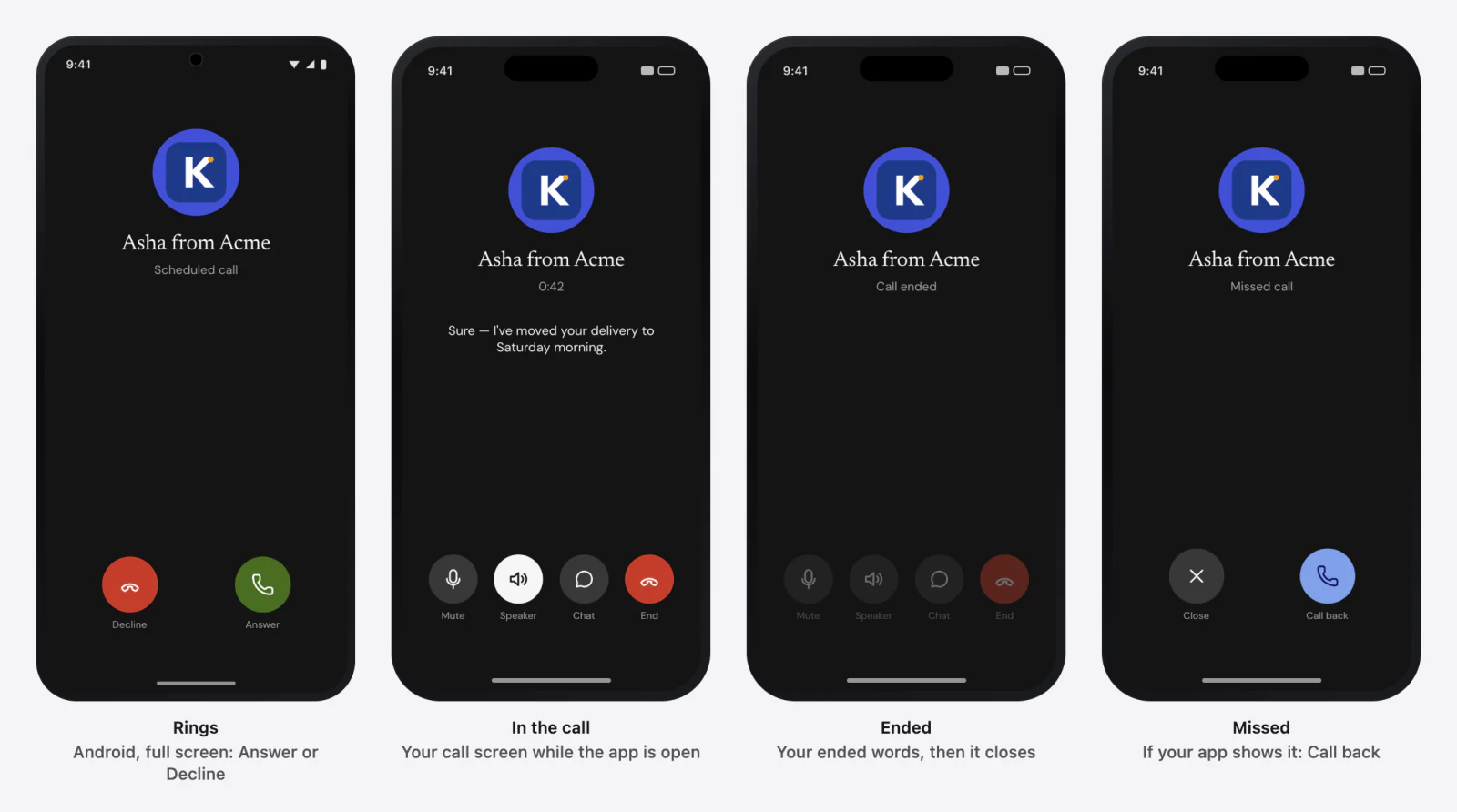
| Moment | iPhone | Android |
|---|---|---|
| Booked | Nothing rings yet. Your app can list it with scheduledCalls() | The same |
| Ringing — the booked time arrives | The system's incoming call, full screen when locked and a banner in use, with your call name and ringtone | A full-screen ring when locked (with the full-screen permission), a heads-up call notification otherwise — Answer and Decline |
| In the call | Your call screen while the app is open; the system's call screen on the lock screen | Your call screen, and an ongoing notification with Hang up |
| Ended | Your ended words for a moment, then the screen closes | The same |
| Missed | Missed call with Close and Call back on the call screen for 30 seconds; no notification is left. It rings once more after your re-ring delay, if you set one | A missed-call notification with Call back; a call screen that showed the ring stays on Missed call for 30 seconds. One more ring after your delay, if set |
| Declined | Nothing rings again for at least 6 hours | The same |
When a call cannot connect
A call that cannot connect ends failed, with a message in its outcome and on
the call screen:
| Message | Platform | When |
|---|---|---|
| The call could not connect within 20 seconds. | iOS | Everything before the conversation opens — the agent's settings, the ticket and the connection — shares one 20-second deadline |
| The conversation did not open within 15 seconds. | iOS | The connection itself did not open — its own limit, which can end the call before the 20 seconds are up |
| The call's audio could not start. | iOS | The conversation opened but the phone never gave the call its audio: the SDK waits 3 seconds, starts it itself once, then waits 3 more |
| The call could not connect within 15 seconds. | Android | The connection did not open in time |
| Nothing arrived for 50 seconds: the connection was lost. | Android | Nothing at all arrived on a live call for 50 seconds; the call does not reconnect |
With the WebRTC module, a call first has up to 12 seconds to connect over WebRTC; one that cannot does not end — it continues on the WebSocket inside the same call, and these messages are what is left when neither can connect.
A call starts at once on the agent's settings the SDK already has — this launch's, or the ones kept on the device — and refreshes them behind the call. On Android a slow network never freezes a call: at most 300 ms of the user's speech waits, the oldest dropped first, and hanging up lets go of the microphone at once.
The call screen's look, words and controls are the Garage's Call tab; the setup per platform is In-app calling and Permissions.
Scheduled calls and the booking sheet
A scheduled call is for a user — the one your Who is the user? field identifies — and rings that user's newest app device, in their time zone, within the agent's Calling Window and outside quiet hours.
| Booked by | How |
|---|---|
| The agent | It books when the user asks to be called back (The agent, during a conversation) |
| Your app or website | The SDK's booking sheet, or scheduleCall({ at, reason }) (Users, from your app) |
| Your team | Agent → Calls & scheduling → Schedule a call, by the user's identifier; Ring now to test |
There is no repeating schedule: for a daily check-in, the agent offers and books the next call at the end of each conversation, or the user books from the sheet.
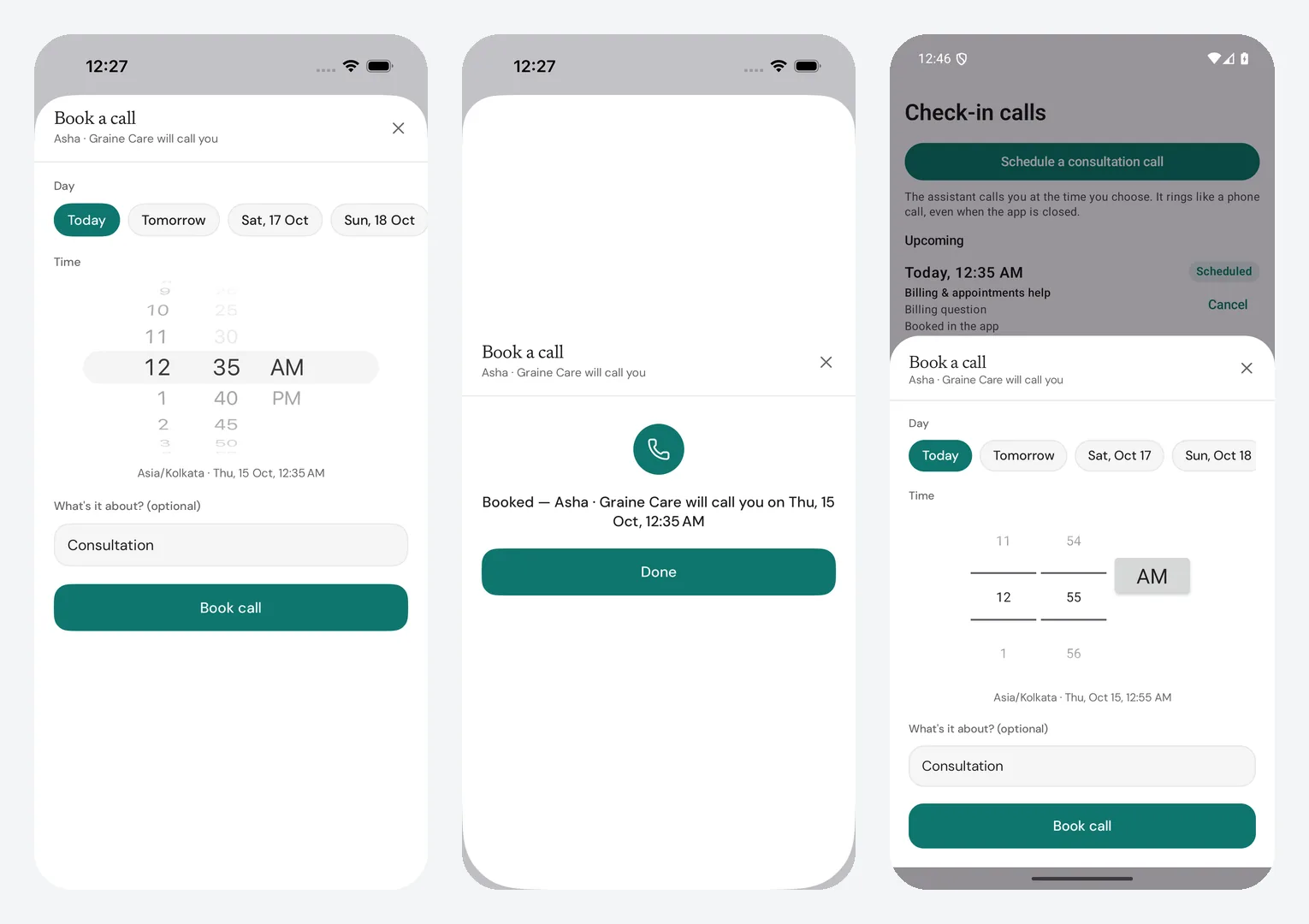
The booking sheet is the SDK's own "Call me at…": the day, the time, the
phone's time zone, what it is about and Book call, in your agent's design,
with every refusal in plain words. Offer it where bookingAvailable is true —
Graine rings this phone, the agent lets users book, and the user is identified;
on a website only the last two count, and the sheet says "We'll ring you in the
app". It returns the booked call, or nothing when the user closed it.
Booking with the SDK's sheet ·
the scheduled-calls list.
A website cannot ring. A call booked on your website — by the agent, the
sheet or scheduleCall — rings the identified user's app on their phone. A
user with no app device seen in the last 30 days is not rung: the call ends
no_device. Identify the user before you offer booking on your website.
Design
One design, chosen in the Garage, drawn everywhere: the launcher, the bar, the chat window, components, the booking sheet and the call screen, on your website and in every SDK. A saved change reaches a website on its next page load and an app the next time it starts. Nothing in your code names a colour or a font. Design in the Garage.
Data and privacy
| What leaves the phone or page | What you report — the screen, traits, variables — masked on the device for PAN, Aadhaar, card and account numbers, phones and emails; the user's voice only while a call is connected; typed messages; your actions' answers |
| The identifier | Never a prompt variable. Graine stores the identifier your app sends so your team can see who each conversation was with; the memory service only ever receives a one-way key derived from it |
| Memory | Short facts under that key, redacted before they are stored, kept for your retention, forgotten on request from the app or the dashboard. Deleting an agent does not delete them; they expire |
| Recent messages | With memory on, an identified user's last 50 messages with each agent, so a conversation continues; kept 7 days after the latest, and forgotten with the memories |
| A ring | The call's id, the call name and which agent is calling — no reason, no variables, nothing about the user |
| Push credentials and tokens | Encrypted with your workspace's own key, never shown again or logged; dead tokens deleted, and devices unseen for 90 days |
| The publishable key | Public by design; it selects the agent and cannot read your data or place a phone call |
Privacy and security · Architecture and guarantees
Error codes
Each SDK raises these as a typed error with a code and a message — which
method raises which is on your platform's SDK reference, and every code with its
fix on Errors.
code | Means | Fix |
|---|---|---|
invalid_key | The publishable key is not one, or belongs to no agent | Copy it again from Embed & Widgets → Install |
origin_refused | The app or site is not allowed | Add app://, or the exact host, to Allowed domains |
identity_required | Booking, ringing or forgetting needs the user's identifier | identify() with the identifier first |
device_limit | This install is not one of the user's allowed devices | Sign out elsewhere, raise Devices per user, or reset their devices |
scheduling_off | Users, from your app is off | Turn it on, or book from the dashboard |
too_soon, too_far | Outside With at least this much notice / Booked at most this far ahead | Pick another time |
outside_window | The user's time is outside the agent's Calling Window | Pick a time inside it |
too_many_pending | The user has the maximum calls waiting | Cancel one first |
not_found | The call is not this user's, or does not exist | Refresh the list |
invalid_request | A field is missing or malformed — a time without its offset, a reason over 120 characters | Fix the request |
rate_limited | Too many requests from this install, key or address | Back off, honouring Retry-After |
unavailable, network | Graine could not complete it just now, or could not be reached | Retry with backoff |
Troubleshooting
| What you see | Where to look |
|---|---|
| Nothing appears | Allowed domains and the key — Install → Troubleshooting |
| Needs microphone | The declaration, or a refusal — Permissions |
| The agent does not know the screen | Screen context |
| The agent says it cannot do something | The action's declaration and handler — Actions |
| No component | Components → Is it actually on the agent?, and the dashboard's Playground |
| It does not remember | The identity field, memory for that user, the device limit — Memory → Troubleshooting |
bookingAvailable is false | The booking sheet → Troubleshooting |
| A booked call never rings | Credentials, device registration, notifications — Hosted ringing → Troubleshooting |
| A call ends could not connect | When a call cannot connect |
| Calls never use WebRTC | The module or build switch, callTransport, the agent's In-app call audio — Calls over WebRTC → Troubleshooting |
| A call rang later than booked | The user's hours and quiet hours — Scheduled calls |
| The design did not change | Restart the app — The Garage |
QA script
Run it on an iPhone, two Android phones and your website, signed in as a test user whose identifier you know.
| # | Do this | Expect |
|---|---|---|
| 1 | Open the app and the bar | The launcher in your design; the agent greets you by name |
| 2 | Ask "what screen am I on?" | It names the screen and its fields |
| 3 | Ask it to do something you declared | It changes in the app, and it says so |
| 4 | Ask for something a component shows | The component appears; a tap continues the conversation |
| 5 | Switch to the chat, and back | One conversation at a time; the call ends when the chat opens |
| 6 | Tell it something to remember, end, start again | It remembers — on the website too, signed in as the same user |
| 7 | Turn memory off for the user, start again | It remembers nothing new |
| 8 | Sign out, start again | Anonymous: no name, no memory; your Call me button hides (bookingAvailable false) |
| 9 | Sign in again with memory on, chat a little, close the app completely, reopen it and open the chat | The earlier messages are there, under a date line; the agent carries on, with no second welcome. New conversation in the header starts over |
| 10 | If your app runs a second agent, open a screen that talks to it | Its own design and greeting; it knows who you are without signing in again; starting it ends the first agent's conversation |
| 11 | Tap your call button | The call screen; the agent knows you called |
| 12 | Turn on airplane mode, then tap your call button | It ends could not connect within 20 seconds (iPhone) or 15 (Android) — not stuck on Connecting |
| 13 | With WebRTC in the build, tap your call button, then answer a Ring now | Both connect as before, the greeting not clipped; the call's transport is webrtc |
| 14 | Set the agent's In-app call audio to Standard, restart the app, call | It connects; transport is websocket. Set it back |
| 15 | Ask the agent to call you back in 10 minutes | It confirms the time; Scheduled calls lists it |
| 16 | Open the booking sheet; pick a time too soon, then a good one | The refusal line under Book call; then Booked — … will call you on … and Done; the chat's card lists it |
| 17 | Book from the website with openBooking | It books; the sheet says We'll ring you in the app; the call rings the app |
| 18 | Ring now from the dashboard with the app closed and the phone locked | It rings on the lock screen; answer, and the agent knows why it called |
| 19 | Decline one, let one ring out | declined, then nothing for 6 hours; missed (a missed-call notification with Call back on Android), then one re-ring if set |
| 20 | Lock the phone mid-call, open another app | The call goes on |
| 21 | Deny the microphone, then notifications (Android 13+) | Needs microphone; a booked call does not ring with the app closed |
| 22 | Book for a user who has never used the app | The call ends no_device |
| 23 | Open each conversation in Call History | Transcript, the app's timeline, the actions, the call's outcome — and who it was with: User ID · u_8812, or your own field's name |
Go-live checklist
Dashboard
- An agent per surface; keys in the builds;
app://and every site, staging included, in Allowed domains - The design saved on all three Garage surfaces; Setup saved
- Actions declared and saved; components ticked; friction tuned
- Memory → Settings: the same Who is the user? field on the app's and the website's agents
- Calls & scheduling: call name, quiet hours, who may book, limits; the agent's Calling Window
- In-app calling credentials Checked and working. on both platforms
- The prompt handles
who_calledandcall_reason, and offers call-backs when it should
Apps
- The microphone declared on every platform;
requestCallPermissions()at onboarding (the microphone, and notifications on Android 13+) - iOS: Push Notifications, Background Modes Audio and Voice over IP;
enableVoIPPushesat every launch - Android: Firebase in the app — the SDK registers for pushes itself (an app with its own messaging service forwards the token and every message,
handlePushfirst) -
identify()after sign-in and at every launch once your sign-in is restored;identify(null)on sign-out - Call me buttons shown only where
bookingAvailableis true - Store submissions: Play's foreground-service and full-screen-intent declarations, App Store review notes, no development launcher (Expo:
expo-dev-client) in the store build — Permissions → Store review - Calls over WebRTC — the module or build switch in the release build, WebRTC in your open-source licences
- Debug logging off in release builds
Website
- The snippet on every page the agent belongs on;
identify()on sign-in
Tested
- The QA script above, on every platform
The fuller list, with what each failure means: Going live.