

Booking from your app with the SDK's sheet
Offer "Call me at…" with no screen of your own: when booking is available, open the SDK's booking sheet — the day, the time, the time zone, what it is about, Book call — in your agent's design, get the booked call back, and show every refusal in plain words. New in 0.8.0.
The SDK draws the whole booking screen, in your agent's design: day chips from today to the furthest day the agent allows, the time (each platform's own picker, only times the rules allow), the phone's time zone, What's it about? (optional) and Book call — then Booked — Asha will call you on Thu 16 Oct, 6:00 PM with Done. Your app opens it and gets the booked call back. New in 0.8.0 on every platform (React Native 0.42.0).
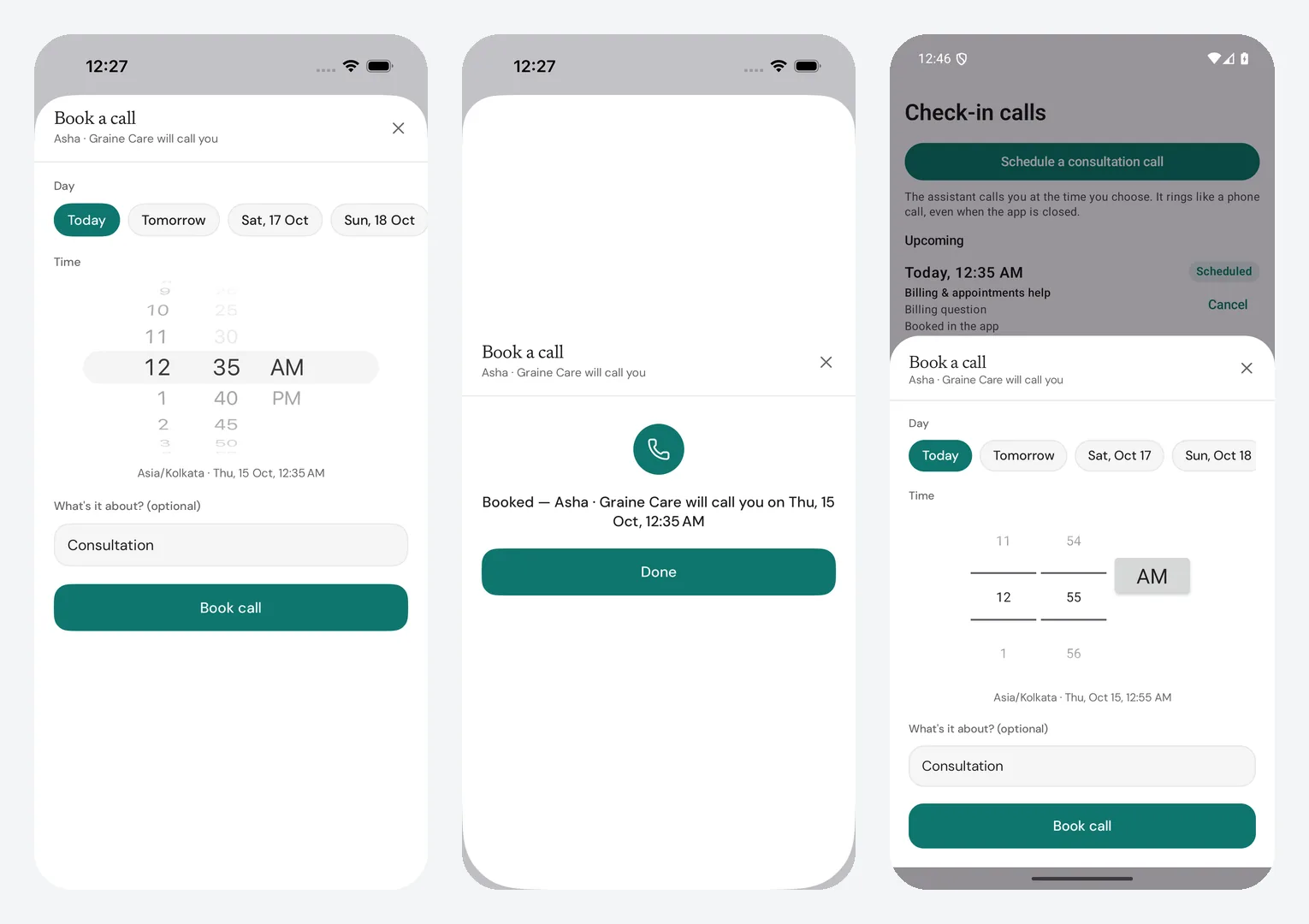
What it needs in the dashboard
| Where | Setting | Value |
|---|---|---|
| Agent → Calls & scheduling → Who may book a call | Users, from your app | On, with At most this many upcoming calls per user, Booked at most this far ahead, With at least this much notice |
| Agent → Calling Window | The hours the agent may ring | A booked time outside them is refused |
| Workspace settings → In-app calling | iOS and Android credentials | Checked and working. — Graine must be able to ring the phone (rings) |
| Agent → Memory → Settings | Who is the user? | Bookings are for the identified user |
| The Garage → Chat tab | Booked calls | Shown, for the chat's own Book a call |
What to do, in order
- Configure the SDK, and on iOS enable VoIP pushes at launch — booking needs Graine to be able to ring this phone (rings).
- Identify the user after sign-in.
- Read
bookingAvailableand show your Call me button only when it is true. It is true when all three hold: Graine rings this phone (In-app calling is set up for the platform), the agent lets users book, and the user is identified. On a website only the last two count. Read it again afteridentifyand once the agent's settings have loaded. - Open the sheet with an optional
reason, which fills What's it about? → It returns the booked call when the sheet closes — or nothing when the user closed it without booking. A refusal stays in the sheet as one line under the button (below); the user can change the time and try again. - Refresh your own list of calls if you show one. The chat window's upcoming-calls card refreshes itself and offers Book a call too.
- On sign-out
identify(null):bookingAvailableturns false.
| Refusal | The line the sheet shows |
|---|---|
too_soon | Pick a time at least 5 minutes from now (the agent's notice) — the sheet moves to the new earliest time |
too_far | Pick a time within 14 days (the agent's limit) |
outside_window | That time is outside the hours we can call — pick another |
too_many_pending | You already have 3 calls booked — cancel one first (the agent's limit) |
scheduling_off | Booking a call isn't available right now |
identity_required | Sign in to book a call |
anything else (rate_limited, unavailable, network) | Couldn't book just now — try again |
The counts are the agent's own settings; one is singular (1 minute, 1 day, 1 call). On a website the sheet adds We'll ring you in the app: a browser cannot be rung.
The code, platform by platform
1 and 2. GraineInApp.configure(…), calls.enableVoIPPushes() at launch;
identify(["user_id": user.id]) after sign-in.
3 and 4. A button that opens the sheet — SwiftUI:
From anywhere, async — over the key window's top view controller:
UIKit: present GraineBookingViewController(reason:done:); your own
presentation: GraineBookingView(onClose:). Objective-C: the agent's
presentBookingWithReason:completion: on GraineObjC, and its bookingAvailable.
5. Refresh your list: let calls = try await GraineInApp.shared.scheduledCalls().
What comes back
The booked call, as GraineScheduledCall:
at is a moment (UTC on the wire); show it in the device's time zone. When it is
due, Graine rings the user's newest phone — Calls Graine rings.
Troubleshooting
| What you see | Why | Fix |
|---|---|---|
bookingAvailable is false | One of the three rules fails | Users, from your app on; In-app calling Checked and working. for this platform; identify with the identifier |
| The sheet opens and says Sign in to book a call | Opened while the user is not identified | Check bookingAvailable before offering it |
| That time is outside the hours we can call | The agent's Calling Window, in the user's time zone | Pick a time inside it, or widen the window |
| No Book a call in the chat | Booking unavailable, or Booked calls hidden in the Garage | As above; Chat tab → Booked calls shown |
The rules every booking follows: Scheduled calls · SDK reference → Booking a call.