

WhatsApp-style calls: the user calls the agent
A call button in your app that rings the agent like a phone call — the call screen, the screen off and the lock screen, Bluetooth and the loudspeaker, mute and end, outcomes for your server, and the messages a call that cannot connect ends with.
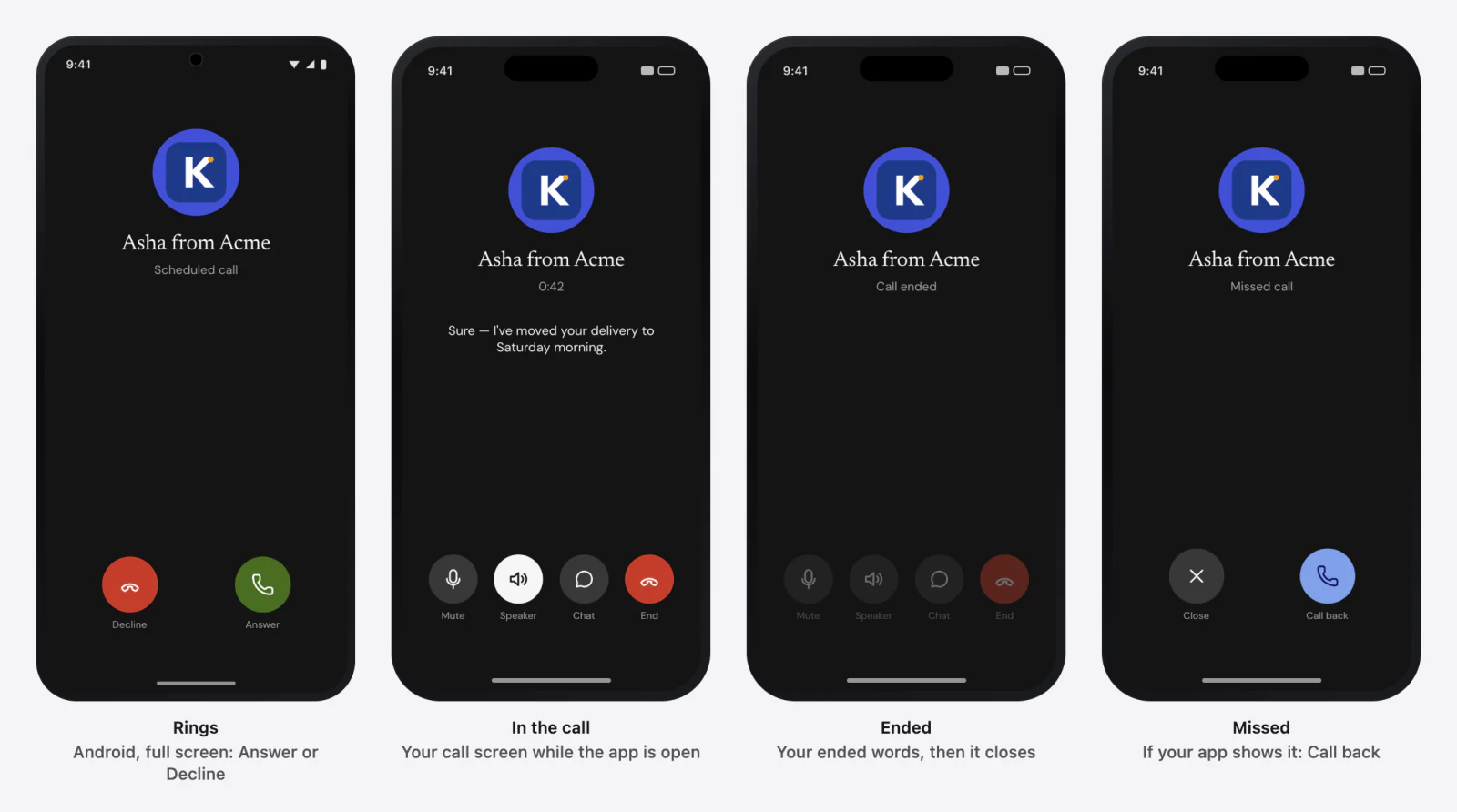
The user taps Call and talks to the agent as on a phone call: full screen, the
system's call handling (CallKit on iPhone, a call notification on Android),
Bluetooth, the screen off. The agent knows the user called and why: it hears
who_called = customer and your reason as call_reason.
What it needs in the dashboard
| Where | Setting | Value |
|---|---|---|
| Agent → Calls & scheduling | Name on the incoming call | What the call screen shows (else the agent's name) |
| The Garage → Call tab | Background, avatar, end button, Buttons on a call, captions, timer, ringtone, the words for each moment | How the call screen looks |
| Agent → Calls & scheduling | In-app call audio | WebRTC (recommended) or Standard. With the SDK's WebRTC module in your app (0.9.0), calls carry their audio over WebRTC; Standard keeps every call on the WebSocket — Calls over WebRTC |
| The agent's prompt | who_called, call_reason | Say how to open a call the user placed, and what each reason means |
No push credentials are needed for calls the user places; they are for calls Graine rings.
What to do, in order
- Set up the app for calls: the microphone; on iOS the Audio background mode (and Push Notifications and Voice over IP if Graine will also ring); on Android nothing — the library's manifest brings it. Optionally, add the SDK's WebRTC module (React Native and Flutter: the build switch) so the call's audio rides WebRTC — Calls over WebRTC.
- Configure calls once, at launch: the name the call shows, the ring.
- Show the call screen while your app is open (iOS, Flutter, React Native and Kotlin Multiplatform: you place the SDK's screen; Android opens its own).
- Place the call from your button with a
reason. → It returns the call's id (call_and a lowercase UUID), or nothing while another call is live; the microphone is asked for if missing; a conversation in the bar ends. - Hear the outcome — answered, then ended (local, remote or failed), or failed with why — for your server or analytics.
- During the call the SDK's screen has mute, the loudspeaker, the chat and
end; your own screen calls
setMuted,setSpeakerandend.
When a call cannot connect, it ends failed with one of these messages (in
the outcome and on the call screen):
| Message | When |
|---|---|
| The call could not connect within 20 seconds. | iOS: everything before the conversation opens — the agent's settings, the ticket and the connection — shares one 20-second deadline |
| The call could not connect within 15 seconds. | Android: the connection did not open in time |
| The conversation did not open within 15 seconds. | iOS: the connection itself did not open — its own limit, which can end the call before the 20 seconds are up |
| The call's audio could not start. | iOS: the conversation opened but the phone never gave the call its audio (the SDK waits 3 seconds, starts it itself once, then waits 3 more) |
| Nothing arrived for 50 seconds: the connection was lost. | Android: a live call heard nothing at all for 50 seconds |
With the WebRTC module in the app, a call first has up to 12 seconds to connect
over WebRTC; one that cannot does not end — it continues on the WebSocket inside
the same call, and the limits above apply from then. transport and
transportFallbackReason say which one carried it.
A call starts at once on the agent's settings the SDK already has — this launch's, or the ones kept on the device — and refreshes them behind the call. The variables a call carries: Variables.
The code, platform by platform
1. Signing & Capabilities → Background Modes → Audio, AirPlay, and Picture in
Picture; NSMicrophoneUsageDescription. Calls need a real iPhone.
2. Configure calls at launch:
3. Show the call screen while your app is open:
4. Place the call:
5. Hear the outcome:
6. Your own controls: calls.setMuted(true), calls.setSpeaker(true),
calls.end(); draw from calls.state, muted, speakerOn, caption,
connectedAt.
Troubleshooting
| What you see | Why | Fix |
|---|---|---|
startCall returns nothing | Another call is live | Wait for it to end; the snapshot's state says so |
| The call could not connect within 20 seconds., The conversation did not open within 15 seconds. (iOS), The call could not connect within 15 seconds. (Android) | No network, or the agent's settings could not load | Retry on a working network; check the key and Allowed domains |
| The call's audio could not start. (iOS) | The phone did not hand the call its audio | Try again; check another app is not holding the audio |
| Nothing arrived for 50 seconds: the connection was lost. (Android) | The network dropped mid-call | The call does not reconnect: place it again |
| The call ends when the phone takes another call | One call at a time | — |
| The agent's voice stalls and catches up on a weak network | The call runs on the WebSocket | Add the WebRTC module — Calls over WebRTC |
In depth: In-app calling · SDK reference → Calls.