

Chat
The typed side of the assistant on every SDK — how the chat and the call take turns, showing the chat in React Native, iOS, Android, Flutter and Kotlin Multiplatform, the window size, conversations that continue and starting a new one, drawing your own, and the chat window's design.
The chat is the same agent, typed. It knows the screen the customer is on, can run your actions, and draws the same components as the call — a list of plans, a set of time slots — in the chat window, in your brand's design. Customers who cannot talk out loud, on a train or in an office, still get the agent.
The call and the chat
What a customer gets is the agent's setting, not your code: Agent → Embed & Widgets → Appearance → Setup.
| What visitors get | In your app |
|---|---|
| Call and chat | The bar opens on the one Opens on names, and carries a switch to the other |
| Voice only | The call. No switch |
| Chat only | The chat. No microphone is opened and no call engine is loaded |
One conversation runs at a time. Moving to the chat ends the call, and moving back closes the chat — otherwise the agent would answer twice, aloud and in writing. A native call ends a chat as it ends a call in the bar.
How it works
The same agent as the call, with the same screen context, actions and components — in text.
Every SDK opens a text connection of its own for the chat — the native chat on iOS, Android and Flutter from 0.7.0 — so the chat needs no microphone and no permission, and draws in your brand's design.
Show it
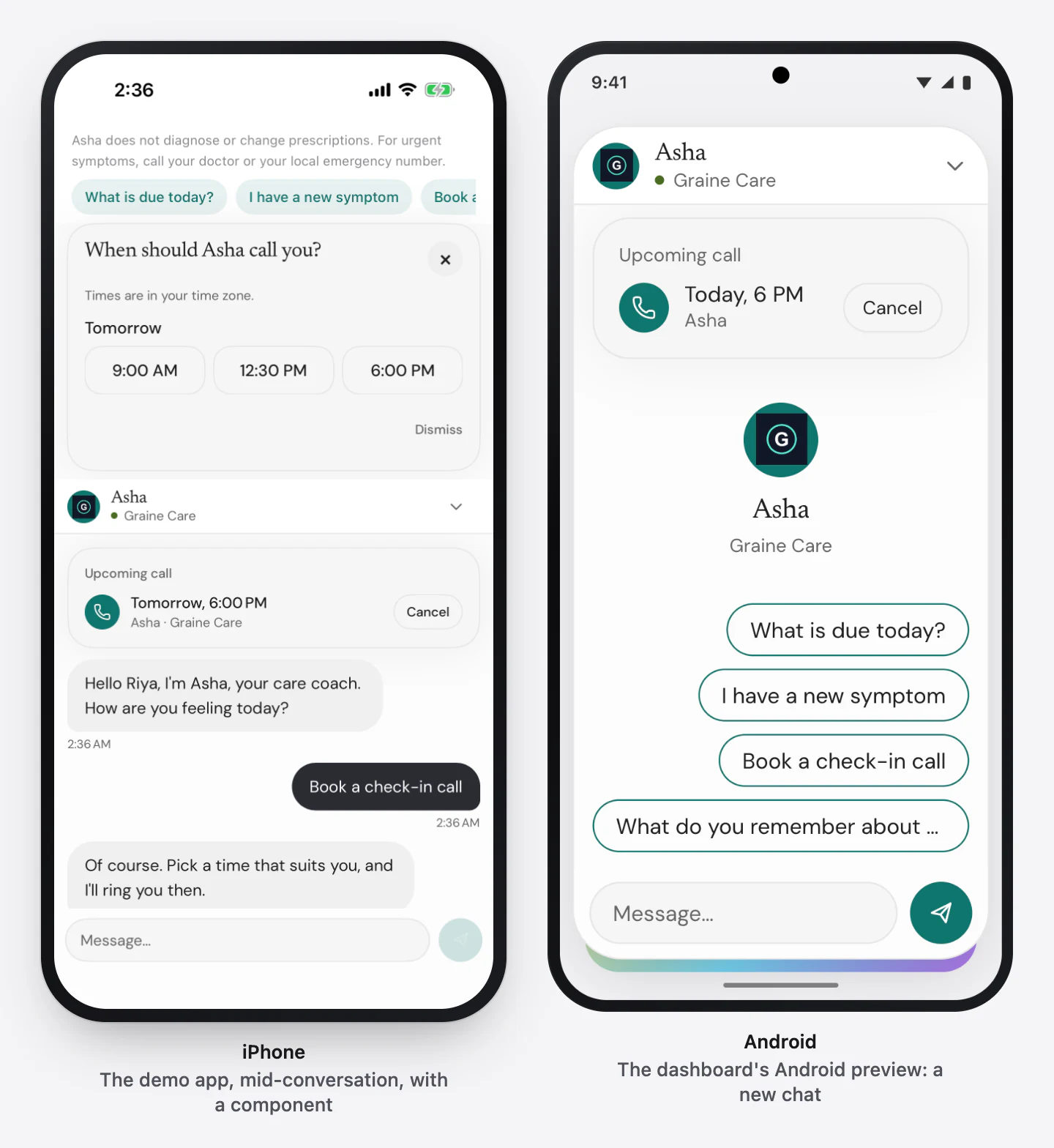
GraineVoiceBar already draws the chat window when the agent offers the chat,
with the switch when it offers both. Nothing more to mount. To open on the chat
for one screen, or follow which is open:
surface chooses among what the dashboard allows; it cannot add a surface the
agent does not offer.
Window size
How big the chat opens is part of the design: the Garage's Chat window tab → Window size — Compact (the default), Large or Full screen — the same in light and dark. Each agent opens at its own design's size.
| On a phone | On a tablet | On a website, on a computer | |
|---|---|---|---|
| Compact | The window above the bar, as it has always been | The same | The panel above the launcher, as it has always been |
| Large | A sheet from the bottom over about 92% of the screen, the app dimmed behind it. Swipe it down, tap the dimmed app, or press the header's chevron to close it | A panel 420 wide and up to 760 tall in the bottom corner on the launcher's side; the app beside it stays usable | The same panel, above the launcher |
| Full screen | The whole screen, with the close chevron leading the header | The whole screen | The larger panel |
Every SDK's bar draws these sizes — React Native's GraineVoiceBar, iOS's
GraineAgentBar, Android's GraineAgentBarView, Flutter's GraineAgentBar and
the Kotlin Multiplatform bar — and so does the website's widget. The chat views
you place yourself (GraineChatView, GraineChatViewController,
GraineChatActivity, Flutter's GraineChat and React Native's
GraineChatScreen) fill whatever space your app gives them.
A phone is a window whose shorter side is under 600 points — or, for a website, a browser window narrower than 640 px. There a website behaves like a phone: Large is a sheet over 92% of the page, Full screen the whole page; the launcher steps aside and the page stops scrolling while it is open.
At every size the composer stays above the keyboard, the conversation, its components and the earlier messages look the same, and moving between the call and the chat keeps the size.
Your app can choose, for every chat and for one open. One open's size wins, then the app's, then the design's; a size an SDK does not know is passed over. An open moves the bar on screen to the chat, at that size, until the chat closes.
chatSize on GraineProvider for every chat, and client.openChat({ size }) to
move to the chat and open it now. GraineChatScreen is the chat as a screen of
your own app: while it is up, the customer is in the chat and the bar steps
aside.
Give the bar safeArea={useSafeAreaInsets()} (react-native-safe-area-context)
for exact insets on a sheet or a full screen.
What the chat carries
| In the chat | |
|---|---|
| The welcome message | The agent's first reply — not when the conversation continues (below) |
| Replies | Text, arriving as it is written |
| Screen context and who the customer is | Exactly as for the call |
| Your actions | Run in your handlers, answered as for the call |
| Components | Drawn in the chat window; a tap is the customer's next message, and the structured answer goes to your webhook |
| Memory | When memory is on and the customer has an identifier — Memory |
| Earlier messages | For a returning customer with memory on — below |
| Call History | The conversation, its transcript and what happened in the app |
Coming back to a conversation
For an identified customer with memory on, the chat continues where they left it — later that day, after the app was closed, on another of their devices — for 7 days after their last message with that agent. The chat window opens on the conversation instead of on a new chat:
- The earlier messages, oldest first — up to the last 50 with this agent.
- A voice call as one row: what was said on a call in your app or on your website shows as Voice call and the time it started, not as its transcript.
- A date line — Today, Yesterday, or the date — wherever the day changes.
- No starters, and no second welcome. The agent continues the conversation and the customer types next. A new call still opens with a greeting, and the agent knows what was said.
Each agent keeps its own conversation: the chat with your help desk never shows what was said to your sales agent. Messages still sending when the customer left stay at the end, and go when the chat connects.
The window opens on a new chat for an anonymous customer, a customer who turned
memory off, a customer who was forgotten, and after 7 days without a message.
forgetMemory() clears the chat on screen too, but only when it succeeds: a
failure — Graine unavailable (503), another customer's device, no network —
leaves the chat as it is, along with the memories. What is kept, and for how long:
Memory → Conversations continue.
Start a new conversation
A support chat often wants a fresh thread. While the chat window holds earlier messages, its header shows New conversation — a compose icon beside close. Tapping it starts over at once, without asking: nothing is lost for your team, because Call History keeps every conversation.
Your app can do the same from a button of its own:
- The agent's chat connection ends, Graine drops the conversation it kept for this agent and customer, the window clears, and a fresh chat opens — with the welcome message and the starters again.
- Memory stays. What the agent remembers about the customer is untouched; to
forget that, use
forgetMemory(). - Only this agent's conversation. With several agents, each starts over on its own: call it on the agent whose chat it is.
- For an anonymous customer nothing was kept, so it only clears the window.
- If Graine refuses — another customer's device, no network, Graine unavailable — nothing changes: the promise rejects (iOS and Flutter throw, Android's callback hears the error) and the chat is as it was.
Drawing your own chat
The SDK's chat window draws the design chosen in the dashboard. To draw your own
in React Native, useGraineAgent() gives you messages, send(text) and
connected, and useGraineWidget() the component on screen —
Components → Drawing them yourself.
Your own window stops following the dashboard's design; useGraineTheme() gives
you its tokens to match. On iOS, Android, Flutter and Kotlin Multiplatform, draw
from the chat's turns (messages on Android) and its state —
Chat reference.
An earlier message put back when the conversation continued carries restored,
and one said on a call carries channel voice: draw a run of those as one
Voice call row, not as bubbles, and offer New conversation while any are on
screen — GraineChatTurn. Every
SDK hands you those rows, day separators included: React Native
chatTurnRows(messages) (chatRows(items, read) for items of your own), iOS
GraineChatRows.build(turns), Android ChatRows.build(messages), Flutter
ChatRows.build(turns, now:) and Kotlin Multiplatform
GraineChatRows.build(Graine.chat.turns.value) —
GraineChatRows. To empty the chat on
screen without ending the conversation: clear() (React Native clearChat()).
Its design
The chat window's size, title and subtitle, avatar, header, background, up to four starters, the composer's placeholder and timestamps are set in the Garage, under the Chat window tab, with the bubbles and the frame under Interior — The Garage.
Troubleshooting
| What you see | Check |
|---|---|
| No chat, only the call | What visitors get is Voice only |
| No switch | The agent offers one of the two, not both |
| A microphone on a chat-only agent | An SDK older than native chat: update it |
| The agent answers twice, aloud and in writing | Two conversations are open: in React Native, a launcher and the provider's own connection — pass autoConnect={false} on SDKs older than 0.34 |
| The chat window is not in your design | Your app draws its own, or the SDK predates the design |
| A returning customer's chat opens empty | They are not identified, memory is off for the agent or for them, it has been more than 7 days, or the SDK is older than 0.7.0 — Memory → Troubleshooting |