

In-app agents
An agent that runs inside your mobile app, sees the screen your customer is on, and can act on it — rather than a chat box that only reads what they type.
An in-app agent lives inside your Android or iOS app. It knows which screen the customer is on, which field failed validation, and how long they have been sitting there without touching anything — and it can fill that field, move them to the next step, or draw the options on screen instead of reading them out.
That is the difference from the website embed. Both talk. Only this one can see, act and show.
New here? The Integration guide is the one page to start from for your app and your website, calls included. Quickstart gets a talking agent into a React Native app in four steps. Integrate in an afternoon is the same path on every platform, through to a tested build, and Architecture and guarantees is the whole platform for the engineer who signs off on it. This page is the why and the shape of the thing.
Conversations open on the agent's web-call variant, exactly as the website embed does. The two share a prompt but are separate agents, so nothing you do here can affect your outbound phone calling.
What it changes
Consider a customer stuck on PAN verification, step 2 of 4, with an empty field and a rejection message on screen.
A chat widget can only wait to be opened, and then ask what the problem is — which is the question the customer least wants to answer. An in-app agent already knows, because your app told it. It can open itself and offer to fix the specific thing that is wrong.
The two directions
Everything on this page reduces to two flows you wire up once.
You write the two ends. Everything in the middle — masking, ordering, retries, friction detection, the transport — is the SDK's, which is why an agent behaves the same in your app as in anyone else's.
| What it is | You write | |
|---|---|---|
| Screen context | Your app tells the agent what the customer can see | One hook per screen — Screen context |
| Actions | The agent asks your app to do something, and waits for the answer | One handler per action — Actions |
Both are optional and independent. An agent given context but no actions is a very well-informed adviser. An agent given both is a co-pilot.
What it draws
When the answer is a list — three cars, two plans, six time slots — the agent puts it on the screen the customer is already holding and gets a structured answer back from the tap. You design it once in the dashboard; the SDK draws it natively, in your brand's colour, in the design grammar of the phone it is running on.
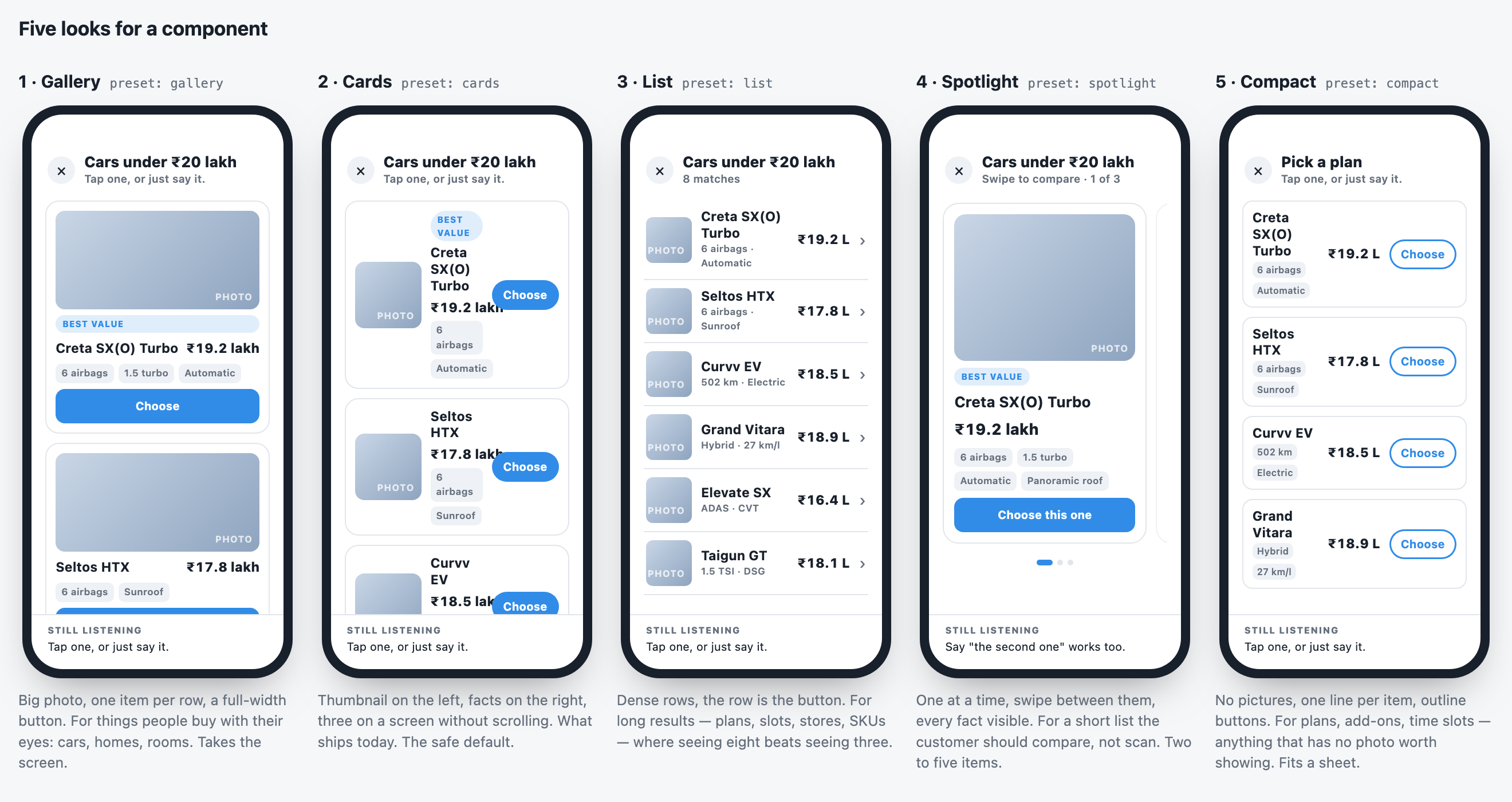
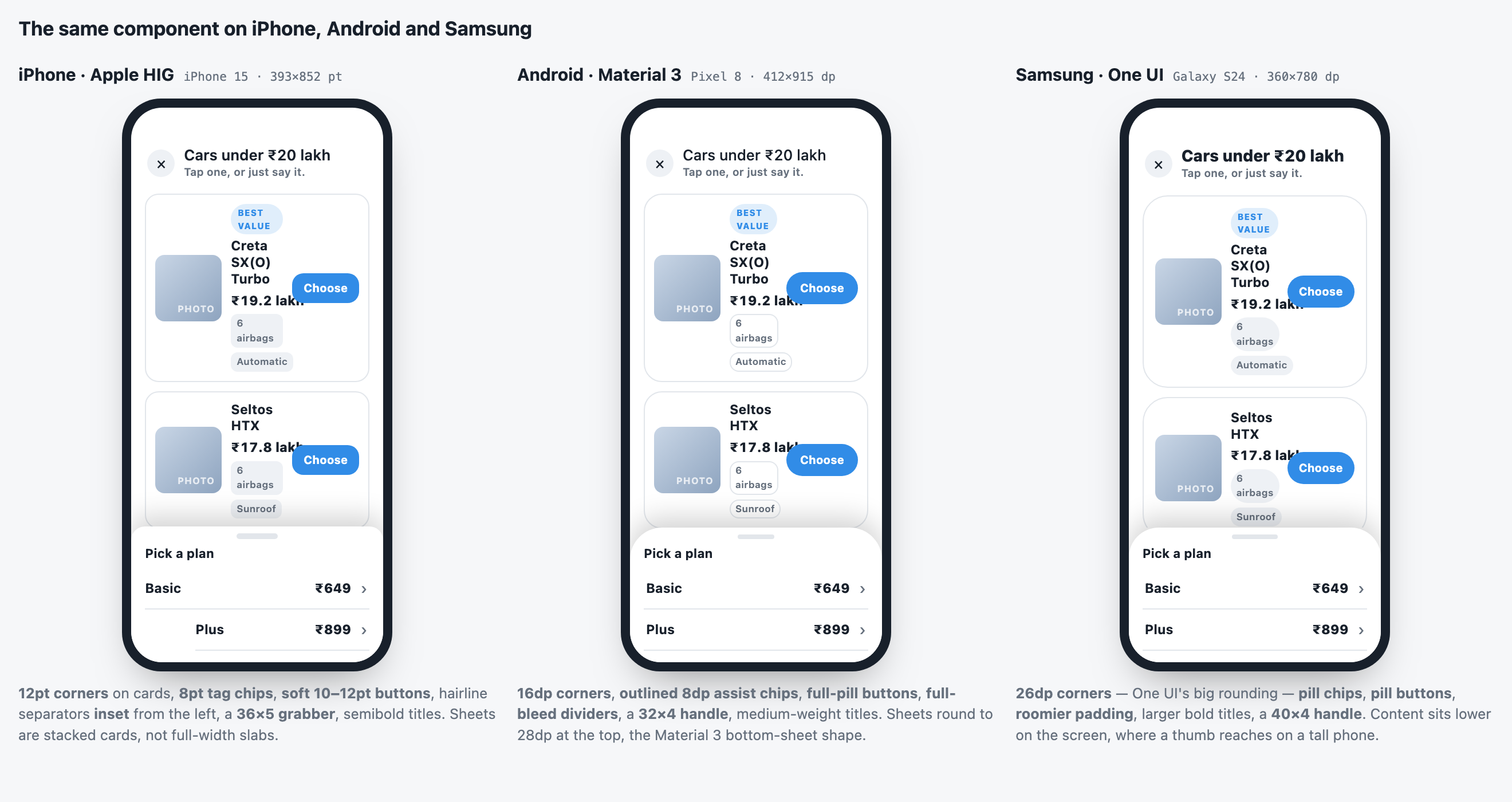
Nothing about that list is written in your app: the items can come from your own API at the moment the agent shows them, the look is a dashboard setting, and a tap can open a screen in your app whose path is also a dashboard setting. Components, end to end
How it looks
The brand chooses how the agent looks in the dashboard — Agent → Embed & Widgets → Appearance, a showroom of design philosophies from Graine Classic to Neo-Brutalist, each tuned for colour, corners, typeface, launcher, motion and chat bubbles. The SDK draws exactly that, on the website and in every app: the launcher, the voice bar, the caption, the chat and every component. It even loads the typeface itself. Your app passes nothing about how the agent looks, so a redesign reaches every phone the next time your app starts, with no release. The Garage · Your design
Calls like WhatsApp
The agent can also be on a call. The customer taps Call in your app, or the agent rings the customer — through a push from your server, or with Graine's hosted ringing. It rings on the lock screen, with the system's own incoming-call screen on iOS and a full-screen call notification on Android, and the conversation carries on with the screen off, over Bluetooth, while they open other apps. The agent keeps your screen context and actions, and every outcome — answered, declined, missed — comes back to your app. In-app calling
What you keep from the embed
Everything below is unchanged, so nothing has to be rebuilt:
- The same dashboard, knowledge base, voices and analytics
- Interactive components — product lists with pictures, plan cards, quick actions, calendar slots — render natively in the app, from one definition that also serves your website. Their content can come from your own API at call time
- Conversations appear in your call history alongside web and phone calls
What you do not reuse is the agent itself.
Give the app its own agent, cloned from the website one. Actions are declared per agent and the model is offered all of them on every surface that agent serves — so a shared agent offers your website tools that only exist inside the app, and it picks worse for having them. Full reasoning in One agent per surface.
Clone rather than start over: the clone carries the prompt and knowledge base across, and you then change only the parts that differ.
One app can also run several agents — a support agent in Help, a sales agent on Plans, a coach on Home — each with its own key, design and actions, choosing one per screen. They share who the customer is, so the customer is the same person to every one of them. Use more than one agent in your app
Availability
| Platform | Package | |
|---|---|---|
| React Native | @graineai/inapp-react-native | Android and iOS from one codebase |
| Android | ai.graine:inapp-android | Kotlin and Java; Compose through AndroidView. No dependencies |
| iOS | GraineInApp, a Swift package | SwiftUI and UIKit, iOS 15+. No dependencies |
| Flutter | graine_inapp | Android and iOS from one codebase |
| Anything else | The protocol | Any host that can show a WebView |
For calls, the Android, iOS and Flutter SDKs need
nothing more; a React Native app adds @graineai/inapp-react-native-calls.
Every one of them runs the same voice engine and is tested against one contract, generated from the React Native SDK: the same masking before anything leaves the device, the same words for a weak connection, the same component looks. A fix to that engine reaches all of them without an app release. Calls are the exception: they run natively inside your app, so they improve when you update the SDK.
For a website, use the script-tag embed instead — it needs no build step.
Next steps
Quickstart
Four steps to a working agent. Start here.
Integrate in an afternoon
React Native, iOS, Android or Flutter, from the dashboard to a tested build.
Architecture and guarantees
What runs where, what leaves the phone, the limits and how it fails.
Components
Draw the options instead of reading them out.
Screen context
Tell the agent what the customer is looking at.
Actions
Let the agent fill fields and move people forward.
Your own UI
Keep the SDK for the call, draw everything yourself — on every platform.
In-app calling
A WhatsApp-style call with your agent: the customer calls it, it rings the customer.
More than one agent
Several agents in one app, one per screen, sharing who the customer is.
Memory
The agent remembers each customer across chats, Talk and calls — and how it uses what it remembers.
Context
What the agent reads on every turn, which source wins, and keeping long conversations within a budget.
Going live
Every setting, every step, how to prove it works, and what each failure means.
Privacy and security
What leaves the device, and what protects the key.
Every released version and what changed is in the changelog.