

Scheduled calls
Calls booked for later — by the agent during a conversation, by the customer from your app, or by your team in the dashboard — rung on the customer's phone at a good time in their own time zone, with the rules that protect them and every outcome recorded.
"Call me back tomorrow at six." A scheduled call is a call booked for later and rung when it falls due — in your app through hosted ringing, or on the phone for a caller who booked it on a phone call. Three ways to book, one set of rules:
| Booked by | How | When it is allowed |
|---|---|---|
| The agent, during a conversation | It books when the customer asks to be called back, and tells them the time it booked, in their time zone | The agent, during a conversation is on |
| The customer, in your app | Your app calls scheduleCall | Users, from your app is on |
| Your team, in the dashboard | Agent → Calls & scheduling → Schedule a call | Always, for anyone who can place calls |
An in-app call rings the customer's devices through hosted ringing, so it needs
your push credentials uploaded, and an app on iOS, Android or Flutter 0.7.0
or React Native 0.41.0 (calls 0.2.0) — the versions with
scheduleCall and hosted ringing. A callback the agent books on a phone call is
an ordinary scheduled phone call to the caller's number.
How it works
Three ways in, checked when booked and again when due, rung on one device at a time.
Set it up
Agent → Calls & scheduling — also on Embed & Widgets → Calls.
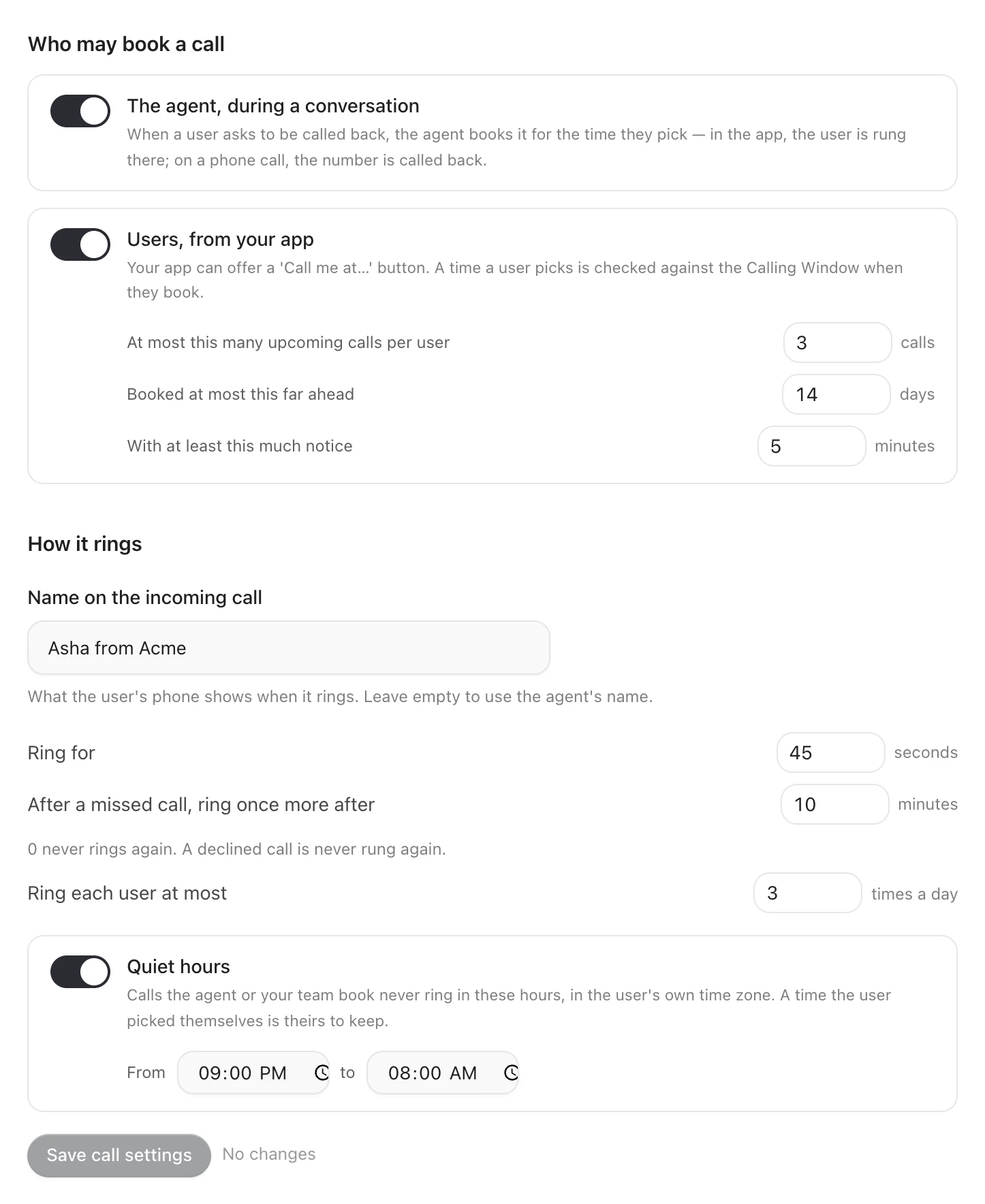
Who may book a call
| Setting | Values | Default | |
|---|---|---|---|
| The agent, during a conversation | On or off | Off | Gives the agent the means to book a call back |
| Users, from your app | On or off | Off | Lets your app call scheduleCall |
| At most this many upcoming calls per user | 1 to 10 | 3 | Booked and not yet rung |
| Booked at most this far ahead | 1 to 30 days | 14 | |
| With at least this much notice | 2 to 1,440 minutes | 5 |
How it rings
| Setting | Values | Default | |
|---|---|---|---|
| Name on the incoming call | Up to 40 characters | The agent's name | What the customer's phone shows when it rings |
| Ring for | 20 to 60 seconds | 45 | How long a ring lasts before it is missed |
| After a missed call, ring once more after | 0 to 120 minutes; 0 never | 10 | One more ring after a missed one — never after a decline |
| Ring each user at most | 1 to 10 times a day | 3 | |
| Quiet hours | A start and an end, or none | 21:00 to 08:00 | No ring the agent or your team booked falls in them, in the customer's time zone |
Save call settings saves both.
The agent's calling window applies to every scheduled call, in the customer's time zone, which your app's SDK reports.
In-app call audio
| Setting | Values | Default | |
|---|---|---|---|
| In-app call audio | WebRTC (recommended) or Standard | WebRTC, where your app includes it | How the audio of every call travels, both when a customer calls the agent and when they answer a call you rang. WebRTC is steadier on weak networks. Standard puts every call on the standard audio path, whatever your app chose — use it only if a network your customers are on blocks WebRTC |
In-app call audio shows once the agent is set up for your app or website, and is saved the moment you change it. Apps pick up the change the next time they start.
Booking
By the agent
With The agent, during a conversation on, the agent can book a call back when a customer asks for one. It is told the current time where the customer is, books a time with its offset, and hears back the confirmed time — or why it could not book — in plain words, which it passes on: "Done — I'll call you tomorrow at 6 pm."
In your app, the call is for the signed-in customer when this device is one of theirs (Identity and users), otherwise for this install. On a phone call, it is for the caller's number.
Say in the prompt when the agent should offer a call back, and what to say about it. It can only book within your rules.
From your app
With Users, from your app on:
What each method returns and every error it can raise is on the
SDK reference → Scheduling; schedulingRules tells your booking
screen which times will be accepted before you ask. A time the customer chooses
is checked against the calling window when it is booked, and refused outside it with a message you can show; quiet hours do not
apply to it — they asked. reason is up to 120 characters; it reaches the agent
when the call connects and never travels in the push.
From the dashboard
Agent → Calls & scheduling → Scheduled calls lists every booked call with its status, and Schedule a call books one: for an in-app customer by their identifier, or for a phone number. Listing needs a role that can view calls; booking and cancelling, one that can place calls.
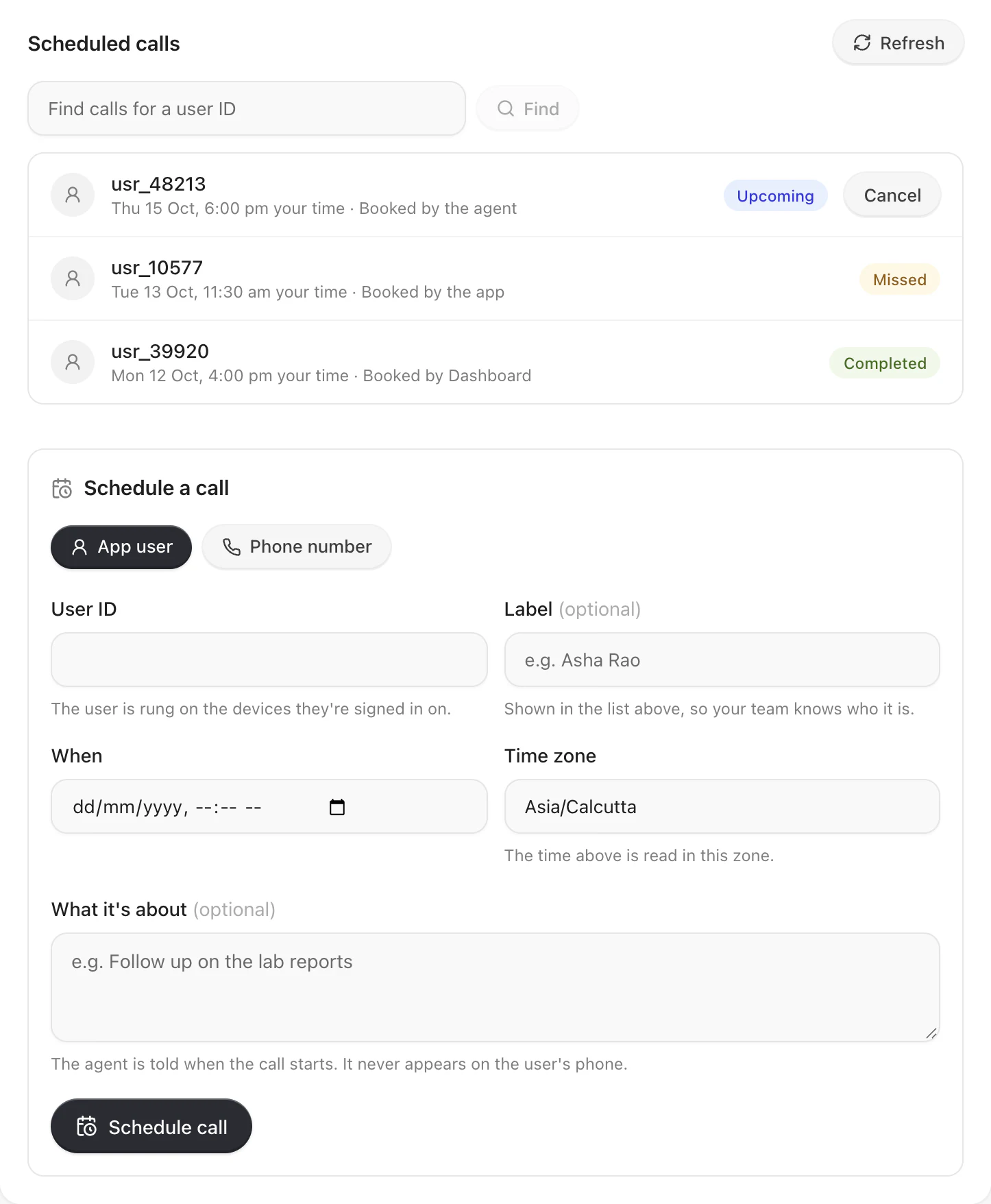
What every booking must pass
- no sooner than With at least this much notice, and no further ahead than Booked at most this far ahead;
- no more than At most this many upcoming calls per user already booked for them;
- your workspace has credit and the agent is on;
- at most 10 bookings an hour from one install, within your workspace's own limit.
What happens at the time
- Credit and the agent. With no credit, or the agent switched off, the call is held — still scheduled — for up to 10 minutes, and expires after that.
- Not stale. A call more than 10 minutes past its time expires instead of ringing late.
- The customer's hours. The calling window, in the customer's time zone, and quiet hours for a call the agent or your team booked. Outside them, the call moves to the next opening if that is still within Booked at most this far ahead, and expires if not. If the time zone cannot be read, the call does not ring.
- How often. No ring within 6 hours of the customer declining one, and no more than Ring each user at most allows.
- A device. The customer's devices seen in the last 30 days, newest first —
or the one install it was booked for. None:
no_device. - Ring. The newest device rings for Ring for; a dead device is skipped
for the next one. Unanswered, the call is
missed, and rings once more after After a missed call, ring once more after, if you set one.
When the customer answers, the agent hears who_called as scheduled and the
call's reason as call_reason, with the variables the booking carried.
Statuses
| Status | Means |
|---|---|
scheduled | Booked, waiting for its time — or held for credit or the agent |
ringing | Ringing on the customer's device |
answered | Picked up; the conversation is on |
completed | The conversation ended |
declined | The customer declined it |
missed | Nobody answered within the ring timeout |
failed | It could not connect |
cancelled | Cancelled by the customer, your app or your team |
expired | It could not ring in time: stale, held too long, or no opening left within the days ahead |
no_device | The customer had no device to ring |
Your webhooks get call_declined, call_missed and call_expired beside the
call's own events, and every rung call is in Call History.
Errors
code | When |
|---|---|
scheduling_off | Users, from your app is off |
too_soon | Sooner than With at least this much notice allows |
too_far | Further ahead than Booked at most this far ahead |
outside_window | The time the customer chose is outside the agent's calling window |
too_many_pending | The customer already has At most this many upcoming calls per user booked |
identity_required | Booking for a customer needs their identifier |
device_limit | This install is not one of the customer's devices |
not_found | Cancelling a call that is not theirs, or does not exist |
invalid_request | A time without its offset, a reason over 120 characters, or another malformed field |
rate_limited | Too many bookings from this install — honour Retry-After |
unavailable | Graine could not take the booking just now — try again |
Troubleshooting
| What you see | Check |
|---|---|
| The agent never offers a call back | The agent, during a conversation is off, or the prompt never says when to offer one |
Calls end no_device | Hosted ringing is not set up, or the app never registered the device — Hosted ringing |
| A call rang later than booked | It fell outside the customer's hours or in quiet hours, and moved to the next opening |
A call expired | It was held for credit or an Off agent for more than 10 minutes, or no opening was left |
| A customer was not rung after declining | By design: nothing rings within 6 hours of a decline |