

Hosted ringing
Let Graine ring your customers' phones for your agent's calls — upload your APNs key and Firebase service account once, and the SDK registers each device, Graine rings it, and every outcome comes back, with no server of yours. What it stores, what a ring carries, and what happens when something breaks.
An agent's call rings a customer's phone through a push. That push can come from your own server, as Your calling server describes — or from Graine, with hosted ringing. With hosted ringing you upload your push credentials once; the SDK registers each device with Graine, Graine rings it when a call is due, and the SDK reports every outcome back. No server of yours is involved.
Versions: iOS, Android and Flutter 0.7.0; in React Native,
@graineai/inapp-react-native-calls 0.2.0 with @graineai/inapp-react-native
0.41.0. Older apps cannot register the device with Graine, so they are not
rung.
Two ways to ring
| Your own push server | Hosted ringing | |
|---|---|---|
| Who decides to call | Your server | The agent, booking a call back in a conversation; the customer, booking one in your app; or your team, in the dashboard — Scheduled calls |
| Device tokens | On your server | At Graine, encrypted |
| The push | Sent by your server through APNs and FCM | Sent by Graine through APNs and FCM, with your credentials |
| What a ring carries | What you put in it: call_id, reason, caller_name, variables | The call's id, the agent's call name and which agent is calling — no reason, no variables, nothing about the customer |
| Outcomes | Your app reports them to your server | The SDK reports them to Graine: the scheduled call's status, Call History and your webhooks. Your app still hears every one |
| What you build | A server: devices, pushes, a record with timers | Nothing beyond the SDK |
The ring itself is the same — CallKit on iOS, the call notification on Android, the same call screen — and so is the conversation. The two can run side by side: a push your own server sends rings as it always has.
How it works
Credentials once, devices as apps start, a push when a call is due, outcomes as they happen.
Create your credentials
You make these once per app, in your own Apple and Google accounts. Graine never sees those logins: you upload only the key file and its details.
You need an Apple Developer Program membership (the Account Holder or an Admin) and your app's bundle ID.
- Create the key. Go to developer.apple.com/account → Certificates, Identifiers & Profiles → Keys → +.
- Name it (for example "Graine calls") and tick Apple Push Notifications service (APNs). If Apple asks you to
configure the key, choose Sandbox & Production and Team Scoped (All Topics). A key limited to one topic must
include your app's VoIP topic,
your.bundle.id.voip. - Continue → Register → Download. The
.p8file downloads once only, so keep it somewhere safe. Note the Key ID (10 characters) shown with the key. - Find your Team ID: the top-right corner of your developer account, or Membership details (10 letters and digits).
- Let the app receive pushes. Under Identifiers, open your app's bundle ID and check that Push Notifications is enabled. In Xcode, the app target → Signing & Capabilities → add Push Notifications, and Background Modes with Voice over IP and Audio, AirPlay, and Picture in Picture ticked. React Native (Expo) and Flutter set these through their config: see Permissions.
- In Graine: Workspace settings → In-app calling → iOS → Set up: the bundle ID, Team ID, Key ID, the
.p8file, and Environment Automatic (each device's own).
One APNs key serves every app in your team, for ordinary and VoIP pushes alike. Graine's calls need no .p12
certificate and no Firebase on iOS.
Never put the .p8 file or the service-account .json in your app or a repository. They are for Graine only:
upload them in the dashboard, where they are kept encrypted in a secrets vault, apart from your workspace's other
data, and never shown again.
Set it up
Upload your credentials. Workspace settings → In-app calling — the same card is on every agent, under Calls & scheduling. Credentials belong to the workspace, one set per app (bundle ID or package name), so every agent that rings that app uses them. It needs a role that manages integrations (an Admin).
| Platform | What you enter |
|---|---|
| iOS | The app's bundle ID, your Team ID, the Key ID and the .p8 auth key from your Apple Developer account, and the Environment: Automatic (each device's own), Production (App Store and TestFlight) or Sandbox (development builds) |
| Android | The app's package name, and the service account JSON of a Firebase service account that may send messages for that project |
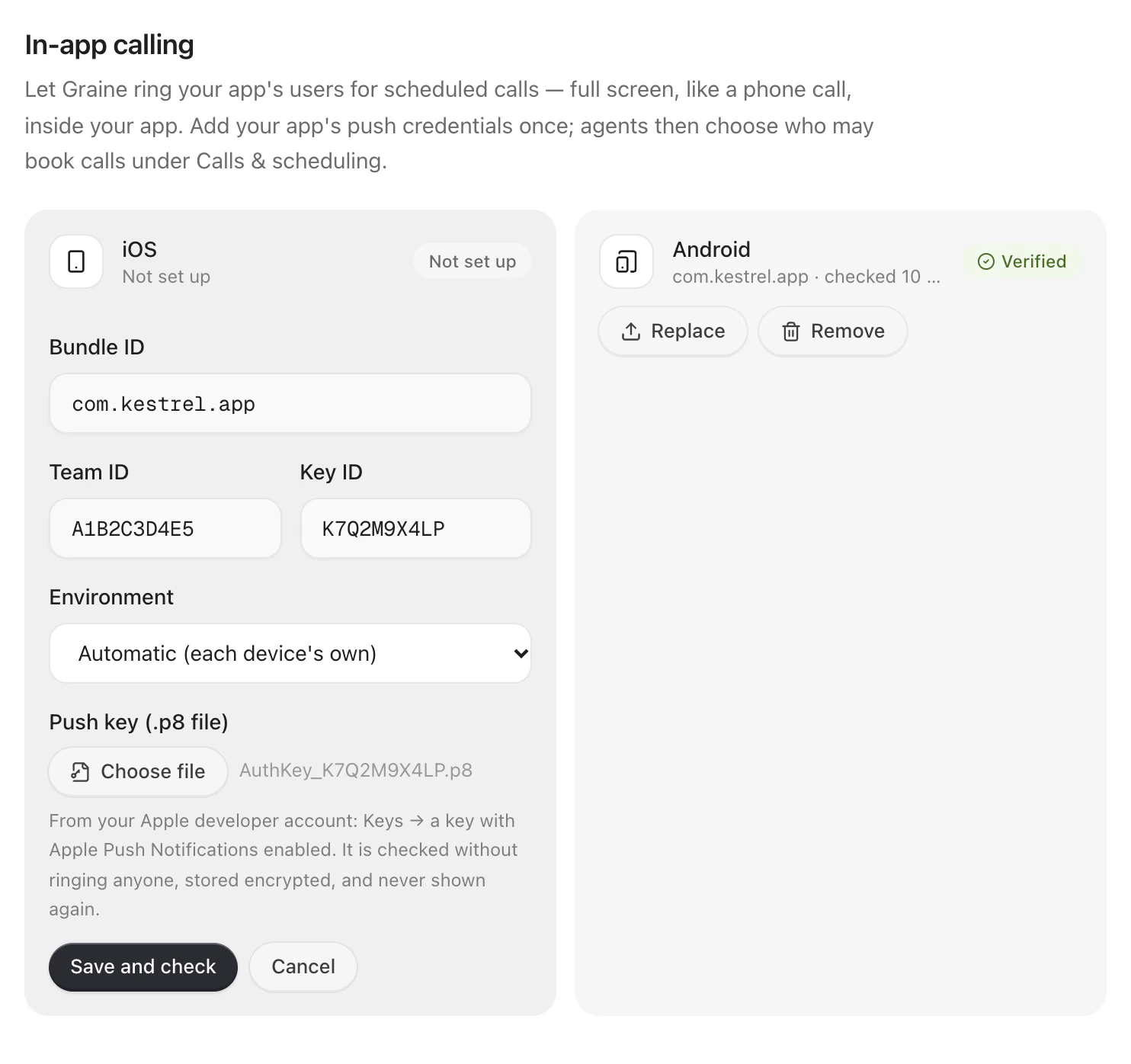
Graine checks them as you save. On iOS it sends a push on your app's VoIP topic to a device that does not exist: Apple answers that the device is unknown when the key is good, and refuses the key when it is not — no real phone rings. On Android it sends a validate-only message. Each platform then shows Verified, or Not working with the reason. Replace uploads a new key; Remove deletes the credentials.
Hand the SDK your push tokens. On iOS, call enableVoIPPushes at every
launch as you do today: with hosted ringing on, the SDK registers the VoIP token
with Graine itself. On Android, add Firebase to your app and the SDK registers for
pushes itself — its own messaging service receives the token and Graine's calls.
Only an app with a messaging service of its own (@react-native-firebase/messaging
and firebase_messaging bring one) forwards Firebase's token and messages to the
SDK — one line each:
A device registers with the install, its time zone and app version, and — when the customer is signed in and this device is one of theirs — the customer (Identity and users). Sign-out unlinks it.
Ring. Book a call — by the agent, from your app or from the dashboard — and Graine rings the customer's newest device when it is due: Scheduled calls.
The app's own setup for calls is unchanged: the capabilities, the permissions and the call screen in In-app calling and Permissions.
What Graine stores
| What | Kept | Deleted |
|---|---|---|
Your credentials — iOS Team ID, Key ID, .p8, environment; Android project and service account | Encrypted, in a secrets vault apart from your workspace's other data — one entry per app. Never shown again, never logged. The bundle ID and package name stay visible | When you press Remove |
| Devices — the push token, platform and app, the install's one-way key, the customer's one-way key when the device is one of theirs, the time zone, app and SDK versions, when it was last seen | The token encrypted. The customer appears only as their one-way key — their identifier is not on the device record | When Apple or Google says the token is dead; 90 days after the device was last seen. Unlinked from the customer when they sign out |
What a ring carries
| iOS | Android | |
|---|---|---|
| Sent as | A VoIP push: apns-push-type: voip, topic <bundle id>.voip, priority 10, expiration 0 — now or never | A data-only FCM message at high priority, living 30 seconds |
| Body | type: agent_call, call_id, caller_name, hosted: "1", agent_id | The same, as data |
agent_id is the id of the agent that booked the call — not personal data. An app
running several agents
answers the ring with that agent, in its design; one it does not have configured
answers with the default agent.
Nothing else: no reason, no variables, nothing about the customer. A push waits at
Apple or Google until the phone is reachable, so it carries only what the ring
shows. The agent learns why it is calling when the call connects — it hears
who_called as scheduled and the call's reason — and the variables the booking
carried reach it the same way.
Answering. With the SDK's WebRTC module in your app (0.9.0), the call is set up while the phone rings, and the answered call carries its audio over WebRTC — steadier on a weak network — or, when WebRTC cannot set it up, over the WebSocket inside the same call, with no second ring. A declined, missed or expired ring lets go of what was prepared: nothing was dialled. The agent's In-app call audio setting can keep every call on the WebSocket — WebRTC or the WebSocket.
Outcomes
The SDK reports every hosted ring to Graine: ringing, then answered,
declined, missed or failed, and ended for a call that connected. A report
counts only for a call Graine rang, from a device it rang; repeated and late
reports change nothing, and a conversation that starts with the call's id counts
as answered even if its report never arrives.
| Where you see them | |
|---|---|
| The scheduled call | Its status — Scheduled calls → Statuses |
| Call History | The conversation, linked to the call that rang it |
| Your webhooks | call_declined, call_missed and call_expired, beside the call's own events |
| Your app | The SDK's outcome listener, exactly as with your own server — GraineCallOutcome |
When something breaks
| What happens | What Graine does | What you do |
|---|---|---|
| Apple or Google refuses your credentials when a ring is sent | Marks the platform Not working and sends your Admins one notification in the dashboard | Replace the key, or fix the service account's role |
| A device's token is dead | Deletes the device, and tries the customer's next device | Nothing |
| The customer has no device seen in 30 days | The call ends no_device | — |
| The phone is offline when the ring is sent | The push expires; the call is missed when its ring time runs out | — |
Troubleshooting
| What you see | Check |
|---|---|
| Not working as soon as you save, on iOS | The Key ID, Team ID and .p8 do not belong together, or the key lacks Apple Push Notifications |
Calls are no_device | The app never registered: iOS must call enableVoIPPushes at launch; Android must forward onNewToken. Or the customer has not opened the app for 30 days |
| A device rings for one customer but not another | The device is past that customer's devices limit, or they signed out on it |
| A ring arrives on iOS development builds but not TestFlight | The environment is Sandbox; set Auto or Production |
| Android rings only when the app is open | handlePush is not the first thing in onMessageReceived, or notifications are not allowed |