

Running a workflow
Publish a version, test it with one contact, run it for one contact or a list, what holds a run back, and following every run step by step.
Publish
Runs follow a published version, never the draft you are editing. Publish checks the draft, then freezes it as the next version: 1, 2, 3 and so on. A run keeps the version it started on until it ends, so publishing again changes only the runs that start afterwards. Each version counts its runs and their outcomes, which makes comparing one version with the next simple.
The draft saves itself as you edit. When someone else saved it after you opened it, you are asked to reload instead of overwriting their work.
Test with one contact
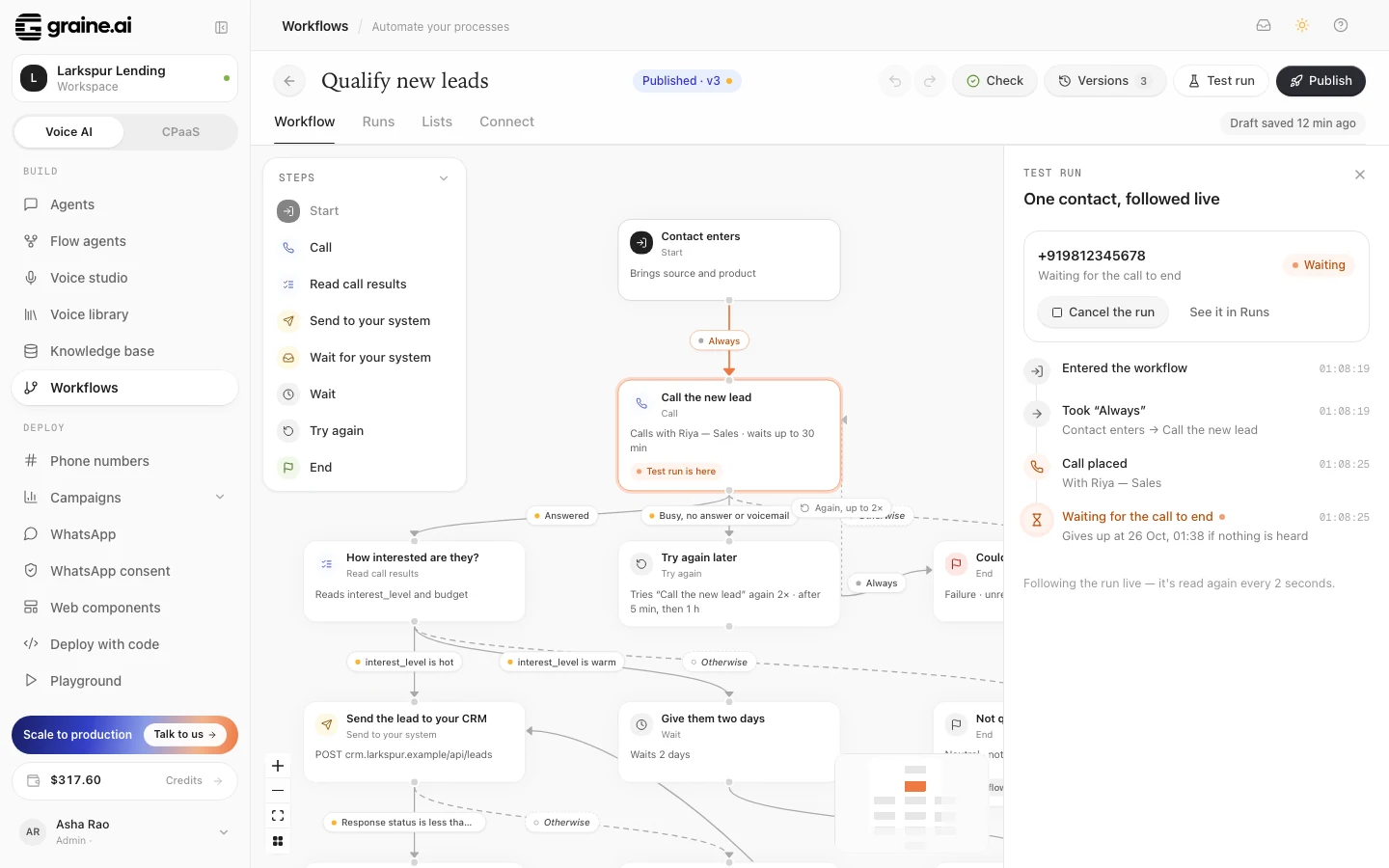
Test run asks for one contact's fields (the Start step's, plus a number), starts a run on the latest version and follows it live, step by step. Use a number you can answer: the call is real and is billed like any other.
The fields it asks for are the Start step's: to fill in one of your agent's
{variables} here, make it a contact field (the Call step's Your agent uses)
and publish.
When the workflow phones someone, Call from picks the number this test's calls come from: one of your Phone numbers, or As each Call step says to keep each step's own caller ID. The run shows the number it called from.
One contact from your system
Three ways to start a run without opening the dashboard:
- the workflow's trigger URL: your system posts the contact to it, with no API key (see Connect your systems);
- the API:
POST /v2/workflows/{workflow_id}/runswith an API key (see Workflows API); - when a call ends: a run starts by itself for the caller, or the person called, of a call with the agents you choose (see Connect your systems);
- a list of contacts, below.
Before anything is spent, every start checks that your balance can pay for it and that the agents the workflow calls are switched on.
A list
The Lists tab holds them. Run on a list takes a CSV file. You match its columns to the Start step's fields, and the rows a workflow cannot take (a required field missing) are shown before anything is sent. The list pins the version it was created with.
- Create the list: pick the workflow (and a version, or the latest) and how many contacts may be in a call at once, 10 by default.
- Add contacts while the list has not started, up to 5,000 at a time. Each one becomes a run that waits its turn.
- Start it. If your workspace asks for approval before a list starts calling, the start waits for an admin, as any campaign does. A turned-down start leaves the list as it was, to change and send again.
- Pause stops new runs from starting; the ones under way go on. Resume carries on. Cancel ends every run not yet over.
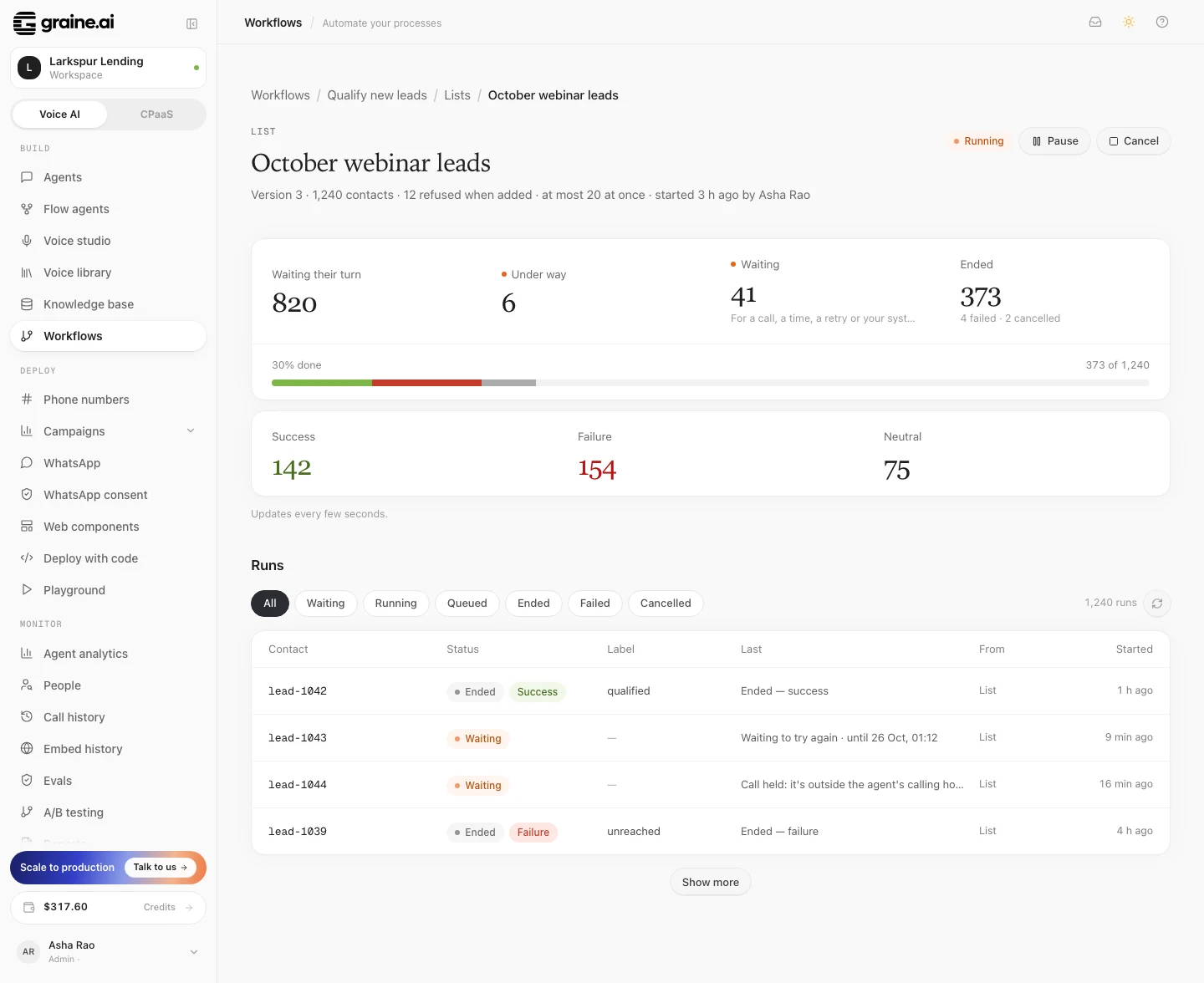
A started list cannot take more contacts. Make a new list instead, so whoever approved the start approved exactly who is called. The list's page shows how its runs stand: waiting their turn, under way, ended, and by outcome.
Your account's line limit still applies
A list's in a call at once is its own ceiling, inside your account's. A workflow places its calls one at a time, so they share your line limit with everything else: on a new account, calls placed one at a time run up to 3 at once per agent while no campaign is dialling. A call over the limit waits for a free line. It is never refused and never counted as a try.
What holds a run back
| When | The run |
|---|---|
| Your balance is empty | Waits. No new runs of a list start, and calls go out once you top up. Never counted as an attempt. |
| The agent is switched off | Waits until it is switched on. A deleted agent ends its Call step as error. |
| It is outside the agent's calling hours | Its call waits for the next opening. |
| Every line is busy, or the agent has its calls placed one at a time running | Its call waits for a free line (line limits). |
| Your carrier is slowing calls down | Its call waits its turn. |
| A call in the app: quiet hours, or outside the agent's calling hours in the person's time zone | It rings at the next time that works. |
| A call in the app: the person already has as many calls booked as the agent allows, or the time is further ahead than the agent books calls | The call is asked for again later: when one of theirs has rung, or when the time comes within reach. |
A call's timeout counts only from the moment it is dialled (a call in the app:
from when it rings, so a call booked for tomorrow is waited for from tomorrow),
so a call held back overnight does not time out. A call that has not been dialled after 7 days is
given up as error. A call that is already under way is never cut, whatever
happens to its run.
Following runs
Runs lists every run of a workflow, newest first, with its status:
| Status | Means |
|---|---|
| Queued | Waiting its turn (a list's run that has not started) |
| Running | Moving right now |
| Waiting | Waiting for a call (a call booked in the app shows when it rings), a time, a retry or your system |
| Ended | Reached an End, with its label and outcome |
| Failed | Could not go on: a required value was missing, or no path was left |
| Cancelled | Ended by a person |
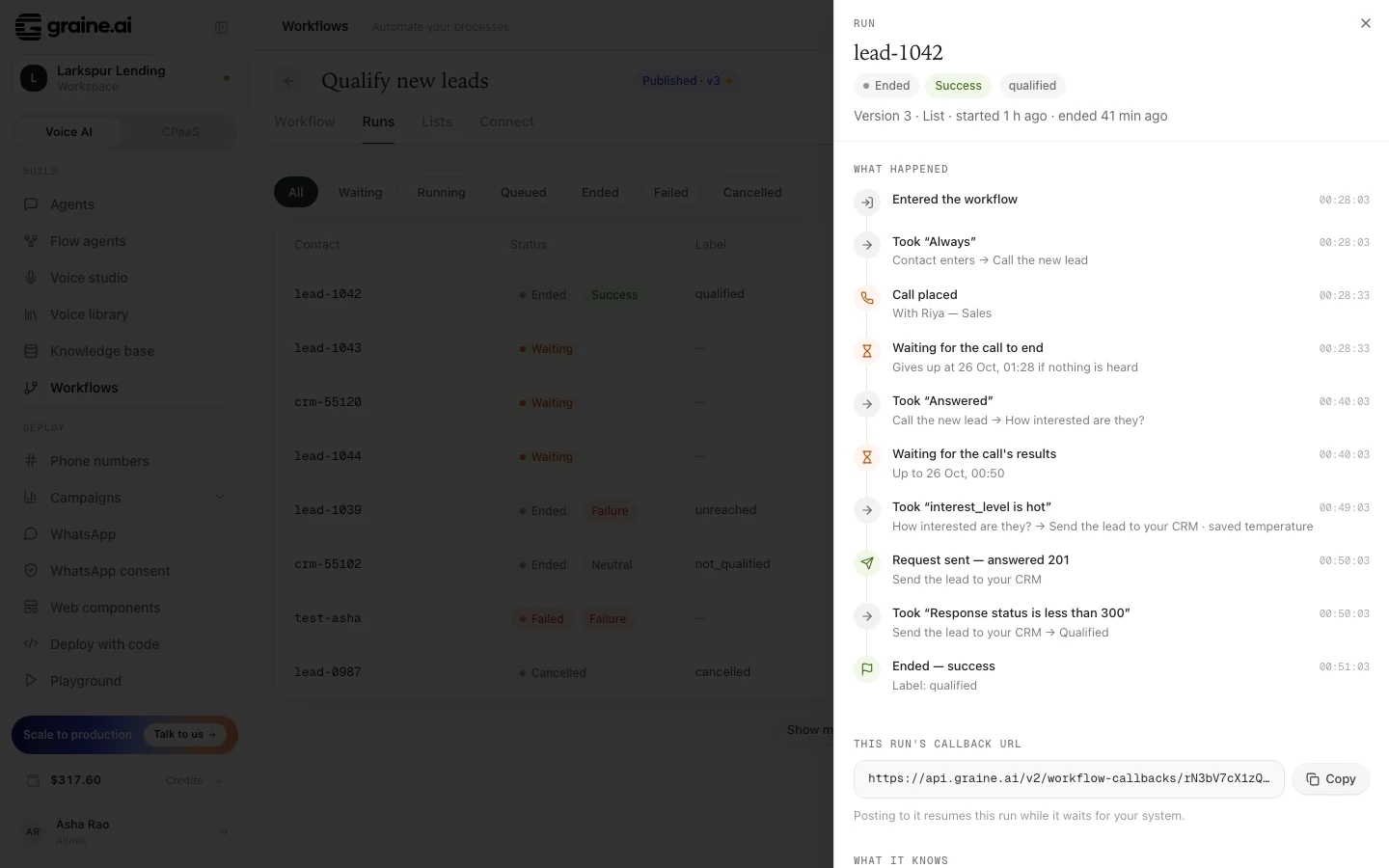
Open a run to see its timeline: when it entered, every path it took and
why, each call it placed with how it ended, each request it sent with its
answer, every wait with what it was waiting for, and how it ended. Its values
(entry, call, extraction, response, callback, state) are shown as
the run saw them.
Calls are ordinary calls
Every call a run places is in Call History with its recording, transcript and analysis, sends your webhooks, and is billed like any other call. A call a run books in your app is also in the agent's Scheduled calls until it rings, booked by a workflow.