

Connect your systems
Send a run's results to your CRM, pause a run until your system answers, start runs from your system with the trigger URL or when a call ends, connect WhatsApp, SMS and email, and sign and check requests.
A workflow talks to your systems in three ways: an HTTP request step sends them a request, a Wait for your system step waits for them to call back, and the trigger URL lets them start a run. The editor's Connect tab shows three ways to start a run — the trigger URL, Start when a call ends and the API — then the callback URL, the signing secret and your messaging connections. The workflow's Connect panel in the dashboard shows its URLs and its signing secret.
HTTP request
One request: method (POST unless you choose GET, PUT, PATCH or
DELETE), URL, headers and a JSON body, with values from the run in
placeholders (see Paths and data).
- The URL's host is written out in full, never taken from a value, and must be a public address. Requests to private or local addresses are refused.
- The answer can be up to 256 KB.
response_mapreads values out of it by dotted path (data.items.0.idreads into a list) and makes themresponse.<name>. response.statusis the HTTP status. A4xxor5xxis an answer, so a path can act on it; nothing is retried behind your back. When your system could not be reached in time,response.erroristransport.- Redirects are followed only when you turn Follow redirects on, at most 3, each to a public address.
- Headers and values are saved with the workflow, and anyone who can view the workflow can read them. Use a token made for this one job, which you can revoke on its own.
Wait for your system
The run pauses until your system posts to one of its callback URLs:
| URL | Use it when |
|---|---|
The run's own, run.callback_url | Your system can be told the URL. Send it in an earlier request, as resume_url is above, and post back to it. |
| The workflow's, in its Connect tab | Your system has one webhook setting for everything, such as a CRM's "when a deal changes, call this URL". The body names the contact, and every run of this workflow waiting for that contact is resumed. |
Either way, the body must name the run's contact at the step's
correlation.payload_path, compared with correlation.matches (the phone
number by default; phone numbers are compared on their last ten digits). The
values you list in payload_map become callback.<name>:
resumed is 0 when no run is waiting for that contact. The step's timeout
gives callback.status = "timeout" instead, and a path decides what happens
then.
Trigger URL
The trigger URL starts a run for each contact your system posts, with no API key. It is off until someone whose starts need no approval (in most workspaces, an admin) turns it on in the Connect tab.
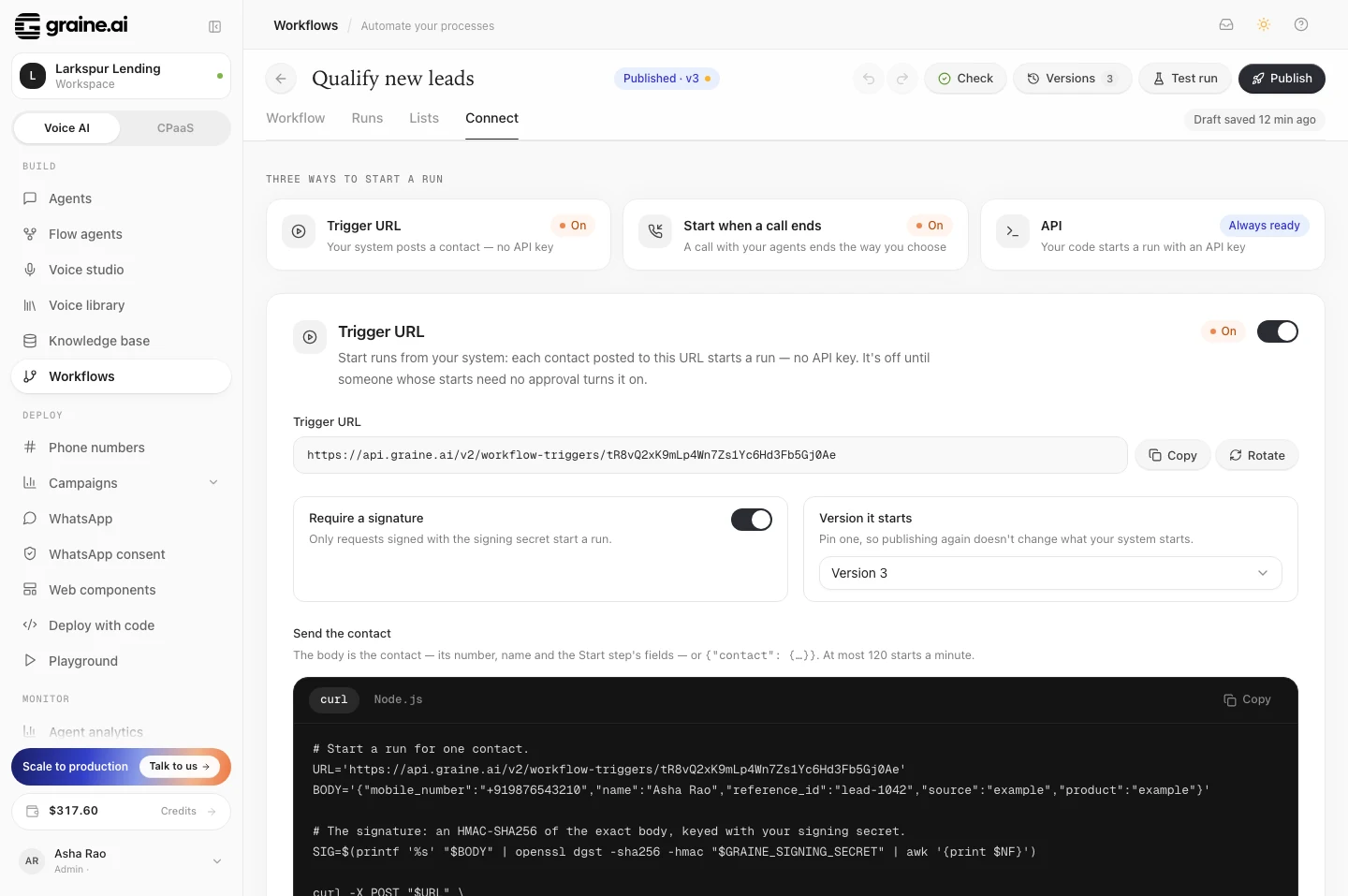
There you can also pin a version, so publishing again doesn't change what your system starts, and require a signature.
The contact can also be the whole body. A trigger URL starts at most 120 runs a minute. Before each start, your balance and the workflow's agents are checked, exactly as for a run started in the dashboard.
Start when a call ends
Turn on Start when a call ends in the Connect tab, and a run starts by itself whenever a call — or a chat — with the agents you choose ends the way you choose:
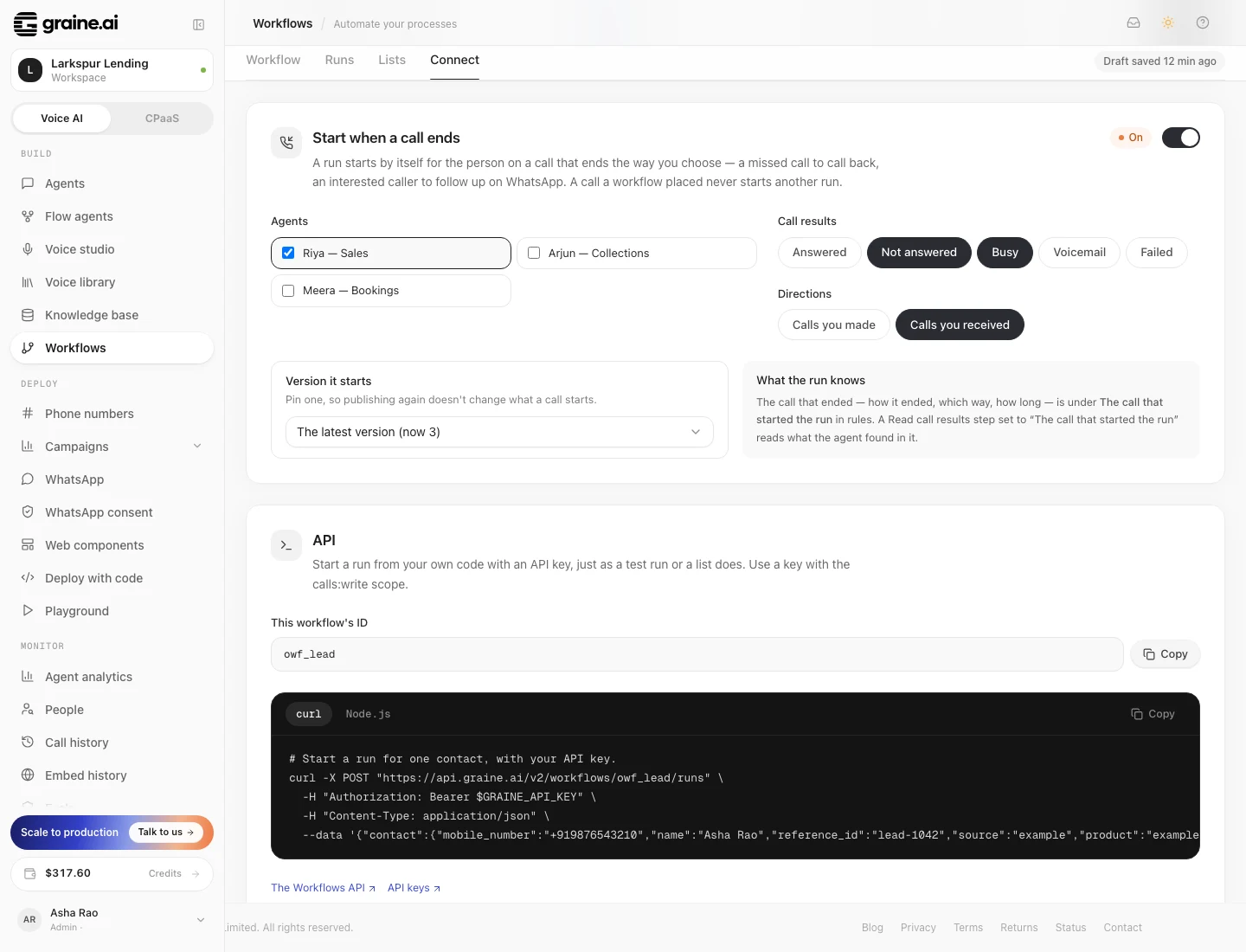
| Setting | Choose |
|---|---|
| Agents | One or more of your agents |
| What counts | Calls, Chats, or both (Calls unless you choose) |
| Call results | Answered, not answered, busy, failed, voicemail |
| Directions | Calls you made, calls you received (phone calls), In the app (calls in your app, whichever way), On the website (voice conversations on your website, or in your app's voice bar) |
| Version | The version that runs, or the latest |
The run is for the person on the other end. On a phone call that is their
number: the caller of an inbound call, the person called on an outbound one, as
entry.mobile_number. In your app, on your website and in a chat it is the user
your app signed in, by the ID the agent knows them by (its Memory & identity
setting): entry.user_id, with the field it is in as entry.user_field. A call
or a chat with nobody signed in starts nothing — the run would not know whom it
is for. A call in your app that Graine rang starts its run when the ring ends:
answered and over, declined, or not answered.
The call that ended is trigger.call, with its status, direction, duration and
id; a chat that ended is trigger.chat, with its id, how many messages were
written and how long it lasted. A Read call results step set to The call
or chat that started the run reads what the agent's analysis found in it. Use
it for a missed call that should be called back, for a sales call whose
interested callers should get a WhatsApp follow-up, or for a chat that asked
for a call (After a chat, follow up).
Each call or chat starts its run once. Whether it was a chat or a call is the conversation's own — never which of its updates reached Graine first — and a call in your app that reconnected partway through (from one connection to another) starts its run once, from the conversation that was really had: the longest. A call placed by a workflow never starts another run, so there are no loops. A person who already has a run of the workflow under way doesn't get a second one. Like the trigger URL, it is turned on by someone whose starts need no approval.
Recent calls that matched, under the settings, lists the latest ten calls and chats that matched, newest first: the person (a number's last four digits), how the call ended, which way and with which agent, and either the run it started or why it started none. That happens when the person already has a run of the workflow under way, an agent the workflow calls with is switched off, the wallet is empty, or the Start step requires a field the call doesn't carry. Open the run opens it in Runs. A call that doesn't match (another agent, result or direction) isn't listed.
In the list of workflows, the Trigger column shows every way a workflow starts by itself: When a call ends, Trigger URL and From your app.
Through the API, the same settings are the workflow's call_trigger:
directions takes inbound, outbound, app and web, and channels takes
call and chat (["call"] when it isn't set).
Before a call is placed
Hold an agent's calls to someone who has already had enough of them. Turn it on, choose the agents, and set the limit — for example, at most 3 calls in the last 2 days. From then on, every call those agents would place is checked the moment it would be placed, whoever places it: a campaign or a list (and their retries and follow-ups), the API, a scheduled call or a workflow.
- What counts: every call placed to the person's number in that time, by any agent in your workspace, answered or not — the same count as the Check call history step. Calls the person made to you don't count.
- A call over the limit waits. It goes out once the person can be called again. It is never marked failed
and never counted as an attempt:
- a campaign or list contact waits its turn until then, and the campaign carries on with everyone else;
- a retry or a follow-up keeps its number and is placed then;
- a scheduled call, and a workflow's Call step, wait — the run waits with it;
- a call you place now with
POST /v2/callsis queued too: the answer is202withstatus: "scheduled",reason: "held_by_call_limit"and thescheduled_atit will be placed at — nothing to resend. Sent again, it isn't queued twice: while that number has a call waiting with that agent, the answer is the waiting call (already_queued: true). Only if it can't be queued do you get error 1204; - a test call — from an agent's page, or one Sprout places — is never held: someone is waiting on it. It still counts towards the number's calls.
- Calls at night. A held call goes out at the first moment it's allowed. A campaign's calls keep to the campaign's calling hours; the API's, scheduled calls and a workflow's keep to the agent's Calling window when it has one — give your agents one, so a call that frees up at night waits for the morning.
- A campaign's end date still applies. A contact, retry or follow-up still waiting when its campaign ends is not called: it closes as skipped, with that reason. Give a campaign enough days for the limit to pass.
- Everywhere in your workspace. It holds the chosen agents' calls wherever they come from, not only this workflow's. When two workflows choose the same agent, both limits apply.
- The window is from 1 hour to 7 days.
Turn it off, or remove an agent, and calls waiting for it go at their next turn.
Start from your app
Your app can start a workflow for the user it signed in, with the in-app SDK and
your publishable key — no server of yours. Turn on Your app can start this in
the workflow's Connect tab (an Admin does), choose the fields your app may send,
and call startWorkflow from the app:
| Setting | Choose |
|---|---|
| Your app can start this | On or off (off unless an Admin turns it on) |
| Fields your app may send | The contact fields the app may fill in: name and the Start step's own fields — never a phone number, an email address or a field a step sends to |
| Version | The version that runs, or the latest |
The run is always for the user your app signed in, by the ID the agent knows them
by (entry.user_id): an ID your app puts in its data is ignored, and so is
anything else the workflow doesn't allow. Each value is text (at most 200
characters), a number or yes/no, and the app may send at most 12. A user who
already has a run of the workflow under way gets that run back, not a second one,
and a retry with the same key never starts two.
Your app never chooses where a run sends. mobile_number, email, any
field a call, SMS, WhatsApp or email step sends to, and any Start field that is a
phone number or an email can't be fields your app may send, and a start never
takes them from what the app sends. When the agent knows its users by phone or
email (its Memory & identity setting) and the user is verified, the run
reaches them at that phone number or address. Otherwise reach people from your
own records — an API step that looks them up — or with a call in your app.
A start passes the same checks as everything your app does with the agent: your apps, a verified app where you require one, and — with Require verified users on — a verified user. It also needs the user signed in on one of their own devices (the agent's Devices per user) unless they are verified, and your balance and the workflow's agents are checked as for any start. Starts are limited per device, per user and per workflow. What the app gets back, and every error, is in the SDK reference. Requires SDK 0.14.4.
Messaging connections
WhatsApp messages go out on the numbers you connected under Integrations → WhatsApp. Nothing more to set up.
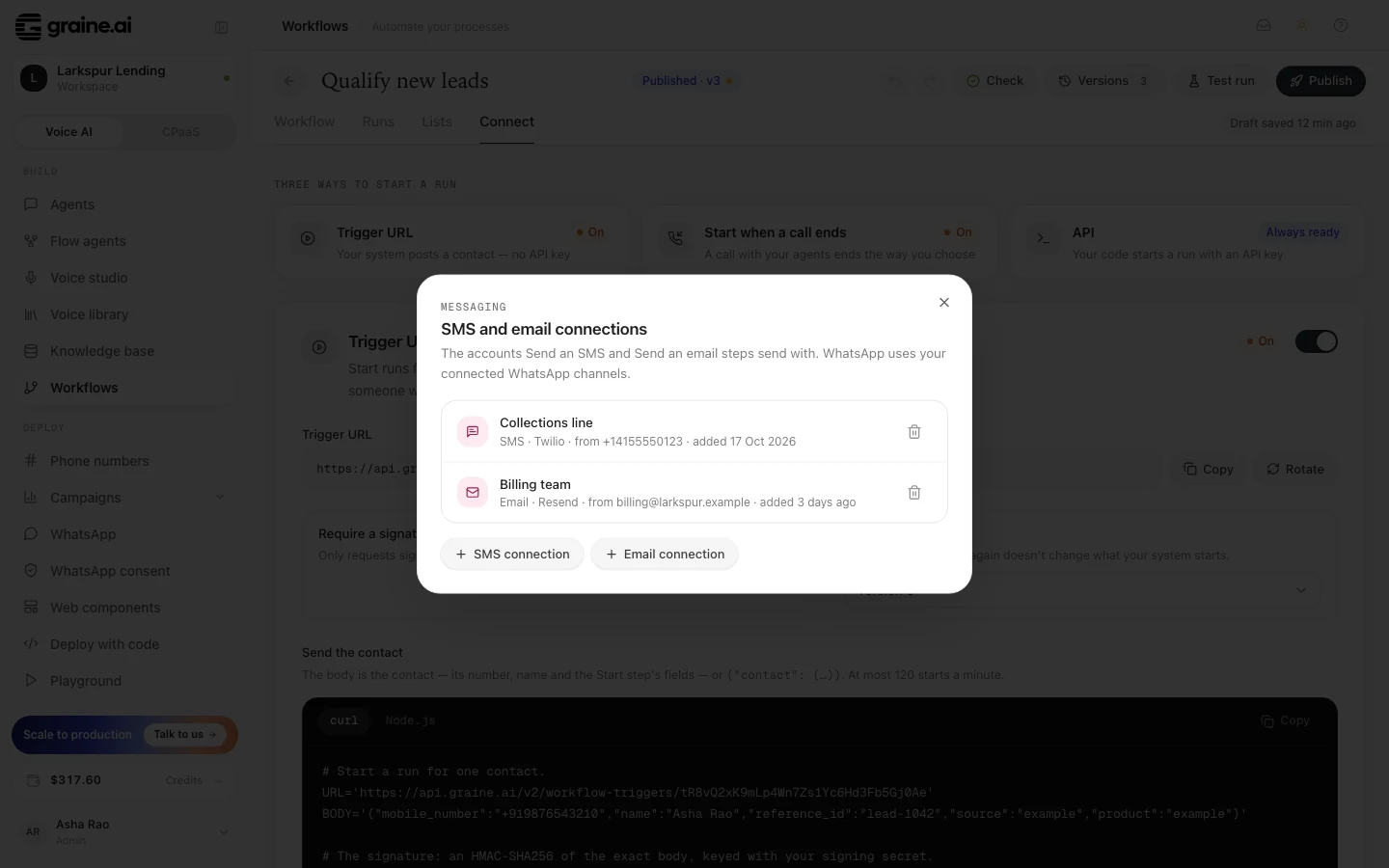
SMS and email use a messaging connection: add one under Manage connections in the Connect tab (the SMS and email connections dialog), choosing Twilio for SMS (account SID, auth token and your Twilio number) or SendGrid or Resend for email (an API key and the address you send from). The credentials are encrypted when you save them and are never shown again. Only workspace admins add or remove connections.
Signing requests
Turn on Require a signature (on the trigger, or on a Wait for your system
step) and only signed requests are accepted. The signature is an HMAC-SHA256 of
the raw request body with the workflow's signing secret, sent as
X-Graine-Signature: sha256=<hex>.
Treat the URLs and the secret like passwords
Anyone with the trigger URL can start runs (and spend your credit), and anyone with a callback URL can answer that run. Keep them in your server's configuration, never in a web page or an app. If one leaks, Rotate it in the Connect tab: the old one stops working at once.
Answers
Both URLs answer in the API's error format, {"error": <code>, "message": "..."}:
| Status | error | Means |
|---|---|---|
| 400 | 1000 | The body is not a JSON object, or it is over 256 KB |
| 401 | 1100 | The signature is missing or wrong |
| 402 | 1400 | Your balance cannot fund a new run (trigger) |
| 404 | 1200 | No such URL, or the trigger is off |
| 409 | 1201 | No run is waiting there (the run's own URL), or the contact already has a run under way (trigger) |
| 409 | 1202, 1203 | An agent the workflow calls is switched off, or was deleted (trigger) |
| 422 | 1000 | The body names a different contact from the waiting run, or lacks a required field (trigger) |
| 429 | 1300 | More than 120 starts in a minute (trigger) |