

Test and fix a flow
Try a flow by chat, web call or phone, read what Check reports and why, see after a call which path was taken and why, and fix the problems flows most often run into.
A flow rarely works perfectly on the first call. This page covers the loop of getting it right: try it, read what the builder and the call tell you, change the flow, and try again.
Try it in the Test area
Test, one of the builder's four areas, keeps the flow on screen while you talk to the agent. Tests always use the agent as saved; with unsaved changes, the panel says so, and you need to save first to test them.
| Way to test | How it works |
|---|---|
| Chat | Open the chat, type as the caller and read the replies. The agent moves through the flow exactly as on a call. No call is placed and no minutes are used. |
| Web call | Talk to the agent from the browser with your microphone, and see how long each turn takes. It uses minutes like any other call. |
| Phone call | The agent rings a real number from one of your workspace's numbers: Number to call, Their name (which fills {callee_name}) and Call from, then Call now. The panel follows the call until it ends. It needs a role that can place calls. |
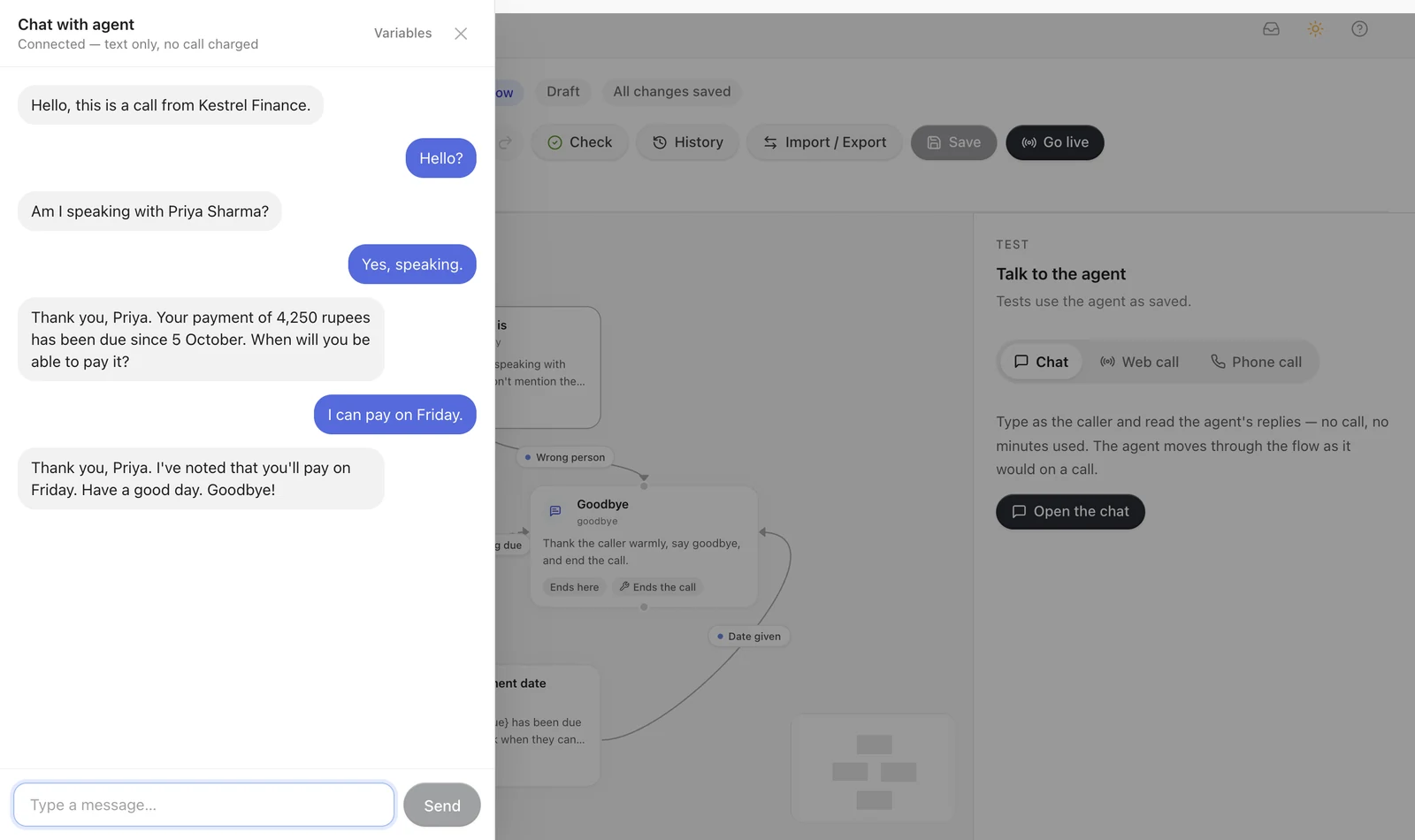
In a chat, Variables at the top of the chat sets test values for the variables in the welcome message, briefing, instructions and lines; Start chat, or Apply & restart chat to start over with new values. A phone test sends only the name and the number, so every other variable comes from its default in the builder's Variables. Set defaults before you test (see The Variables panel).
Try the turns that are easy to forget: a caller who says no, one who asks a question first, one who goes quiet, one who answers two questions at once.
Check
Check, in the header, shows how the flow stands:
- a red count: problems that stop a save;
- an amber count, when nothing stops a save: warnings;
- a green tick: nothing found.
Opening it lists every problem, those that stop a save first, each marked Stops a save or Warning and with where it is: a step, a step's path, or a Settings tab. Click one to go there. If you can edit the agent, opening Check also asks the server to check the flow as it is now, and a line at the top says whether the list is the server's verdict or only the builder's. The same problems are listed in each step's and path's panel, marked on the canvas cards, and shown in the side panel when nothing is selected.
These stop a save. Nothing is saved until they are fixed.
- The flow itself: no steps; no first step, or one that doesn't exist; a step ID that isn't usable.
- Branches: a branch without an Always path, with instructions or a line, or waiting for an event; branches that lead to each other in a circle.
- Paths: a path that leads nowhere or to a step that doesn't exist; two AI-decided paths on one step with the same tool name, which is what happens when two lead to the same step without names of their own.
- Rules: a rule path with no rules; a rule without a field or a comparison; a value that doesn't suit the comparison, such as no list for is one of or a value for is filled in.
- Events: an event path with no event name.
- Collected fields: a reserved name (
reasoning,confidence,recipient_data,detected_language, or one starting with_), an unknown type, or allowed answers on a field that isn't text. - Tool names: a path's tool name that uses other characters than letters,
digits,
_and-, is longer than 64 characters, or is already taken. - Tools: a step set to use a tool the agent doesn't have, for example Transfer the call after call transfer was removed.
- Models: a reply or decision model that isn't offered; a step's own model on another provider; a reasoning effort the model doesn't take; verbosity on a model that isn't GPT-5; a decision effort on Sarvam; max tokens that aren't a whole number above 0.
- Step settings: words to interrupt outside 0 to 10; a silence repeat that isn't above 0 seconds.
- Knowledge: a knowledge base with no library, or passages to read that aren't a whole number of 1 or more.
- Text you pasted or imported: values of the wrong kind, such as text where a number belongs, and anything that isn't an AI reply, a fixed line or a branch.
These are warnings. The flow saves, but the warning is worth reading.
- An AI-decided path with no condition: the decision model has nothing to choose it by.
- An AI reply with no instructions: the AI improvises.
- A fixed line with nothing to say, with no line for one of the agent's languages, or with a line for a language the agent doesn't speak.
- A fixed line set to hang up that still has paths: it moves on instead.
- A tool set on a fixed line (other than hanging up) or on a branch: it does nothing there.
- Two rule or Always paths on one step with the same order: a tie, settled by the order they were added in.
- A step that nothing leads to: no call can reach it.
- A step with its own decision model but no AI-decided paths.
- A path listed after an Always path: keep the Always path last, where the list matches how the call uses it.
- A rule that compares a number with text, or with an empty value.
- A collected field name that will be awkward in text (anything but letters,
digits and
_, starting with a letter). - A tool description with no tool name, an order below 0, a temperature outside 0 to 2, or a GPT-5 step not at temperature 1.
Flows saved before a check existed
A flow saved before one of today's checks may not pass it. You can still rename that agent, switch it off or change its voice: while a save leaves the flow and its reply model as they are, its old problems are shown as warnings instead of stopping the save. The next change to the flow itself has to fix them.
See why a call went where it did
Every finished call keeps a record of each decision the flow made. In Call History, open the call's execution log from its Logs column, go to Raw data and open Decisions (see Execution Logs). It holds one entry per decision:
| Field | What it tells you |
|---|---|
from_step, to_step | Where the call was, and where it went. |
changed_step | Whether the call moved at all. |
reasoning | Why. For the decision model, its own short reason, which is usually the quickest way to see why a condition did or didn't match. Otherwise it says what decided instead: a rule, the fallback, an event or a branch. |
confidence | How sure the decision model was, from 0 to 1. Rules and fallbacks are always 1. Low values across a step mean its conditions are hard to tell apart. |
decision_model, latency_ms | Which model decided, and how long it took. |
Next to the entries, step_path lists every step the call passed through, in
order. On the Turn timing tab of the same page, Caller waited includes
the time the decision model spent choosing the step.
Values that paths collected also reach your webhook after the call, in
collected_fields, and the transcript is in Call History.
Problems and what to change
| What you see | Usually because | What to change |
|---|---|---|
| The call stays on a step and keeps asking | No condition fits what callers actually say, or a path is waiting for a value it collects. | Read the reasoning. Reword conditions the way people talk, give "no" and "not now" their own paths, or add an Always path or a _step_turns rule as a way out. |
| The call goes to the wrong step | Two conditions on the step overlap. | Make them exclusive, say which one wins in the Decision guidance, or decide data-based cases with rules. |
| Decisions on one step have low confidence | Its conditions read alike. | Sharpen them, or give that step its own, stronger Decision model in Fine-tune this step. |
| A step is skipped | Its first words were already answered, a rule (such as one on _total_turns) holds earlier than you meant, or an Always path moves on whatever the caller says. | Check the first turn rules in How a call moves, and the order of the step's rules. |
| A time or weekday rule never holds | The call has no time zone: it sent none and the flow has none. | Send timezone with each call, or pick a Time zone in Settings › On the call (see The time zone). |
| A rule on a value you sent never holds | The field name is wrong (variables sent with the call start with recipient_data.), or a list comparison meets text. | Fix the name, or give the variable a type in Variables. |
| A variable is silent in a reply | It has no value and no default. | Set a default in Variables, or send it with every call. |
| On long calls, early answers are forgotten | The AI reads the last 50 messages of the conversation. | Collect what matters on paths: collected values stay in the call's data for the whole call. |
| A fixed line starts a moment late | It contains a variable, or its audio wasn't ready yet just after a save. | Nothing to fix for a variable; otherwise it starts at once from the next calls. |
| An event was sent, but nothing happened | The call had ended or was still connecting (the answer was 409), the step the call was on had no path for that name, or the caller was speaking, so the new step answered them instead of speaking first. | Check the answer to your request, the event name, and step_path to see where the call was. |
| A step set to use a tool didn't call it | Its instructions use a variable that the tool needs, and the call had no value for it. | Give the variable a default, or send it with the call. |
| The call never ends | No closing step is reached, or a fixed line set to hang up still has paths, and the agent's own end-of-call settings are off. | Lead every route to a closing step, and check End the call after a long silence and Maximum call length. |
| The caller kept talking after the goodbye and the call went on | Let the caller talk over a closing step is on. | That is what it is for; switch it off if every goodbye should end the call. |
Next: Save and publish.